Last Updated

Key Takeaways

Generated from the text of customer reviews

SmartAdvocate is a legal case management software for law firms, available in cloud-based and server-based versions. Users value its case organization, customizable features, and document management tools, while some note occasional slow loading. Overall, it suits litigation firms of all sizes. Recent updates include expanded AI tools, a refreshed interface, and enhanced billing capabilities.

Our Verdict

SmartAdvocate is a reliable option for mid-size to large litigation firms managing high caseloads and complex workflows. Pricing runs moderate to high, making it less practical for solo practitioners on tight budgets but justifiable for growing practices needing long-term scalability. We recommend it specifically for plaintiff-side litigation firms where operational consistency and case volume demand a purpose-built solution.

Overall Rating

Based on 44 users reviews

4.8

Rating Distribution

Positive

98%

Neutral

2%

Negative

0%

Starting Price
Custom

SmartAdvocate Specifications

  • Case Management
  • Document Management
  • Client Management (CRM)
  • Billing & Invoicing
View All Specifications

What Is SmartAdvocate?

SmartAdvocate is a comprehensive legal case management software designed specifically for law firms. As both a cloud-based and server-based solution, it caters to legal professionals seeking an all-in-one platform for managing their cases and client interactions. SmartAdvocate addresses key issues such as inefficient case handling, disorganized documentation, and the need for better client communication. The software ensures easy access from anywhere and facilitates collaboration among team members.

Recently, the platform has introduced SmartIntelligence™ AI tools – including AI document summaries, rewrites and translate. In addition, new updates entail a refreshed interface as well as new billing capabilities that provide invoice generation, approval, and, not to mention, distribution workflows.

What Is SmartAdvocate Best Known For?

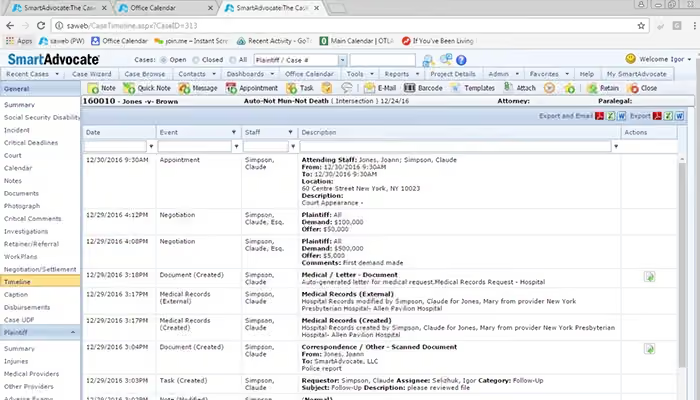
It stands out for its highly customizable dashboards and reporting. Legal teams can build dashboards with charts, graphs, and maps drawn from any case data, track critical deadlines, staff activity, and financial performance, and have reports automatically emailed on any schedule. The 2025 release further expanded this with the new Dashboard Viewer, making it especially powerful for high-volume litigation firms that need real-time visibility across their entire caseload. 

How Much Does SmartAdvocate Cost?

SmartAdvocate typically offers pricing that ranges from $109 to $1,995. The platform’s pricing tiers are designed to support different team sizes and deployment needs. 

Firms evaluating SmartAdvocate should account for the following additional costs beyond the base subscription or licensing fee: 

  • Implementation/Setup: $2,000–$10,000+ 
  • Data Migration: $1,500–$15,000 
  • User Training: $500–$5,000 
  • Workflow Customization: $2,000–$25,000+ 
  • Third-Party Integrations: $50–$500/month 
  • OCR/Medical Record Processing: $200–$2,000/month 

User reviews generally describe SmartAdvocate’s pricing as moderate to high. Many firms find the cost reasonable for managing complex litigation workflows and high case volumes, while smaller practices and solo firms occasionally mention concerns about implementation costs, customization expenses, and limited pricing transparency. 

Get a personalized SmartAdvocate price estimate specific to your requirements.

Disclaimer: Pricing references are based on publicly available third-party information and industry benchmarks. Actual costs may vary. 

How Does SmartAdvocate Work? 

Once onboarded, SmartAdvocate guides your firm through every stage of a case — from first contact to settlement — through a connected, browser-based system accessible on any device. Here’s how it works: 

  • Capture new leads instantly using the built-in Intake Wizard, with automatic conflict checks 
  • Automate case stages end-to-end using exclusive Workflow and Automated Procedures 
  • Trigger text messages, emails, and document generation based on case events 
  • Organize all documents using 4,000+ merge codes, custom folders, and batch barcoding 
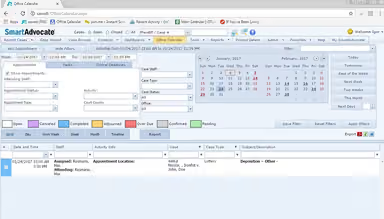
  • Sync statutes of limitations, deadlines, and appointments directly to Outlook calendars 
  • Monitor firm-wide performance through custom dashboards with automated scheduled reporting 
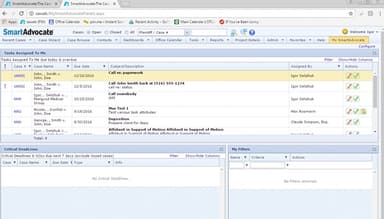
  • Collaborate across your team by viewing and acting on any staff member's task queue 
  • Access all case data remotely via browser or the iPhone, iPad, and Android apps 
Watch a free SmartAdvocate demo to learn more about its capabilities.

SmartAdvocate Integrations

SmartAdvocate software seamlessly integrates with various popular business applications, including: 

Who Is SmartAdvocate For?

SmartAdvocate is designed for businesses of all sizes across the legal industry. Its practice areas include:

  • Employment Law
  • Personal Injury 
  • Mass Torts 
  • Workers' Compensation 
  • Veterans Affairs 
  • Municipalities 
  • Criminal Defense 

SmartAdvocate Use Cases 

Based on our analysis of user feedback and SmartAdvocate’s functionality, we identified several scenarios where the platform aligns well with law firms handling large caseloads, complex documentation, and litigation-driven workflows: 

1. Personal Injury Firms Managing High-Volume Litigation 

SmartAdvocate works well for personal injury firms handling a large number of active matters across intake, treatment tracking, negotiations, and settlements. Firms dealing with repetitive case workflows can use the platform to keep documentation, communication, and deadlines centralized. This setup is particularly useful for practices balancing fast-moving pre-litigation work with longer litigation cycles. 

2. Multi-Attorney Firms Requiring Standardized Case Processes 

Firms with multiple attorneys, paralegals, and support teams often need consistent workflows across departments. SmartAdvocate fits organizations that want standardized handling for tasks such as intake reviews, document approvals, and case updates. This reduces dependency on manual coordination and helps leadership maintain visibility across ongoing matters. 

3. Workers’ Compensation And Disability Practices Tracking Complex Documentation 

Practices handling workers’ compensation, Social Security disability, or veterans’ affairs cases often manage extensive medical records and compliance-related paperwork. SmartAdvocate is well-suited for firms that need structured tracking of deadlines, forms, and client communication throughout lengthy case timelines. It also supports teams coordinating with external providers, insurers, and agencies. 

4. Law Firms Transitioning From Manual Or Legacy Systems 

Firms moving away from spreadsheets, paper-based tracking, or outdated legal systems can use SmartAdvocate to centralize operations in one environment. This is especially relevant for growing firms experiencing workflow bottlenecks due to disconnected tools or inconsistent data management. The software helps consolidate daily operations without requiring separate systems for case tracking and document management.

Is SmartAdvocate Right For You?

If your organization handles high-volume litigation — from personal injury and mass torts to workers' compensation, criminal defense, or municipal law — SmartAdvocate is built for exactly that workload. Smart Advocate stands out in the industry for its focus on delivering tailored solutions that streamline case management, enhance productivity, and improve overall operational efficiency for legal practices. It scales from solo practitioners to large multi-location firms, protects data with bank-caliber security, HTTPS encryption, and two-factor authentication. 

Trusted by 20,000+ legal professionals nationwide — including firms like Bisnar Chase, Harding Mazzotti LLP, and Craig Swapp. SmartAdvocate is the 2025 LegalTech Breakthrough Case Management Solution of the Year. 

Still not sure if SmartAdvocate is right for you? Get in touch with our customer support team at (661) 384-7070, and it will help you make the best decision. 

SmartAdvocate Features

Built-in AI Tools

SmartAdvocate's built-in AI tools automate routine tasks and analyze data, helping law firms streamline workflows and improve accuracy. They instantly summarize cases, medical records, motions, briefs, and depositions, provide multi-document summaries, conduct data and photo analysis, and offer AI case chat functionality. They assist with document review, case predictions, and identifying trends, reducing manual effort and enhancing decision-making efficiency.

See How It Works
Intake/Lead Management

The built-in Intake Wizard simplifies capturing and tracking potential clients by allowing intake staff to capture all necessary information from new prospects. It streamlines the onboarding process, ensures no leads are missed, and helps prioritize follow-ups, leading to more efficient client acquisition and better conversion rates.

See How It Works
Specialized Screens

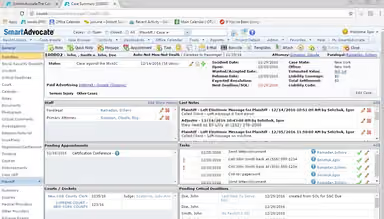
SmartAdvocate offers specialized screens tailored to different legal practices, displaying relevant case details and tasks. These include the Case Summary Screen (showing a snapshot of the case on one screen) and Settlement Screen (calculating settlement distributions, including firm fees, liens, and client disbursements). This customization enhances user experience by providing focused, context-specific information and improving productivity.

See How It Works
Staff Collaboration

Staff collaboration tools facilitate seamless communication and teamwork within the firm. Shared calendars, task assignments, and real-time updates ensure that everyone stays informed and coordinated. With appropriate permissions, staff can view and act upon the home page of any other staff member, including making updates to Tasks, Critical Deadlines, and Appointments. All messages are automatically saved to the related case file for future reference and auditability, boosting overall efficiency and reducing the risk of miscommunication.

See How It Works
Barcoding

This built-in feature ensures physical documents can be easily tracked and managed. Batch scan multiple documents simultaneously and have each document automatically attached to the appropriate case using embedded barcodes. Scanning barcodes links paper files to digital records and can even link directly to specific providers (e.g., medical records) – all without human intervention, improving document organization and retrieval while minimizing the risk of lost or misplaced files.

See How It Works
Workflows and Automated Procedures

SmartAdvocate Workflows and Automated Procedures can be set up to automatically generate Documents, Tasks, Email, and Text Messages that are triggered based on the status of a matter (such as Intake or Investigation). Workflows and Automated Procedures, along with built-in Dashboards and Reports, allow firms to easily track each step of a case's progression.

See How It Works
AI Case Chat

Introduced in the 2025 software release, AI Case Chat lets users query and interact with case data conversationally. Attorneys can quickly surface key information from within a case without manually searching through documents or records.

See How It Works
AI Document Summarization

Using pre-populated or custom prompts, SmartAdvocate's AI instantly summarizes cases, motions, briefs, depositions, and transcripts. Results can be emailed, copied to the clipboard, or saved directly within the case file for easy reference.

See How It Works

Pros And Cons of SmartAdvocate

Pros

  • Excellent organization capabilities

  • All features are customizable

  • User-friendly interface makes navigation easy

  • It makes obtaining medical records simple

Cons

  • New contacts cannot be added directly from disbursements

  • Occasional slow loading during busy operations

  • Some initial training may be required, according to software users

SmartAdvocate Reviews

Total 44 reviews

4.8

All reviews are from verified customers

Rating Distribution

5

Stars

77%

4

Stars

20%

3

Stars

2%

2

Stars

0%

1

Stars

0%

Share your experience

AL

Alexandra L.

Legal Services, 51-100 employees

Less than 6 months

5.0
March 2026

powerful case management hub

Pros

Having everything in one system makes SmartAdvocate really valuable for managing cases. It keeps case details organized in a single place and I really like being able to handle tasks, documents, notes and communications all within the same platform. The workflow and template customization is also a big plus since it helps us stay efficient while handling a heavy caseload.

Cons

At the beginning the system can feel a little overwhelming simply because there are so many features and customization options to work through.

Rating Distribution

Ease of use

10

Value for money

10

Customer Support

10

Functionality

10

ND

Nick D.

Law Practice, 11-50 employees

Less than a year

4.0
January 2026

Like the helpful layout

Pros

SmartAdvocate offers really strong functionality overall. Every tool is user friendly and doesn't take long to learn. I also really like that the case notes are shown right on the main page and the overall layout works very well.

Cons

One thing I'd like to see improved is how case documents are organized. It would be much better if it used folders instead of keeping everything in one long list. I'd also like quicker responses to support tickets when reporting issues or bugs.

Rating Distribution

Ease of use

8

Value for money

8

Customer Support

7

Functionality

7

D

Dawn

Legal Services, 11-50 employees

More than a year

5.0
January 2026

Good for organized case files

Pros

One of the best parts of it is how well the files and cases are organized. It makes documents quick to locate whenever I need them.

Cons

The only thing that bothers me about it is that the left-side panel is not consistent across every case.

Rating Distribution

Ease of use

10

Value for money

10

Customer Support

10

Functionality

10

Frequently Asked Questions

Does SmartAdvocate offer an API?

Yes, SmartAdvocate offers an API.

What language does SmartAdvocate support?

SmartAdvocate supports English.

What other apps does SmartAdvocate integrate with?

SmartAdvocate integrates with Salesforce CRM, Twilio, Quickbooks, Attorney Share, Blazeo, CalendarRules, and DocuSign.

Does SmartAdvocate support mobile devices?

SmartAdvocate supports Android and iOS devices.

What type of pricing plans does SmartAdvocate offer?

SmartAdvocate’s pricing generally ranges from $109 to $1,995. Its pricing structure is designed to accommodate varying team sizes and deployment requirements. So, acquire a tailored SmartAdvocate cost estimate specific to your needs.

Who are the typical users of SmartAdvocate?

Typical users of SmartAdvocate include these practice areas: employment law, personal injury, mass torts, workers' compensation, veterans affairs, municipalities, and criminal defense.

What level of support does SmartAdvocate offer?

SmartAdvocate offers email, chat, phone support, Knowledge Base, and FAQs.

Is SmartAdvocate free?

No, SmartAdvocate is not free.