


Tabs3
Last Updated
Overview
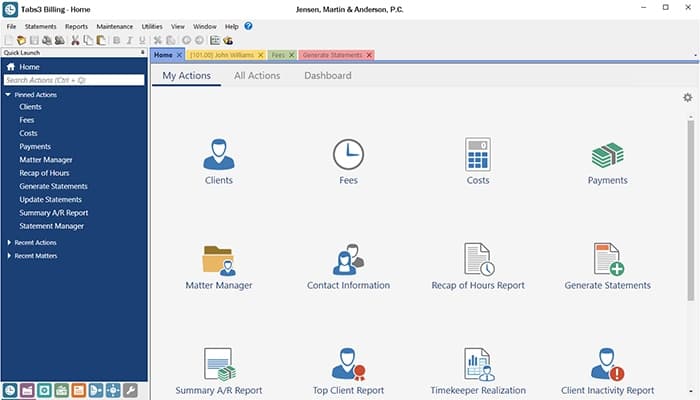
Tabs law firm software focuses on security and high performance. Its fully integrated suite delivers excellent customization, flexible remote work capabilities, and top-notch U.S.-based support. While integration between programs is somewhat limited, Tabs3 still provides a robust and comprehensive client management platform.

Tabs3 Specifications
- Case Management
- Document Management
- Client Management (CRM)
- Billing & Invoicing
Tabs3 Features
Billing
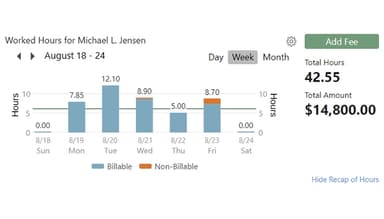
Tabs3 offers comprehensive billing solutions that allow users to create detailed invoices, track payments, and manage billing rates efficiently. It includes features for customizable invoices, batch billing, and various payment processing options.
General Ledger
The General Ledger feature provides a complete financial overview of firms, allowing for accurate tracking of all financial transactions. Users can generate reports, manage accounts, and maintain compliance with accounting standards.
PracticeMaster
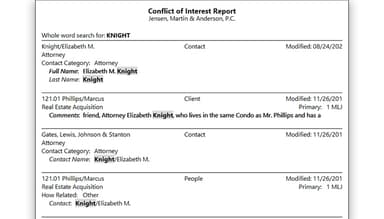
This feature includes tools for practice management, such as a firm-wide calendar, document management, task management, and conflict-of-interest checks. It helps streamline daily operations and improve organization within the firm.
Trust Accounting
Tabs3 facilitates the management of client trust accounts, ensuring compliance with legal regulations. This feature allows for tracking trust deposits and withdrawals, generating reports for audits, and managing retainer accounts.
Accounts Payable
The Accounts Payable feature helps firms manage their outgoing payments, including vendor invoices and payments. It allows for tracking expenses, generating reports, and maintaining an organized system for managing financial obligations.
Pros And Cons of Tabs3
Pros
Comprehensive client management
Detailed billing features
Quick deployment
Efficient report generation
Cons
Limited integration between programs
Frequent error messages
Document recovery is a concern after accidental deletions
Tabs3 Reviews
Total 17 reviews
4.8
All reviews are from verified customers
Rating Distribution
5
Stars82%
4
Stars18%
3
Stars0%
2
Stars0%
1
Stars0%
Share your experience
Legal, 11-50 employees
More than a year
“Setup process was quick”
Pros
The setup process has been quick, installation is easy and the software is quite simple to navigate.
Cons
Did not face any problems with this product.
Rating Distribution
Ease of use
10
Value for money
9
Customer Support
10
Functionality
9
Legal, 11-50 employees
More than a year
“Highly recommend Tabs3”
Pros
The application is easy to use along with the variety of modules available. I appreciate how the interface allows access to client interaction details from multiple perspectives.
Cons
I have noticed there is a limitation on the number of users who can access the platform at the same time.
Rating Distribution
Ease of use
10
Value for money
10
Customer Support
10
Functionality
10
Legal, 11-50 employees
More than a year
“Tabs3 is very user-friendly”
Pros
The software is quite easy to handle. I appreciate the seamless integration across different programs.
Cons
Everything about it is something I appreciate and no major issues come to mind.
Rating Distribution
Ease of use
10
Value for money
10
Customer Support
10
Functionality
10
Frequently Asked Questions
Does Tabs3 offer an API?
No, Tabs3 does not provide API access.
What language does Tabs3 support?
Tabs3 supports the English language only.
What other apps does Tabs3 integrate with?
Tabs3 integrates with several applications, including Worldox, PenSoft, Lexshare.io, Nelco, and Netdocuments. Watch the Tabs3 demo to learn more about its integration options.
Does Tabs3 support mobile devices?
Yes, Tabs3 offers support for mobile devices.
What types of pricing plans does Tabs3 offer?
Tabs3 pricing starts at $30/month. It offers various subscription plans and a free trial. Users can request a custom quote for a detailed Tabs3 cost analysis.
Who are the typical users of Tabs3?
Tabs legal software caters to legal professionals in solo to mid-sized law firms.
What level of support does Tabs3 offer?
Tabs3 offers support through a knowledge base, phone, and email/help desk.