


Last Updated
Overview
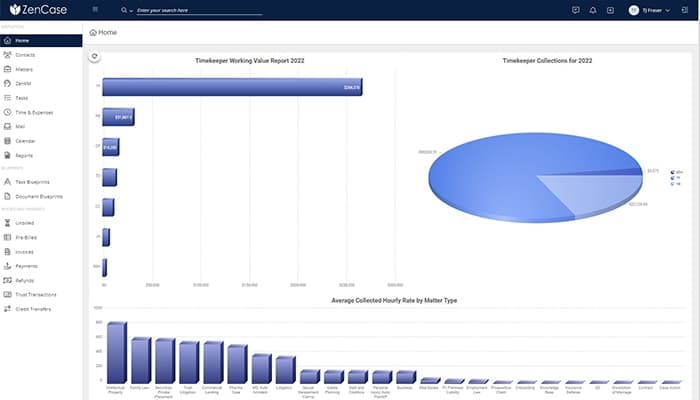
ZenCase is law practice management software for lawyers that streamlines legal tasks and helps reduce time spent on client billing and collections. While users may encounter initial challenges, ZenCase provides automated time capture tools and customizable dashboards. The software also supports AI tools to reduce manual work.
ZenCase Specifications
- Case Management
- Document Management
- Client Management (CRM)
- Billing & Invoicing
ZenCase Features
Time And Billing
The feature allows quick access to billings, invoice generation, AR balance monitoring, LEDES billing, and trust account management. It provides thorough documentation to reduce disputes and audits.
Expense Management
ZenCase simplifies accurate expense invoicing. It streamlines expense management with one-click expense entry, "Paid When Paid" vendor payments, and easy attachment of digital receipts.
Document Management
The solution secures documents and emails in the cloud with top security and integrates with solutions like NetDocuments. The feature facilitates easy client linking, collaboration, and audit tracking.
Knowledge Management
It tackles information overload by organizing all relevant, complex data—subjects, legal authorities, facts, and more—into manageable chunks. It also enables easy knowledge sharing within firms.
Task Management
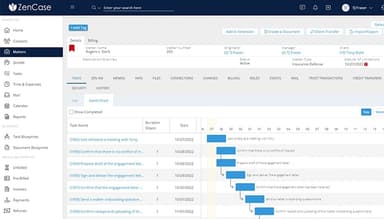
ZenCase task management fosters results-oriented firms. It allows firms to allocate and track tasks, balance workloads, and visualize deadlines and dependencies.
Pros And Cons of ZenCase
Pros
Customer-centric approach
Reduces extra time on manual tasks with its automated tools
Productive user experience for teams as well as individual use
Advanced task management features
Cons
Limited email and document management
Initial learning challenges, according to some software users
ZenCase Reviews
Total 27 reviews
4.4
All reviews are from verified customers
Rating Distribution
5
Stars52%
4
Stars41%
3
Stars4%
2
Stars4%
1
Stars0%
Share your experience
Michon
Legal Services, 11-50 employees
More than a year
“So easy and saves time”
Pros
ZenCase is so easy to use and it honestly saves me a lot of time every single day
Cons
Our main issue is that you can only link a single bank account for both Trust and Operating purposes.
Rating Distribution
Ease of use
9
Value for money
8
Customer Support
9
Functionality
7
Jennifer
Law Practice, 11-50 employees
More than a year
“Incredibly easy to get started”
Pros
It is incredibly easy to get the hang of. Plus having my Outlook emails linked for tracking time and the ability to send bills with a direct payment link means our clients pay us much faster.
Cons
The system won't let us assign a single payment to multiple revenue categories and we cannot split a payment across different practice areas which is a real limitation for our accounting.
Rating Distribution
Ease of use
9
Value for money
7
Customer Support
8
Functionality
7
Cathy
Law Practice, 11-51 employees
“Fairly good but not the best”
Pros
Zencase provides a convenient and contemporary method for inputting time. The standout feature for me is the ability to log time without needing to connect to a remote server.
Cons
I really wish there was a way to pre-set frequently used features for time entries, especially to make matters default as billable. That would be an awesome feature!
Rating Distribution
Ease of use
7
Value for money
5
Customer Support
8
Functionality
8
Frequently Asked Questions
Does ZenCase offer an API?
Yes, ZenCase provides API access.
What language does ZenCase support?
ZenCase supports the English language only.
What other apps does ZenCase integrate with?
ZenCase integrates with several third-party applications, including NetDocuments, QuickBooks Online, LawPay, ECFX, Adobe, and Box. Watch the ZenCase demo to learn more about its integration options.
What types of pricing plans does ZenCase offer?
ZenCase pricing comprises only one plan at $999/per user/year, with all its features and no hidden fee. Request a custom quote for a detailed ZenCase cost analysis.
Who are the typical users of ZenCase?
ZenCase benefits administrators, managing partners, attorneys, and IT managers in the legal industry.
What level of support does ZenCase offer?
Zencase offers support through phone, email, chat, a knowledge base, and FAQs/forums.