Last Updated

Key Takeaways

Generated from the text of customer reviews

REALTRAC is a job shop ERP that manages quoting, scheduling, and job costing for machine and fabrication shops. While it lacks built-in accounting and integrations, many users praise the Rightboard visual scheduling tool for eliminating whiteboard chaos. Recently, REALTRAC added a Sensitive Job setting that blocks file access for defense and government contracts requiring CUI protection.

Our Verdict

Realtrac works best for small-to-midsize, custom ‘make-to-order' manufacturing businesses and precision job shops. Pricing is module-based, so businesses only pay for the specific features and users they need rather than a flat enterprise fee. We recommend REALTRAC for shops that need real-time cost tracking and visual scheduling without switching their existing accounting system.

REALTRAC Specifications

  • Production Planning
  • Inventory Management
  • Quality Control
  • Work Order Management

What Is REALTRAC?

REALTRAC is an enterprise resource planning (ERP) and shop management software for machine shops, job shops, and make-to-order manufacturers. It helps a manufacturing business manage the complete flow of a customer job, from quotation and production planning to shop-floor work, purchasing, inventory, job costing, delivery, and accounting integration.

For example, a machine shop receives an order to manufacture 200 custom metal components. REALTRAC can help the business create the quotation, turn the accepted quote into a production job, define the required machines, labor, materials, and operations, and schedule the work in the right order. It can purchase missing materials, compare actual cost with the quoted cost, then deliver the order, and send financial information to accounting.

What Is REALTRAC Best For?

One of the main features of REALTRAC is its visual scheduling board, known as the Rightboard. In many custom job shops, scheduling is traditionally done through physical whiteboards with dry-erase markers and magnets. The REALTRAC’s Rightboard digitizes this entire process into a real-time, interactive electronic whiteboard. It shows which manufacturing jobs should run, in what order, and on which machine or work center. Managers can move jobs with drag-and-drop controls, prioritize urgent work, re-route work, and see the effect of schedule changes in real-time. That eliminates the chaos of checking machine statuses or constantly erasing and rewriting schedules manually. It gives them macro-level visibility to prevent machines from sitting idle.

How Much Does REALTRAC Cost?

The estimated REALTRAC pricing starts at approximately $189/feature/month, since specific figures aren't published on the official website. Software is module-based, so businesses only pay for the specific products and users their operations need, with the ability to add users or modules at any time.

REALTRAC offers three purchasing models:

  • SaaS (Billed Annually)
  • SaaS (Billed Monthly)
  • Software Ownership

Training and support are included in package pricing for both SaaS plans; ownership customers can add an optional annual service, support, and training contract.

Beyond the base package, REALTRAC also offers an optional cloud backup add-on, REALTRAC Garage:

  • Monthly - $39.00
  • Annually - $400.00
Contact us for a custom REALTRAC cost quote based on your specific requirements.

Disclaimer: Pricing references are based on publicly available third-party information and industry benchmarks. Actual costs may vary.

REALTRAC Integrations

The platform offers integration with a wide range of third-party apps, including:

How Does REALTRAC Work?

Here's how you can access the platform and start using its features:

  • Log in to REALTRAC through the desktop client or Mobile Web App
  • Create an estimate or quote for a customer's job, or copy a previous one to save time
  • Convert an approved estimate directly into a new job order
  • Route the job, defining the sequence of operations it needs to pass through
  • Schedule the job onto specific work centers using the Rightboard visual scheduling tool
  • Track job progress in real-time through Shop Floor Control, including run status, actual hours, and assigned employees
  • Manage purchasing and inventory to keep materials available for scheduled jobs
  • Generate shipping documents, invoices, and job costing reports once the job is complete
Schedule a free REALTRAC demo to explore its features in detail.

Who Is REALTRAC For?

The vendor serves organizations across a range of industries and sectors, including:

  • Machine shops
  • Tool and die shops
  • Fabrication shops
  • Screw machine shops
  • Aerospace manufacturing
  • Contract manufacturing

REALTRAC Use Cases

Based on our analysis of REALTRAC features and platform capabilities, we have identified key scenarios where this software is a strong fit for:

Job Shops Quoting Custom Parts With Unique Specs

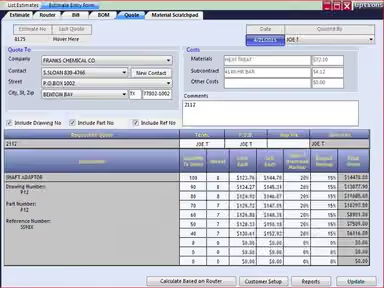
Usually, a job shop does not sell one standard product at one fixed price. A customer may request a new part with a unique drawing, material, tolerance, quantity, finishing requirement, and delivery date. Before accepting the order, the shop must work out the likely cost of labor, machine time, material, outside processing, and overhead. If it quotes too low, it may win the order but lose money. If it takes too long to quote, the customer may give the work to another supplier. REALTRAC uses process plans and actual manufacturing cost experience to build estimates, then lets the team turn an accepted estimate into a production job.

Machine Shops Running More Orders Than Machines

A machine shop may receive many customer orders at the same time. However, it may have only one or two machines available for a particular type of work. For example, one CNC machine for cutting metal parts, one welding station, or one inspection area for checking finished parts. This means the shop cannot work on every order at the same time. A production manager must decide which job runs first and whether the shop has enough available capacity to meet customer due dates. Problems can occur when an urgent new order arrives, a machine stops working, an employee is unavailable, or an earlier job takes longer than expected. In these situations, the shop must change the plan quickly to avoid late deliveries. REALTRAC shows open operations by work center and provides Rightboard, a visual machine-loading and scheduling tool for resequencing work.

Manufacturers Assembling Products From Multiple Components

Some customer orders require several components to be made separately and then assembled into one finished product. One late component can delay the entire assembly, even if every other part is ready. The shop therefore needs to know the production status of each component and ensure that work is completed in the correct order before the assembly due date. For that, the software can schedule jobs and assemblies, show unfinished operations, and schedule work backward from the required due date.

Shops Checking Whether A Job Was Actually Profitable

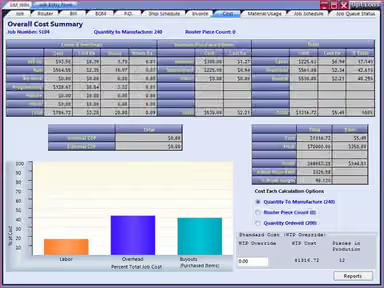
Before starting a customer order, a machine shop prepares an estimate. The estimate includes how much the shop expects to spend on worker time, machine time, materials, outside services, and other business costs. It also includes the price the customer will be charged. But the real cost of making the part can be different from the estimate. For example, workers may take longer than expected, a machine may need extra setup time, more material may be used, or an outside supplier may charge more than planned. If the shop does not compare the estimate with the real cost, it may think a job is profitable when it is actually losing money. REALTRAC tracks labor, machinery, and overhead costs and supports cost analysis for active and completed jobs.

Is REALTRAC Right For You?

REALTRAC is right for you if you run a small-to-mid-sized machine shop, job shop, or custom make-to-order manufacturing business that needs a simple, real-time system to track costs and scheduling. But, if you want built-in accounting, then it is not the right pick. Because REALTRAC does not have its own standalone accounting ledger module. It relies on its integrations to push financial data to third-party software like QuickBooks.

REALTRAC offers a ‘Sensitive Job’ setting. When a job is marked sensitive, file attachments (including blueprints and CAD files) are blocked from Shop Floor and Piece Count Panel clients. The thumbnail preview normally displayed on the shop-floor interface is also hidden. This ensures your shop can legally handle defense, aerospace, or government contracts that involve Controlled Unclassified Information (CUI). It prevents unauthorized operators or visitors on the shop floor from seeing or copying highly confidential client blueprints and proprietary part design.

Still not sure if REALTRAC is the right choice for you? Contact us at (661) 384-7070, and our team will help you decide based on your requirements.

REALTRAC Features

Shop Management

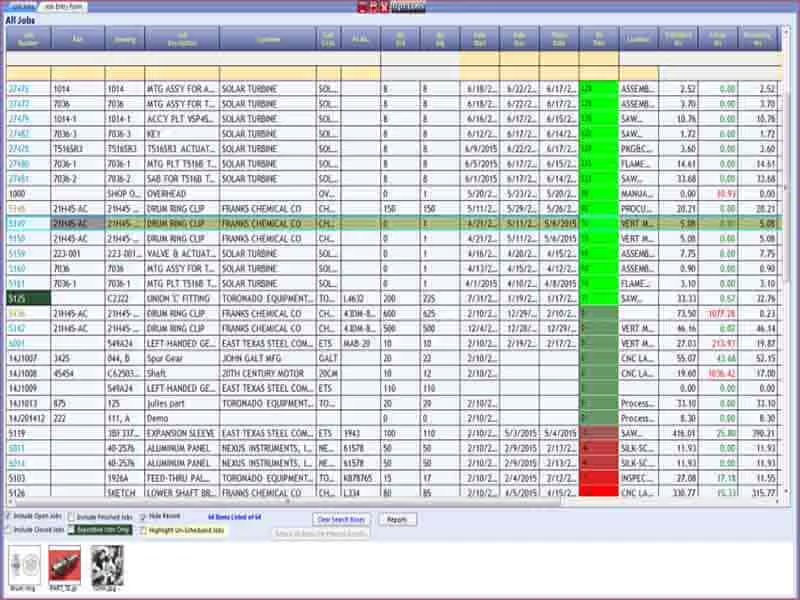
This one is the core manufacturing job module. It includes the site-listed functions production jobs, quoting, job order, routing, job costing, and shipping and invoicing. It helps a shop take a customer request, build an estimate, convert it into a production job, define each manufacturing operation, track costs, and complete shipment and invoicing. Because of that, estimators and sales teams can generate faster, and accurate quotes. Meanwhile owners and project managers can immediately check live profit margins on any active job.

See How It Works
Data Collection

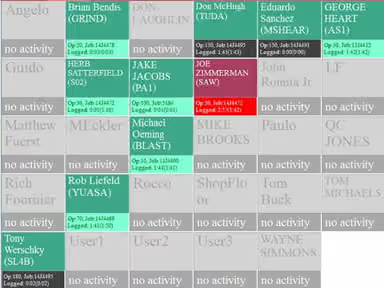
Data Collection is the area used to capture what is happening on the shop floor. REALTRAC lists employee piece count panel and shop floor control within this solution group. Shop-floor employees can record time, work sessions, job progress, and production quantities against the relevant job and operation. This matters because a manufacturing job can appear profitable in an estimate but become unprofitable if labor takes longer than planned; parts are rejected, or work is waiting at a machine. Without actual shop-floor data, a manager only knows what was planned, not what is truly happening.

See How It Works
Scheduling

REALTRAC lists Rightboard, loading, open job status, and complex job and assemblies under this area. This all helps the shop decide what work should be done, when it should be done, and on which machine or work center. Through this, a scheduler can see a bottleneck, move urgent work forward, or avoid assigning too much work to one machine. Operators gain a clearer view of their next priority, and managers can better assess whether customer delivery dates remain realistic.

See How It Works
Purchasing And Inventory

This operational module ensures that the materials needed to build custom orders are available when production begins. This area exists because owners and managers need more than order and machine information. They also need a view of quality requirements, employee attendance, operational performance, task completion, launch readiness, and compliance-related activity. For example, a manufacturer preparing to ship a complex part may need to ensure that setup tasks, inspection tasks, production tasks, and shipping tasks are completed in the correct order.

See How It Works
Accounting Integration And Tax Reporting

This is an interoperability framework built to connect manufacturing data to financial ledger ecosystems. It automatically syncs finalized customer invoices and vendor POs straight into platforms like QuickBooks or Sage 50. This eliminates double data entry entirely. It benefits bookkeepers and CFOs who want to ensure their accounts receivable, accounts payable, and general ledgers match shop floor realities without rekeying receipts.

See How It Works

Pros And Cons of REALTRAC

Pros

  • Multiple search fields make it easier to find jobs, estimates, and parts

  • Detailed labor cost breakdowns help track expenses and job profitability

  • Multi-level BOM tracking provides better inventory visibility across jobs

Cons

  • Operators cannot split their time across multiple concurrent jobs

  • The dated interface can make navigation and daily use less intuitive

REALTRAC Reviews

Total 64 reviews

4

All reviews are from verified customers

Rating Distribution

5

Stars

34%

4

Stars

44%

3

Stars

16%

2

Stars

5%

1

Stars

2%

Share your experience

P

Patti

Wholesale, 1-10 employees

More than a year

4.0
December 2020

Realtrac

Pros

I am very happy with the feature that allows me to attach drawings to Part Numbers when creating a new order. It saves me so much time as the drawings are automatically pulled up every time I process an order, eliminating the need to search through files.

Cons

I wish there was a more convenient way to input a material list.

Rating Distribution

Ease of use

8

Value for money

8

Customer Support

9

Functionality

8

A

Abbey

Building Materials, 1-10 employees

Less than 6 months

4.0
November 2020

Realtrac

Pros

Their customer service is outstanding, always willing to educate me about their system.

Cons

I find the software to be less than user-friendly. It is challenging to use, and there are too many ways to perform the same task.

Rating Distribution

Ease of use

7

Value for money

8

Customer Support

10

Functionality

7

L

LOUIS

Oil & Energy, 11-50 employees

More than a year

5.0
November 2020

REALTRAC POSSIBLY THE FUTURE OF SHOP FLOOR SCHEDULING

Pros

The search functions are effortless to use, and I appreciate the ability to customize reports and create custom pages tailored to my specific desktop needs.

Cons

There are still some missing features, but I appreciate that Realtrac takes the time to listen to our ideas and potentially include them in future updates. This is great for me, and hopefully, it helps them sell more of their product.

Rating Distribution

Ease of use

10

Value for money

8

Customer Support

10

Functionality

8

Frequently Asked Questions

Who are the typical users of REALTRAC?

Typical users of REALTRAC include machine shops, tools and die shops, fabrication shops, and aerospace manufacturers.

What languages does REALTRAC support?

REALTRAC offers support in the English language.

Does REALTRAC have a mobile app?

Yes, REALTRAC offers a Mobile Web App accessible from any modern device with a web browser.

Does REALTRAC offer an API?

No, the platform does not offer an API.

What other apps does REALTRAC integrate with?

REALTRAC software offers integration with several third-party platforms, including QuickBooks Desktop, QuickBooks Online, and Sage 50 (Peachtree).

What types of pricing plans does REALTRAC offer?

REALTRAC pricing starts at approximately $189/feature/month, based on industry benchmark estimates. Contact us for a custom REALTRAC price quote.

What level of support does REALTRAC offer?

REALTRAC offers support through email, phone, and live chat.