


Last Updated
Overview
SimScale’s cloud-based physics and AI simulations enable engineers to test and validate designs in real-time. This simulation accelerates innovation by leveraging agentic engineering to validate workflows. While beginners may find it complex at first, its browser-based accessibility and collaboration tools make it an indispensable asset for engineering teams.
SimScale Specifications
- Production Planning and Scheduling
- Product Lifecycle Management (PLM)
- Quality Control
- Real-Time Monitoring
What Is SimScale?
SimScale is a cloud-native simulation platform that empowers engineers, designers, and manufacturers to virtually test product performance under real-world conditions. It supports CFD, thermal, and structural analysis, helping teams identify design flaws early and reduce the cost of prototyping. Operating entirely in the browser, it removes traditional software limitations and offers scalable computational resources. Its collaborative workspace, driven by real-time model sharing, enables multiple teammates to run simulations simultaneously. Thus, it enhances productivity and precision, supporting data-backed design decisions.
SimScale Pricing
The SimScale cost offers flexible pricing models tailored to individual users, startups, and enterprises. Plans typically include:
- Community: Free
- Professional: Custom price
- Teams: Custom price
- Enterprise: Custom price
Disclaimer: The pricing is subject to change.
SimScale Integrations
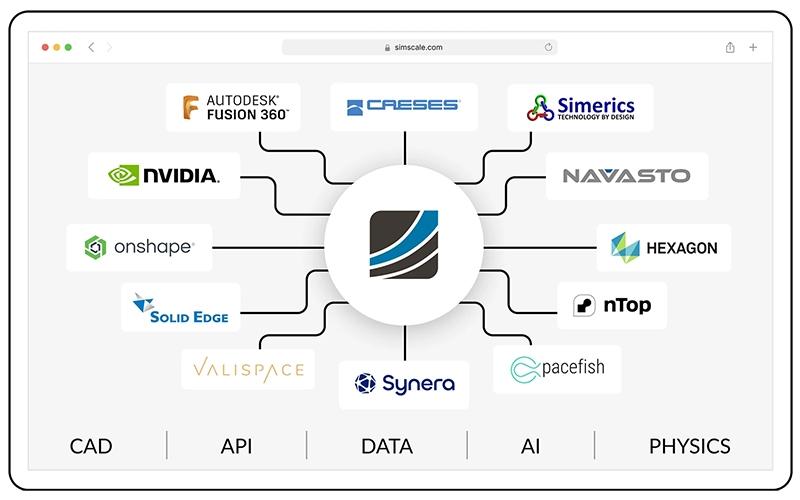
The software supports integration with multiple platforms, such as:
- Onshape
- Autodesk Fusion 360
- Solid Edge
- Inventor
Who Is SimScale For?
SimScale is ideal for a range of industries, including:
- Manufacturing
- Aerospace and defense
- Machinery and industrial equipment
- Automotive and transportation
Is SimScale Right For You?
If your manufacturing team struggles with repeated physical prototyping, delayed design verification, or limited access to simulations, then SimScale might be the solution. It shifts simulation from local machines to the cloud, enabling thousands of iterations in seconds and reducing time-to-market. It eliminates the need for physical testing, significantly reducing the cost linked to prototyping analysis. Trusted by leading brands like Oxygen8 and Metraflex, the software brings trusted cloud-CAE to your design workflow.
Still not sure about SimScale? For further guidance, please contact our support team at (661) 384-7070.
SimScale Features
Non-Linear Structural Analysis
SimScale enables advanced simulations of nonlinear materials and thermomechanical interactions. It assesses the stiffness of complex material during unloading to predict how designs behave under real stress conditions. This feature ensures greater structural reliability and improved product performance, while reducing the cost of physical product testing.
Data Management
The platform provides secure cloud-based data storage, allowing teams to organize, share, and access all simulation files from anywhere, elevating traceability. This centralized management system simplifies collaboration, eliminates version conflicts, and streamlines project tracking for distributed engineering teams.
Process Management
SimScale software optimizes process management by deploying vetted simulation workflows from setup to post-processing, ensuring compliance. Its built-in automation tools standardize operations, helping users maintain project quality while minimizing repetitive tasks and reducing operational errors.
Cleanroom Design
Engineers can simulate airflow patterns, contamination risks, and HVAC performance for cleanroom environments with this software. Visualizing air movement and particulate control in real-time enables more efficient and compliant designs for critical facilities, resulting in improved air change effectiveness and flow speed.
Thermal Analysis
SimScale features thermal analysis tools allowing users to study heat transfer across materials, surfaces, and fluids. By identifying temperature hotspots and inefficiencies early, engineers can enhance product reliability and optimize energy consumption. This ensures long-term performance stability in product designs.
Pros And Cons of SimScale
Pros
Cloud-based platform, no local installation or hardware required
Multi-physics simulation with powerful parallel processing
Collaborative environment for team-based engineering projects
Cons
Advanced solver settings may require simulation expertise
It's challenging to go back and forth between multiple software
SimScale Reviews
Total 5 reviews
4.6
All reviews are from verified customers
Rating Distribution
5
Stars80%
4
Stars0%
3
Stars20%
2
Stars0%
1
Stars0%
Share your experience
Avash K.
Health, Wellness and Fitness, 500+ employees
Less than a year
“cloud simulations with helpful training”
Pros
Running computations in the cloud is one of the things I really appreciate about SimScale. They also offer courses directly through SimScale and those do more than just explain how to use the platform they also walk you through real projects you can complete with it. That was especially valuable as a beginner. I was able to do some Computational Fluid Dynamics simulations through one of the guided projects and it helped me get comfortable with the software. Another big plus is that it stays fairly lightweight and doesn't consume too many browser resources.
Cons
To be honest, I don't really have any major complaints about SimScale. Of course, it could include some more advanced features but for most users, what's already there is more than sufficient.
Rating Distribution
Ease of use
10
Value for money
10
Customer Support
10
Functionality
10
Rafael M.
Design, 11-50 employees
Less than 6 months
“clean interface”
Pros
Using it has been a really positive experience because it delivers very good results, the interface is simple to work with and the support team responds quickly whenever questions come up. Another big advantage is that I can keep using my computer for other tasks, like writing a report or editing geometry for a new design, while the simulations run.
Cons
One thing that could make Simscale even better in the future is adding support for shell and beam elements.
Rating Distribution
Ease of use
10
Value for money
10
Customer Support
10
Functionality
10
kevin m.
Architecture & Planning, 11-50 employees
More than a year
“Made work easier for me”
Pros
It's really convenient for me to be able to quickly launch a Pedestrian Wind Comfort study using this tool
Cons
In my view, the 3D model viewer could be a bit simpler to browse.
Rating Distribution
Ease of use
10
Value for money
10
Customer Support
10
Functionality
10
Frequently Asked Questions
What language does SimScale support?
SimScale supports the English language only.
What other apps does SimScale integrate with?
Its popular integrations include Onshape, Autodesk Fusion 360, Soli Edge, and ParaView.
Who are the typical users of SimScale?
Its users are engineers, architects, and manufacturers in the automotive, aerospace, electronics, industrial machinery, energy, and transportation industries.
Does SimScale offer an API?
Yes, SimScale provides API access for automation and integration with third-party tools.
What types of pricing plans does SimScale offer?
The SimScale price plans include Community, Professional, Teams, and Enterprise, with custom-based models. Request a personalized SimScale pricing quote tailored to your business needs.
Does SimScale have a mobile app?
SimScale does not have a mobile app.
What level of support does SimScale offer?
Support includes tutorials, webinars, community forums, live chat, and FAQs.