


Vectric Aspire
Last Updated
Overview
Vectric Aspire helps CNC businesses create detailed 2D and 3D designs for router-based production. Although it is designed for Windows, its integrated modeling, layout, and toolpath tools support projects ranging from dimensional signs to custom wood carvings. Overall, it suits businesses handling customized CNC work.
Be the first one to leave a review!
No review found

Starting Price
Custom
Vectric Aspire Specifications
- Production Planning And Scheduling
- Product Lifecycle Management (PLM)
- Production Planning
- Inventory Management
What Is Vectric Aspire?
Vectric Aspire is a computer-aided design (CAD) and computer-aided manufacturing (CAM) software built for creating and machining parts with CNC routers. It combines 2D design, 3D modeling, and machining preparation into one application, which enables users to develop decorative and dimensional designs for physical production. Users can create artwork from scratch or bring in existing 2D and 3D designs from other sources. The software converts these designs into machining instructions for compatible CNC equipment.
What Is Vectric Aspire Best For?
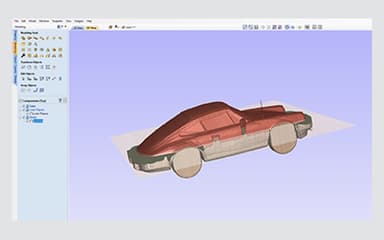
Among different Vectric Aspire features, it stands out for its integrated '3D Modeling' environment. This capability allows users to turn 2D artwork into detailed, three-dimensional components for CNC machining. They can adjust the dimensions and appearance of individual components and combine them to develop more complex decorative models.
How Much Does Vectric Aspire Cost?
Vectric Aspire costs $1,995 as a one-time purchase license. A free trial is also available.
Disclaimer: The pricing is subject to change.
Vectric Aspire Integrations
Vectric Aspire supports the following third-party software imports and account connections:
- SketchUp
- CabinetParts
- CabinetSense
- KCD
- Mozaik
- V&Co Account
How Does Vectric Aspire Work?
Log in to the software and follow these instructions:
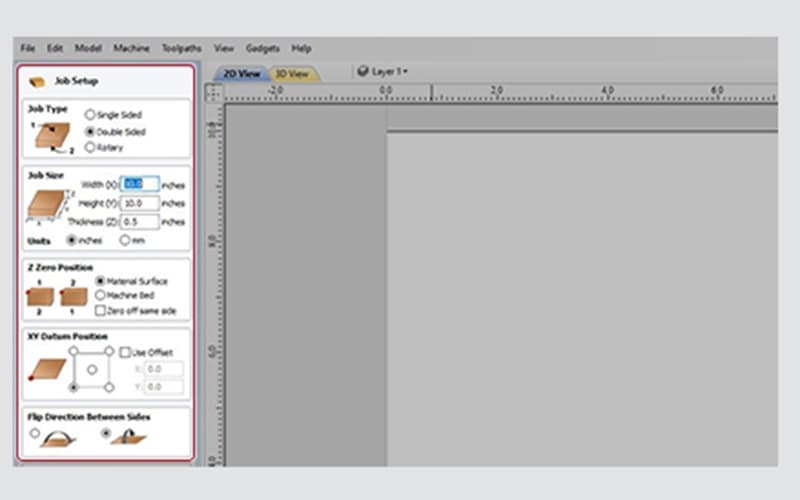
- Define the material dimensions, thickness, machine reference points, and job orientation according to the CNC machine and production requirements
- Draw the required shapes and layouts or import existing vectors, bitmap images, and design files
- Arrange design elements into layers and sheets to keep different parts and materials organized throughout the project
- Develop and adjust the required components, positioning the design elements to match the intended physical part
- Select the appropriate cutting strategies, define machining boundaries, and specify the tools and cutting parameters
- Simulate the calculated toolpaths to inspect the expected cut, identify design or setup issues, and review the estimated machining time
- Generate and save the CNC output file for use with the configured machine
Who Is Vectric Aspire For?
Vectric Aspire suits the following businesses in the manufacturing industry:
- Woodworking and carpentry
- Furniture manufacturing
- Sign making
- Custom CNC fabrication
- Interior designing
Vectric Aspire Use Cases
Based on Aspire's capabilities, the following scenarios highlight where it can address specific production needs for different businesses:
Sign Makers Producing Dimensional Lettering And Decorative Signs
Creating signs with raised lettering and decorative backgrounds can require different cutting approaches to achieve the intended appearance. Aspire supports raised prism machining for lettering and shapes, along with textured toolpaths for decorative sign backgrounds. This capability gives sign makers more options for producing dimensional designs and finishes that resemble hand-carved details.
Millwork Shops Producing Custom Moldings And Architectural Details
Aspire can be used by millwork businesses to produce custom moldings, arches, and frames with consistent cross-sections along different paths. The molding toolpath supports separate roughing and finishing operations. This approach gives workshops more control over the final surface while reducing unnecessary machining and finishing work.
Engraving Businesses Handling Recurring Badge And Plate Orders
Businesses processing large orders for employee badges, identification plates, or industrial labels may spend considerable time preparing layouts for different names and identifiers. Aspire's 'Production Plate Engraving' feature allows businesses to merge text lists from CSV or text files into existing templates, with text sizing adjusted to fit the layout. This feature reduces repetitive design work and makes it easier to handle batches of personalized products.
CNC Workshops Producing Cylindrical And Double-Sided Components
Producing parts with details on multiple faces or around cylindrical surfaces can be challenging when machining preparation is handled separately for each side or orientation. Aspire supports double-sided projects within one session and includes rotary machining for CNC machines equipped with a fourth axis or indexer. This gives workshops a way to prepare more complex decorative components, such as turned wooden pieces and parts with designs on opposite face.
Is Vectric Aspire Right For You?
Vectric Aspire is worth considering for manufacturing businesses that produce decorative or dimensional parts. It particularly suits businesses that need to develop their own designs and prepare them for CNC machining rather than relying exclusively on ready-made production files.
For security, account access is logged by IP address, personal information is not sold to third parties, and server-to-browser data transmission uses SSL/TLS encryption. Database backups and stored information are also covered by the stated encryption practices.
The woodworking industry is placing greater emphasis on productivity, product quality, and production consistency. The 2026 Millwork Equipment Trends Report, released by Würth Baer Machinery, found that these factors have overtaken labor shortages as the primary reasons manufacturers invest in automation. Aspire supports this direction at the design and machining preparation stages by allowing businesses to develop designs, calculate toolpaths, and generate CNC output.
Still doubtful if Vectric Aspire is the right fit for you? Connect with us at (661) 384-7070 for further guidance.
Vectric Aspire Features
Drawing And Layout Tools
Aspire gives users the tools to create designs from scratch or make changes to existing artwork. They can draw shapes, lines, curves, and arcs, set precise dimensions, and position objects using snapping tools. Existing images can also be imported, cropped, adjusted, and converted into vector outlines for further editing.
Layer Management
The platform enables users to organize design elements into separate layers, thereby making larger projects easier to manage. They can also use Aspire to hide layers when working on specific parts of a design, while related vectors can be grouped together. Machining instructions can also be assigned to individual layers and saved as templates.
2D Production Profiling
For parts that need to be cut out of a material sheet, Aspire calculates the required cutting paths based on the selected vector shapes and machining settings. Users can choose a cutter and adjust parameters such as cutting direction, entry points, ramping, and cutting passes. The software also accounts for the cutter radius and arranges the cutting sequence so internal sections are completed before the outer profile.
Machine Wrapped Rotary Parts
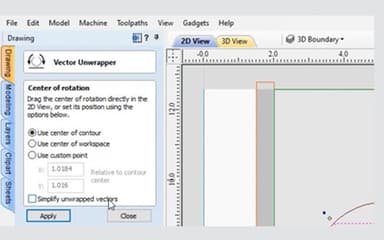
Users working with cylindrical materials can prepare rotary machining projects in Aspire. The software lets them define the material dimensions, job orientation, and rotational axis before arranging designs in the wrapped workspace. Existing 3D models can also be imported and positioned around the cylinder.
High-Quality Toolpath Preview
Aspire includes a 3D preview that shows how calculated toolpaths will remove material during machining. Users can inspect individual operations or view several toolpaths together to get a better idea of the finished part. Material textures and fill colors can also be applied to make designs easier to present to customers before production.
Pros And Cons of Vectric Aspire
Pros
Reduces the need to switch between separate design and CNC machining applications
Supports customized 3D carvings and decorative components
Expands the range of projects workshops can handle
Cons
May be more than needed for users handling only basic 2D CNC cutting
Advanced design and machining options may take time to learn
Vectric Aspire Reviews

No reviews yet!
Be the first to review this product
Frequently Asked Questions
What is the difference between Vectric Aspire and VCarve?
Both VCarve and Aspire support 2D design, V-carving, and 2.5D machining. The main difference is that Aspire also includes advanced 3D modeling tools.
What is the latest version of Vectric Aspire?
The latest version of Vectric Aspire is 12.5, released on September 22, 2026. The update includes improvements to text and node editing in the 3D view, along with new filleting and trimming tools. It also brings faster pocketing and improved material visualization.
Does Vectric Aspire provide training resources for new users?
Yes. Vectric Aspire provides more than 90 hours of tutorials covering different design and CNC machining tasks. The lessons use practical examples to help users understand the software and become familiar with its tools.
Does Vectric Aspire run on macOS?
No. Vectric Aspire is designed for Windows computers. Mac users can run it through virtualization software such as Parallels, but support may be limited depending on the configuration.
Is Vectric Aspire compatible with different CNC machine brands?
Yes, Vectric Aspire software works with a range of CNC machines through its machine configuration and post-processor options.