


Last Updated
Key Takeaways
Generated from the text of customer reviews
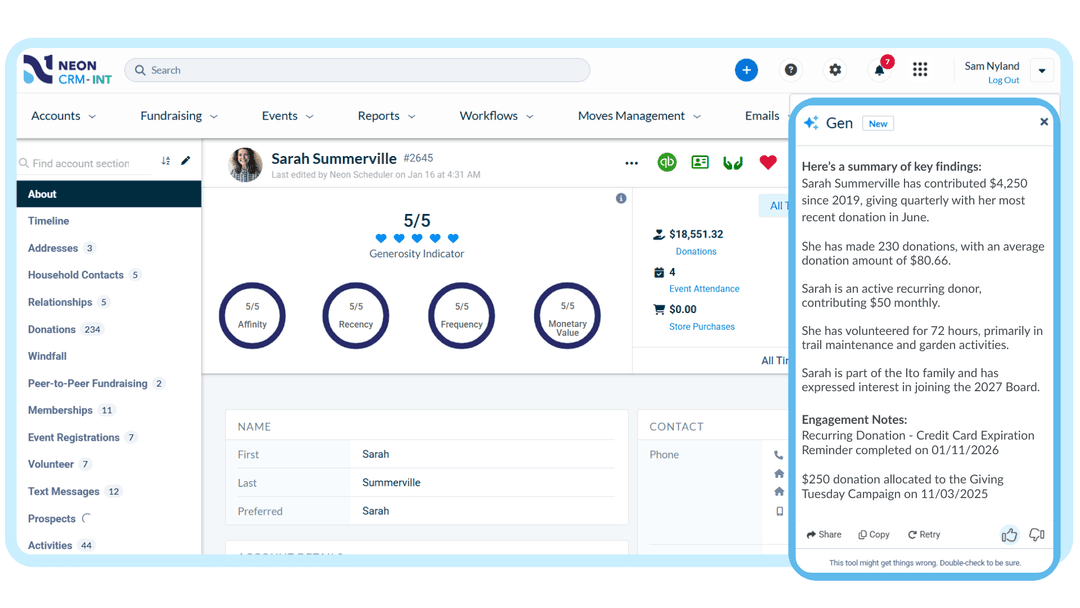
Neon CRM is a CRM tool for nonprofits that combines the donor database, fundraising efforts, and communication channels into a single platform. It serves smaller to medium-sized nonprofit organizations; human services and advocacy teams can get the most out of it. Users praise its pre-built reports and unified ecosystem. However, it lacks a native mobile application. Neon CRM recently added the Generosity Indicator, which scores constituents 1–5 on giving and engagement across the Neon One network to help fundraisers identify high-potential donors.
Our Verdict
Neon CRM is a practical option for nonprofit organizations struggling to manage their donors, members, and events with few employees. Its pricing is revenue-based, which helps users ensure that the cost stays in proportion to how large the organization becomes. This approach makes Neon CRM affordable for teams without many resources. We recommend it for nonprofits ready to consolidate scattered tools into one system.
Overall Rating
Based on 17 users reviews
4.4
Rating Distribution
Positive
88%
Neutral
6%
Negative
6%
Starting Price
$99
per month
Neon CRM by Neon One Specifications
- Contact Management
- Customer Communication Tracking
- Email Integration
- Customer Segmentation
What Is Neon CRM?
Neon CRM is a non-profit relationship management platform designed for small and midsize organizations. It brings information about donors, members, volunteers, and event attendees into one system, allowing teams to maintain supporter records, track interactions, and view each person’s engagement with the organization in one place.
What Is Neon CRM Best For?
The software is best known for its automated supporter engagement workflows, which lets nonprofits trigger multiple actions from a single event. Teams can automatically send thank-you emails, assign internal tasks, update records, and follow up with supporters based on actions such as donations, membership lapses, volunteer applications, or failed payments. Its if/then branching and timed delays also allow organizations to tailor follow-ups based on supporter behavior. Teams can also use automated welcome series, lapsed-donor win-back campaigns, and follow-ups encouraging monthly giving. This makes Neon CRM particularly useful for nonprofits with lean development or membership teams that need consistent engagement without manually managing every follow-up.
How Much Does Neon CRM Cost?
Neon CRM pricing starts at $99/month and scales with the organization’s annual revenue, not the size of their database. Every plan includes unlimited users, contacts, forms, workflows, emails, and reports, with no per-seat or per-record fees. Users can add events, memberships, and volunteer modules as the team grows.
Disclaimer: The pricing is subject to change.
Neon CRM Integrations
In addition to having an open API, Neon CRM integrates with the tools nonprofits already use, including:
- Cuseum
- Giving Docs
- Constant Contact
- Eventbrite
- Mailchimp software
- Double the Donation
- ClickBid
- QuickBooks
- TaxJar
- VolunteerLocal
How Does Neon CRM Work?
Here's how you can get started with the software:
- Create an account and complete the guided onboarding setup
- Import existing donor and contact records using the Import Manager
- Configure custom fields, giving levels, and campaign categories
- Build donation, membership, and event registration forms using the drag-and-drop form builder
- Manage fundraising, donor records, communications, events, memberships, and volunteer activities within one platform
- Track gifts, emails, event registrations, and volunteer hours in supporter records to maintain a history of interactions
- Set up automated workflows for receipts, reminders, welcome messages, lapsed-donor outreach, and monthly giving communications
- Segment supporters and send targeted email or text communications based on their records and engagement
- Track donations, memberships, and event registrations as they come in
- Run reports and dashboards to review fundraising results and supporter engagement trends
Who Is Neon CRM For?
Neon CRM is designed for small and midsize nonprofit organizations, typically with teams of two to ten people and often without dedicated technical staff. These teams manage donor relationships, deadlines, and organizational data alongside their daily responsibilities. The platform provides a centralized system for maintaining records and tracking interactions with donors, members, volunteers, and other supporters.
Is Neon CRM Right For You?
Neon CRM is a good fit for nonprofits looking to manage supporter information and organizational activities within a single platform. According to Neon One, more than 7,000 nonprofits in the United States and Canada use its platform. The company also reports an average 35% increase in donations during organizations’ first year on the platform.
Unsure whether Neon CRM fits your nonprofit? Call us at (661) 384-7070 to discuss your options.
Neon CRM by Neon One Features
Donor Management
See every gift, email, event, and interaction in one place with a 360° view of every supporter. Giving history, communications, event attendance, memberships, and volunteer activity all live on a single record, so your team can personalize outreach and build relationships that last.
Online Donation Forms and Fundraising Campaigns
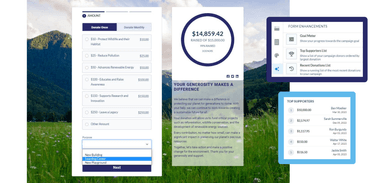
Launch campaigns quickly with unlimited branded donation forms built for conversion. Embeddable goal meters show progress in real time, recurring gifts and donor advised funds are supported out of the box, and parent and child campaign structures let connected efforts roll up cleanly in reporting.
Peer-to-Peer Fundraising
Let supporters, staff, and volunteers launch personal fundraising pages that extend your reach, with every dollar and new donor flowing straight into your CRM. Native peer-to-peer is included with every Neon CRM plan, so there’s no separate tool to buy or sync.
Reporting and Analytics
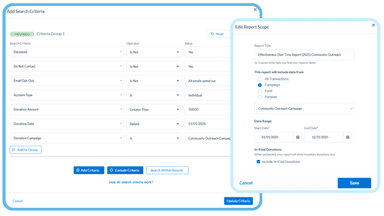
One-click reports for quick answers, executive reports for board meetings, fully custom reports when you need to slice data your own way, and customizable dashboards so the metrics you care about are visible the moment you log in.
Nonprofit Event Management and Ticketing
Create events that bring people closer, from a single gala to a full season of programming. Sell tickets, manage registration, run day-of check-in, and follow up with attendees, all tied back to the same supporter record so every connection is captured without extra data entry.
Membership Management
Build member experiences that strengthen engagement and drive renewals. Handle joins, automated renewals, member-only pages and events, private and public directories, and non-dues revenue, all connected to the supporter record so you have one complete view of every member.
Pros And Cons of Neon CRM by Neon One
Pros
Workflow automation reduces manual work and improves team efficiency
Unified communication tools help teams coordinate outreach
Built-in security helps organizations process payments with confidence
Flexible reporting helps teams access data for better decision-making
Centralized data reduces administrative work and improves donor visibility
Cons
Limited website customization can restrict control over page layouts
Single-user grant assignments can complicate collaborative application work
Limited live dashboards can make real-time performance tracking harder
Neon CRM by Neon One Pricing
Neon CRM |
|---|
$99 per month |
|
Disclaimer: The pricing details were last updated on Sep 25, 2026 from the vendor's website. Please contact us for a tailored pricing list.
Neon CRM by Neon One Reviews
Total 17 reviews
4.4
All reviews are from verified customers
Rating Distribution
5
Stars71%
4
Stars18%
3
Stars0%
2
Stars6%
1
Stars6%
Share your experience
Small Business, 11-50 employees
“powerful campaign tracking”
Pros
Right away, it felt easy to work in which made getting started pretty quick. I spend a lot of my time with the reporting tools and they've been especially useful. I also really value being able to organize everything by campaign or event so I can track donations and registrations, stay in touch with supporters and generate real time reports. Overall, it does a very good job of simplifying communication with volunteers, donors, constituents and supporters.
Cons
Somethings that could be better are the workflow and the reporting side of the system. Reports have certain limitations which can make users feel a bit restricted sometimes. I'm still learning the workflows and with reports, I'd just like to have more room to be creative.
Rating Distribution
Ease of use
8
Value for money
8
Customer Support
10
Functionality
8
Non-Profit Organization Management, 11-50 employees
“all in one nonprofit toolkit”
Pros
Having everything in one place has been a big plus. The system can automatically generate letters, emails, campaigns and a wide range of reports, including custom reports I can build myself. It also handles event management and registrations in an organized format which has been really helpful.
Cons
Setting up a new event or campaign can be a little confusing at times. I'd benefit from more training in those areas, along with more hands on practice.
Rating Distribution
Ease of use
8
Value for money
10
Customer Support
10
Functionality
9
Small Business, 11-50 employees
“User friendly system”
Pros
Working with this tool has been a really positive experience. The system is very user friendly and the donor management workflow feels smooth which makes it much easier to stay on top of tasks and get things done. Recording donations is much simpler than it was with our previous software and that has saved us a lot of time while allowing our small staff to focus on other responsibilities. Data entry is also quick, with hardly any lag or frustrating wait time and I rarely run into the dreaded spinning wheel. Updating information like an address is basically a quick cut and paste job and entering donations follows a clear and simple process. It's also really helpful to be able to pull up a member's full donation history with a single click and run all kinds of reports depending on what information I need. Exporting those reports to Excel is just as convenient.
Cons
I don't have any complaints.
Rating Distribution
Ease of use
10
Value for money
9
Customer Support
10
Functionality
9
Frequently Asked Questions
How much does Neon CRM cost?
Neon CRM starts at $99 per month, with total cost depending on your organization’s revenue and any add-on modules you choose. Pricing is based on revenue rather than record counts, so you only pay more as you raise more. Three optional modules, Memberships, Volunteers, and Events, are available for an added percentage of your CRM subscription fee: +10% for Memberships and Volunteers, and +20% for Events.
Can Neon CRM manage fundraising, events, and volunteers?
Yes. Neon CRM includes dedicated tools for fundraising campaigns, event management, and volunteer coordination in a single system. Nonprofits can launch online donation pages and peer-to-peer campaigns, manage event ticketing and registrations, and schedule volunteer shifts, all from the same platform. Every touchpoint — ticket scans, shift sign-ups, and gifts — updates a unified supporter profile automatically.
What integrations does Neon CRM offer?
Neon CRM offers many built-in integrations, including QuickBooks for accounting, Windfall Data for wealth prospecting, Mailchimp for communications, and Zapier. Integrations are included at no additional cost. Organizations with more specific workflow needs can also use Neon CRM’s open API to build custom integrations.
What fundraising reporting is available in Neon CRM?
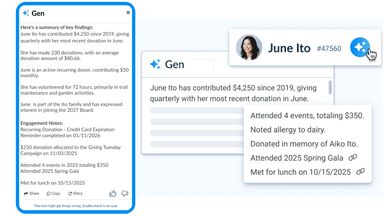
Neon CRM includes a built-in report builder with tagging for organization and the ability to run complex reports in the background. Optional AI-driven insights surface a supporter’s complete giving and engagement history at the profile level, and one-click communication tools let staff send personalized emails or texts directly from report results.
How do I get support for Neon CRM?
Neon CRM includes free live support by phone, email, and chat for every customer, regardless of organization size. Support runs through four channels: a 24/7 virtual agent, live chat, email, and phone during business hours, all staffed by a US-based team that understands nonprofit workflows. Neon One resolves the median support ticket in just 4.5 hours, and every customer gets access to Neon One Academy for self-paced training and certification.
Can I migrate my existing data into Neon CRM?
Yes. Neon One offers onboarding packages that include full-service data migration, where their team maps your existing records — donor history, gift data, contact information — into Neon CRM. Organizations that prefer a lighter lift can choose a more guided self-service setup instead. Either way, staff get comprehensive training and configuration support so the team is confident using the system from day one.
What can I expect when I book a demo?
During a Neon CRM demo, a Neon One team member walks through the platform based on your nonprofit’s specific challenges, such as manual data entry or limited reporting. You’ll see how Neon CRM’s integrated fundraising, donor management, and reporting tools work together to replace disconnected systems, so your team can spend more time building relationships and less time managing technology.
What support does Neon CRM include?
Neon CRM offers customer support through live chat, phone, and email on all plans at no additional cost. Support services include data migration assistance, account management, one-on-one training, office hours, and access to Neon One Academy, which provides educational resources and training materials. The support team is based in the United States.