


Last Updated
Overview
OfficeEMR is an all-in solution that helps practices streamline clinical workflows to reduce administrative burdens. Optimize billing, claims processing, scheduling, reporting and more. Utilize the patient portal to access records, intake forms and charts. Explore the full range of capabilities offered by the tool today!
OfficeEMR Specifications
- Appointment Management/Scheduling
- e-Prescriptions
- Lab Integration
- Patient Portal
OfficeEMR Features
Telehealth
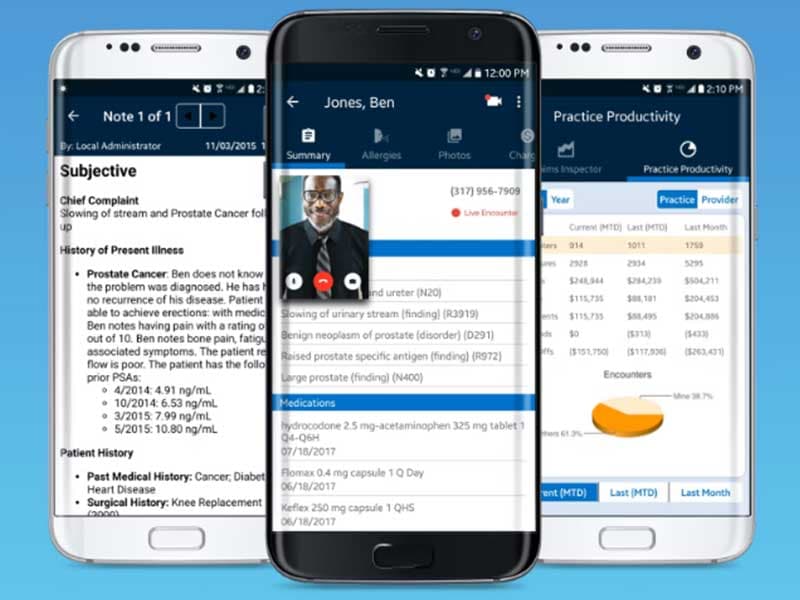
The telehealth feature facilitates virtual consultations, allowing healthcare providers to connect with patients remotely. This capability helps extend medical services beyond physical boundaries, ensuring accessibility and convenience for practitioners and patients.
Intake Forms
OfficeEMR offers customizable intake forms that help collect essential patient details electronically, simplifying the patient onboarding process. This streamlines administrative tasks and enhances data accuracy. Thus, ensuring healthcare providers have comprehensive and up-to-date information.
Patient Portal
The patient portal provides secure online access to their health records. Patients can view test results, schedule appointments, and communicate with physicians. This feature fosters patient engagement and promotes a collaborative approach to healthcare.
Medical Billing (RCM)
OfficeEMR's medical billing feature streamlines the revenue cycle management (RCM) process. From creating billing profiles to submitting claims electronically, this feature ensures efficiency in managing financial data. Furthermore, it helps in reducing mistakes, allowing users to bill and receive payment promptly. It helps practices optimize their financial workflows and minimize errors, ultimately improving overall revenue management.
Electronic Statements
OfficeEMR modernizes the billing communication process by offering electronic patient statements. Practices can send digital statements to patients, improving the speed and accessibility of billing information. This feature contributes to a more efficient and patient-friendly billing experience, reducing the reliance on traditional paper statements.
Merit-Based Incentive Payment System (MIPS) Reports
OfficeEMR supports healthcare providers in navigating complex quality reporting requirements with its MIPS Reports feature. By automating the generation of reports required for the Merit-Based Incentive Payment System, the software assists practices in demonstrating their commitment to quality care, ensuring compliance with regulatory standards, and potentially qualifying for performance-based incentivess
Pros And Cons of OfficeEMR
Pros
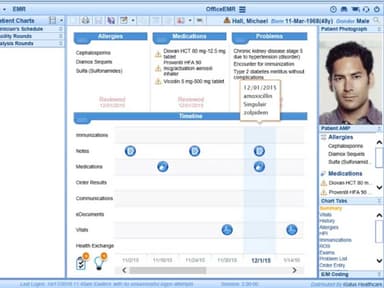
Allows to easily edit a patient's chart
Intuitive user interface
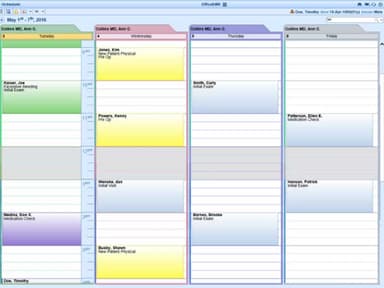
Efficient scheduling and appointment management
User-friendly mobile app
Cons
Customization complexity for some advanced features, according to some reviews
Users cannot modify their own templates
OfficeEMR Reviews
Total 1 reviews
5
All reviews are from verified customers
Rating Distribution
5
Stars100%
4
Stars0%
3
Stars0%
2
Stars0%
1
Stars0%
Share your experience
Jennifer H.
Hospital & Health Care, 1-10 employees
“A reliable EMR system for small practices”
Pros
I love using this as our only EMR; it is amazing both in terms of usability and affordability. I do not remember it ever being down during business hours in the five or more years I have been using it. It has great integration with fax, phone reminders, the patient portal, online forms, and eRx.
Cons
I would really like to see all the data we have on a customer in one place, and there’s also no way to modify templates. Templates are the main reason we switched to a software-based solution (to save time), but the modification is still lacking.
Rating Distribution
Ease of use
10
Value for money
9
Customer Support
10
Functionality
10
Frequently Asked Questions
What level of support does OfficeEMR offer?
OfficeEMR provides support via email, phone and fax.
Who are the typical users of OfficeEMR?
The typical users of OfficeEMR include neurosurgery, nephrology, pain management, urology and orthopedics.
Does OfficeEMR support mobile devices?
Yes, OfficeEMR supports mobile devices.
Does OfficeEMR have an app?
Yes, the software has an OfficeEMR mobile app.
What type of pricing plans does OfficeEMR offer?
OfficeEMR pricing is customizable and can be tailored according to your needs. Request a personalized quote today!
Does the OfficeEMR mobile app offer support 24/7?
Yes, the OfficeEMR mobile app support is available outside of business hours, as patients can need support anytime.
Is OfficeEMR an EMR software?
Yes, OfficeEMR is an electronic medical records software. It facilitates precise patient data capture and improves billing and payment processes. It also allows seamless monitoring of scheduling, patient information, and financial data across multiple devices.