


Patient Chart Manager EHR
Last Updated
Overview
Patient Chart EHR offers practice management solutions to enhance clinical operations for various specialty practices. Optimize workflows with scheduling tools, SOAP notes, medical billing and more. Explore the software’s full suite of features to reduce administrative burdens and promote better care quality.
Patient Chart Manager EHR Specifications
- Appointment Management/Scheduling
- e-Prescriptions
- Lab Integration
- Patient Portal
Patient Chart Manager EHR Features
Clinical Documentation
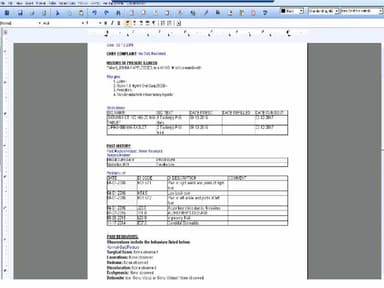
Practice Chart EHR offers comprehensive clinical documentation capabilities, allowing providers to seamlessly record and manage patient information. This includes electronic health records and forms that capture patient history, diagnoses, treatment plans, and other essential medical data. Moreover, physicians can also use chart templates and customize documents according to their needs and specialty.
Appointment Scheduling
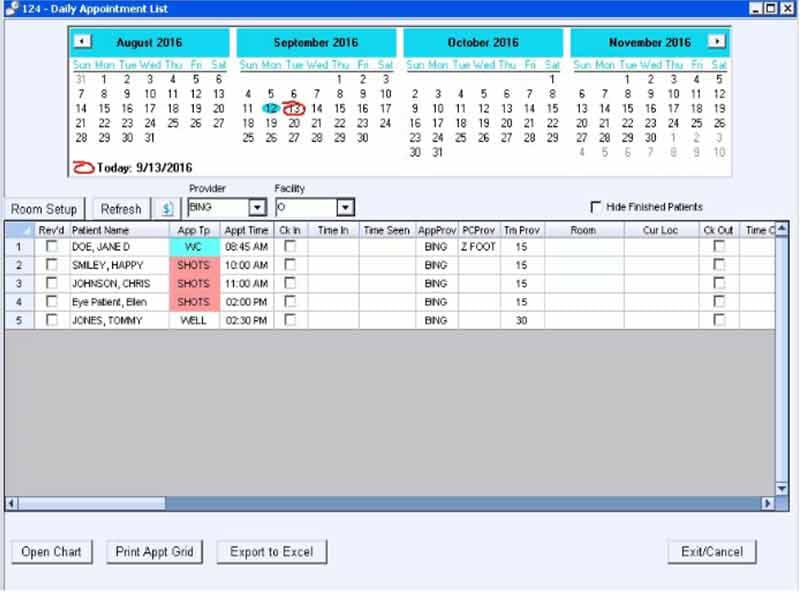
The software offers a user-friendly platform to manage and optimize their appointment processes. This feature includes tools for scheduling, rescheduling, and canceling appointments, ensuring that healthcare providers can effectively organize their calendars while minimizing scheduling conflicts. The result is improved patient flow and enhanced operational efficiency.
Medical Billing
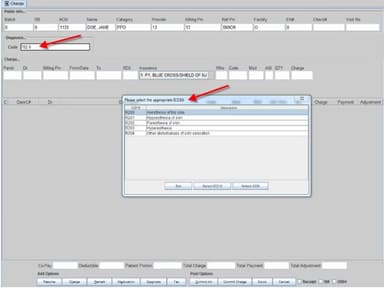
Practice Chart EHR simplifies medical billing processes, offering a comprehensive billing and revenue cycle management tool suite. The system automates billing tasks, including claim generation, submission, and tracking, reducing manual errors and accelerating reimbursement cycles. Additionally, it supports the management of patient billing information, facilitating transparent communication and financial interactions between healthcare providers and patients.
Lab Reports
This feature enables healthcare providers to access and review patients' lab results within the EHR platform. It promotes efficient communication between healthcare professionals and laboratories, ensuring timely access to critical diagnostic information for informed decision-making and patient care.
Prescription Management
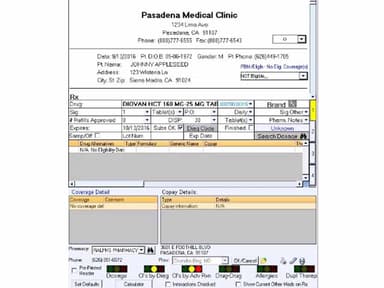
The prescription management feature of Practice Chart EHR streamlines the process of prescribing medications. Healthcare providers can quickly generate electronic prescriptions, enhancing accuracy and reducing the risk of errors associated with traditional paper prescriptions. The system also facilitates prescription tracking, ensuring comprehensive medication management and supporting compliance with regulatory standards.
Pros And Cons of Patient Chart Manager EHR
Pros
Physicians can enter patient notes with ease
Allows users to upload and edit forms
Text message reminders to reduce missed appointments
Helps to track patient chart data
Cons
The user-interface layout needs improvement
Customer support does not respond promptly
Patient Chart Manager EHR Reviews
Total 2 reviews
3
All reviews are from verified customers
Rating Distribution
5
Stars50%
4
Stars0%
3
Stars0%
2
Stars0%
1
Stars50%
Share your experience
Small Business, 11-50 employees
“Actionable intent data”
Pros
It has completely changed how we approach demand generation. The intent data is highly actionable and the integration with our CRM plus marketing automation platform works flawlessly. It helps us prioritize leads more effectively and personalize campaigns at scale. The weekly intent reports have been particularly useful for keeping sales and marketing aligned around high-potential accounts.
Cons
The interface could be more accessible especially when it comes to filtering options or customizing views.
Rating Distribution
Ease of use
10
Value for money
9
Customer Support
9
Functionality
10
Healthcare, 11-50 employees
More than a year
“Worst EMR program I've ever used”
Pros
It allows uploading forms and overlaying patient data fields for automatic formfitting based on demographics.
Cons
EVERYTHING ELSE. Interface is TERRIBLE. System is unstable. Too many sub-menus and pop-up windows. NOTHING is simplified. Graphics and ions are ambiguous. Learning curve is WAY too steep. It has every appearance of being developed by people who think in algorithms, rather than considering the fact that the user experience will greatly affect usability.
Rating Distribution
Ease of use
2
Value for money
4
Customer Support
2
Functionality
2
Frequently Asked Questions
How much does Patient Chart EHR cost?
The pricing of Practice Chart EHR is customizable and can be tailored according to an organization's needs. Request a personalized pricing quote today.
Who are the main users of Patient Chart EHR?
Practice Chart EHR solution adjusts to the needs of healthcare organizations, whether solo practices or multi-specialty groups.
What are the main features of Patient Chart EHR?
Patient Chart EHR offers patient charts, scheduling, medical billing, online forms, imaging and medication management.
What level of support does Patient Chart EHR offer?
Patient Chart EHR provides support via phone and form submission.
Is Patient Chart EHR cloud-based?
Patient Chart EHR can be employed on-premises.