Article
How to Integrate Salesforce With Your LMS: A Step-By-Step Guide
6 mins read
Last Updated

Writer


Article
6 mins read
Last Updated
Writer

Exporting user lists, manually updating training statuses, and double-checking records become unavoidable when your systems are disjointed. All your valuable customer and employee data stays inside Salesforce, while training records and learning content remain locked in a separate LMS. This disconnect makes it challenging to use data effectively across both platforms.
Connecting your Learning Management System (LMS) to Salesforce addresses this challenge by syncing training records directly into Salesforce objects. Your team will have access to unified and up-to-date information that supports better tracking, planning, and decision-making.
In this guide, you will learn what Salesforce LMS integration is, why organizations need it, and how you can implement it in a structured way. We have also highlighted some common challenges and how to avoid them.
Salesforce LMS integration is a connection between the LMS and Salesforce via connectors, middleware, or APIs. It ensures a smooth flow of training data, such as enrollments, progress, completions, and certifications, into CRM records. You can centralize information, deliver timely and target learning, and tie training results directly to business performance.
Businesses often struggle to keep training data aligned with actual performance because their systems operate in isolation. Connecting these systems resolves this problem by providing a single source of truth for learners, activities, and outcomes. Here are a few reasons organizations implement this:
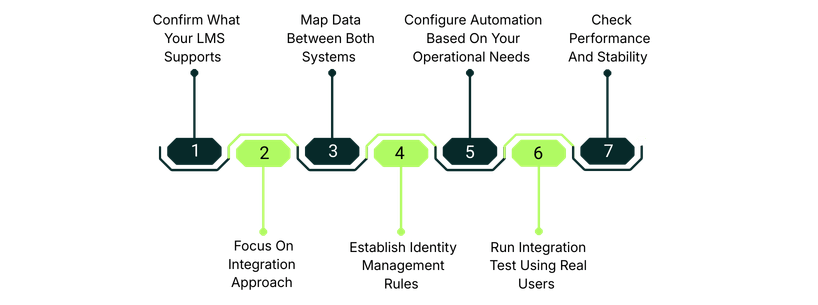
LMS Integration with Salesforce is a strategic move that will require careful planning and a systematic approach. We have mentioned a practical step-by-step guide that will help you with Salesforce LMS integration:
Check whether your LMS offers native Salesforce connectors, API endpoints, SCORM/xAPI tracking, webhooks, and Single Sign-On (SSO). These capabilities will help you determine the integration path.
There are several ways to integrate Salesforce with your LMS, but you need to choose the one that suits your requirements.
Plan how users, courses, enrollments, completions, and certifications data will appear in Salesforce. Create a detailed mapping document that matches each LMS field to its corresponding Salesforce field. Clear mapping prevents mismatched IDs, duplicate users, and incorrect reports.
Configure SSO to ensure login with the same identity, enable SCIM (if supported) to automatically create/update users, and set up a consistent external ID.
Set auto-enrollment for a representative into onboarding courses, send reminders when certifications are about to expire, and trigger learning paths when an opportunity reaches a particular stage. These automations reduce admin work and make training operationally meaningful.
Don't roll out to your entire team. Start by testing it with actual users and real records instead of dummy data. Validate provisioning, course assignment, sync completion, permissions, reporting accuracy, high-volume usage, and API rate behavior. This testing reveals issues and ensures reliable integration after launch.
Keep a check on the integration regularly to ensure data remains synced accurately. It includes reviewing sync logs, ensuring connector updates, and confirming the correct transfer of new user profiles between systems. This ongoing monitoring prevents silent failure and keeps integration reliable over time.
Even well-planned Salesforce LMS integrations can run into issues if not handled appropriately. The points below outline the most frequent issues teams face and how to resolve them before they impact your live environment:
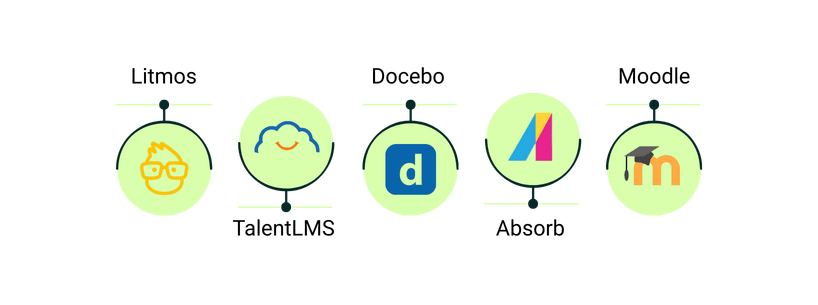
Here are the top 5 LMS that can integrate smoothly with Salesforce.
Litmos offers native connectors that provide embedded courses, rapidly deployed instructor-led training, preconfigured reports, dashboards, and snapshots of partner training. This improves customer experience, provides actionable insights, and boosts sales.
TalentLMS integrates with Salesforce through APIs or middleware tools. It provides a centralized hub for viewing the progress of the internal workforce and external audience by exchanging information. This helps automate LMS workflows, provide instant login, and track training performance without leaving the platform.
Docebo LMS Salesforce integration is available as a managed package, which is enabled by installing the Salesforce app inside Docebo. This synchronizes users, courses, learning plans, and enrollments between the platforms. After this sync, existing Salesforce users are provisioned automatically in Docebo. This integration embeds an AI-powered social learning experience into the CRM and keeps your sales and employee training workflows aligned.
Absorb LMS offers a native Salesforce connector with strong reporting capabilities and seamless delivery of learning content. It enables your customers, partners, and employees to self-enroll, browse a targeted course catalog, and access relevant training directly within Salesforce, including sales, and community portals without leaving the system.
Moodle integrates with Salesforce through middleware or custom APIs, which allows setting up triggers and actions between the two applications. This integration provides no-code AI automation, an easy visual workflow builder, GDPR compliance, and full audit trails, allowing employees, partners, and customers to access training, track progress, and sync learning data directly within Salesforce.
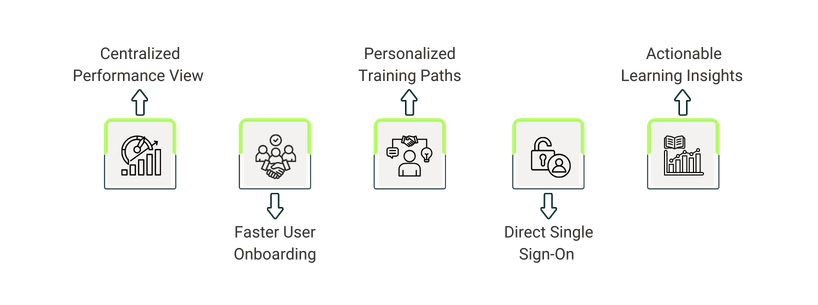
Salesforce LMS integration creates clearer visibility, faster workflows, and more reliable decision-making across teams by connecting sales and learning and bringing training data directly into the CRM. The points below outline the most practical benefits organizations gain: