

When it comes to choosing the best project management software for your company’s needs there’s a lot to consider. How big is your team? How many departments are you catering to? Are your workflows generic or highly customized?
But also, how long do you have to set up your PM system and what resources are you willing to invest?
Where some organizations will want an incredibly personalized setup in tune with their every need, others might want a scalable model that can support their team’s growth in the years to come. This complete guide is designed to guide you through the process so you can make the best, informed decision.

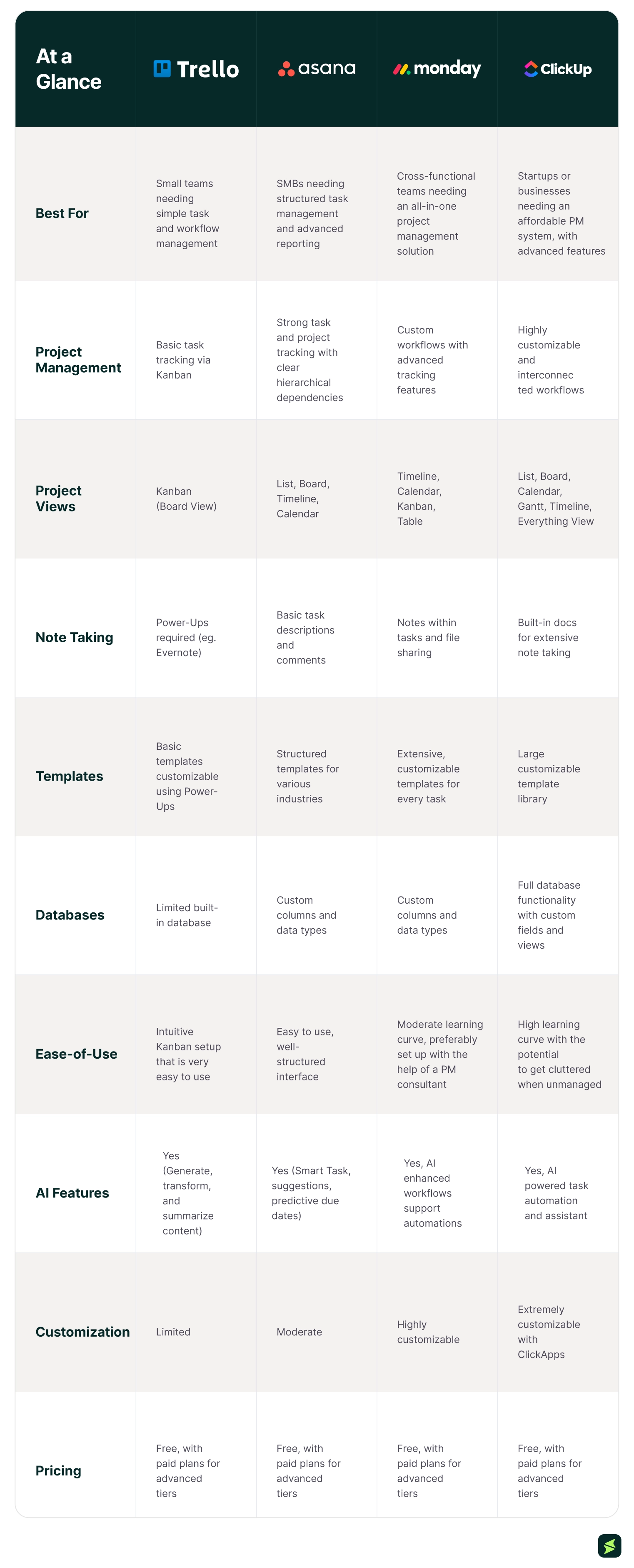
- Trello is the best visual task management tool for individuals and small teams. Its simple kanban boards come with built-in automations, making it easy to streamline workflows and track progress
- Asana works well for mid-sized to large teams with complex projects who need detailed project management
- monday is ideal for cross-functional teams with multiple departments who need a flexible project manager that can adapt to their versatile systems. It can be scaled from SMBs to enterprises acting as both a CRM system and a work management solution
- ClickUp is a versatile PM tool that works well for companies that need to track multiple clients, projects, and teams. It is highly recommended for startups looking to set up an operating system from the ground up
By The Numbers
| Metric | Trello | Asana | Monday | ClickUp |
|---|---|---|---|---|
| Monthly Visits | 107.19M | 51.01M | 48.55M | 59.35M |
| Traffic Share By Country | 18.23% (Brazil) | 26.41% (USA) | 31.07% (USA) | 16.17% (USA) |
Trello software is a Kanban-based task management tool that works best for freelancers and small teams. Its mobile version is perfect for people working on the go, making it incredibly easy to keep track of targets, goals, and deadlines without feeling overwhelmed.
Trello’s built-in Butler Automation tool comes with intuitive templates that take seconds to set up and save hours of your team’s time.
Key Features Include:
- Targeted Data: Users can organize the boards to sort cards by person, due date, category, or any other custom label
- Multiple Viewing Options: Premium plan users have access to many project views including Timeline, Calendar, and Table formats
- Board Visibility: Users have the option to customize visibility for their workspace, so boards are private, public, or accessible for team members
- Power-Ups: Over 200+ Integrations with third-party apps like Slack and Jira maximize its efficiency
- Community-Made templates: Categorized by field, Trello members can benefit from expert-designed templates across business, education, engineering, marketing, productivity, sales, and product management department
Pros And Cons
Trello is an easy-to-use task manager that works well for individuals or small businesses looking for a beginner-friendly productivity tool. The Kanban boards are great for making checklists and streamlining workflows.
Users highlight that:
That said, Trello cannot compete with the project management potential of powerhouse tools like monday and Asana. It is not meant for teams with complex workflows that require intricate customization and cannot provide metrics on financials or operational efficiency.
Users complain that:
Trello As Compared To Alternatives
Trello is the best option for beginners, freelancers, and small teams who need a basic fuss-free task manager. It is quick to set up, requires minimal training, and offers basic oversight over projects in a clean and intuitive interface. This makes it an ideal choice for businesses that need a system up and running quickly.
When compared to other PM software like Asana, a long-term user claims:
Startups who don’t need the complexities of PM software like monday and Asana can save time by setting up a Trello account and shift to an advanced platform when they’re ready to scale up their system. The free account is quite inclusive with 10 boards and unlimited cards.
Plans And Pricing
Trello pricing starts at $5/user/month for its Standard plan. Further pricing plans include:
- Free: $0
- Premium: $10/user/month
- Enterprise: $17.50/user/month
Disclaimer: Pricing is subject to change.
Key Aspects
User Interface
Trello’s interface is built around three core elements: boards, lists, and cards. These elements are laid out on a single visual plane that mimics moving sticky notes across a physical whiteboard. There are no nested menus or deep navigation layers to work through.
Users consistently highlight that the interface feels visually clean and less overwhelming than many competing tools. It is easy to see exactly where a project stands in about two seconds, without hunting through a dense spreadsheet or a cluttered inbox.
The layout keeps everything visible at once, making it easier to organize work compared to tools with multiple dashboards or views. Where it starts to show friction is at scale, boards with a high volume of cards can become harder to scan. Additionally, features like task dependencies or reporting require Power-Ups rather than sitting natively in the interface.
Scalability
Trello works best for startups, freelancers, and small teams managing straightforward workflows. Its board and card structure is easy to set up and maintain without any extensive trainings onboarding.
Users frequently rely on Trello for personal to-do lists, content planning, and small projects. However, limitations become noticeable as the project grows across multiple teams. Managing work across several boards can feel fragmented since Trello lacks strong native support for cross-project visibility, task dependencies, and reporting. Automation and reporting capabilities also become more restricted unless teams move to higher-tier plans and additional Power-Ups.
That is where Asana, ClickUp, and monday.com are built differently. All these tools offer task dependencies, cross-project visibility, and built-in reporting, which become increasingly important as organizations scale beyond small-team project management.
Asana software is the best project management tool for mid-sized to large teams with complex projects who need a highly customizable workspace. The detailed task tracking system allows teams to set goals and targets, making it ideal for companies managing multiple, interdependent departments.
Key Features Include:
- Project Tracking: Asana stands out for its robust progress tracking features with clear due dates, responsibilities, and progress bars
- Collaborative Dashboards: Team members can move cards, comment on tasks, attach files, and track updates while coordinating on tasks
- Multiple Viewing Options: Premium members have access to many project views including Boards, List, Timeline, Calendar, and Gantt formats
- Integrations: Over 200+ Integrations with third-party apps like Transcend and Salesforce maximize its efficiency
- Automation: Users can choose from among pre-built automations or set custom rules to initiate specific actions and streamline workflows
- Workflow Builder: Asana’s workflow builder allows teams to map out and automate multi-step processes, creating complex workflows that span multiple projects
- Detailed Reporting: Organized dashboards showcase a clear picture of team progress by task, project, month, and assignee making it easy to collect metrics and gauge success
Asana is the ideal PM tool for companies with layers of management that need to generate comprehensive progress reports.
Pros And Cons
When set up well, Asana is a solid project management tool for mid-sized companies with many interdependent teams or departments. Users can add a high level of detail to their boards by setting naming conventions, interlinking comments to tasks, and customizing the workflow tabs with information like assignees and due dates.
One major drawback for Asana is that it doesn’t offer project accounting features making it unsuitable for small businesses or startups who want to set up a single system that includes financial management for their projects.
A manager at a non-profit explains:
On the other hand, users clarify that:
Asana As Compared To Alternatives
Asana offers a more structured project management approach when put up against Trello’s simple Kanban system.
The thing about Asana is that it works amazingly well when customized to support a company’s existing workflow. This takes time, effort, and money to build properly, making it a solid option for companies with the budget to invest in a well-designed PM tool. With the advanced tier plan teams can set up automated workflows that quickly streamline all their processes.
However, for teams that lack the resources and intend to set up a basic system themselves, Trello or ClickUp may be a better option. Asana’s free version is also quite limited when compared against the other options on this list.
Plans And Pricing
Asana pricing starts at $13.49/user/month for its Starter plan. Further pricing plans include:
- Personal: $0/seat/month
- Advanced: $30.49/seat/month
- Enterprise: Custom pricing
Key Aspects
User Interface
Asana features a modern, and highly organized interface. It utilizes a three-page layout to maximize productivity. It includes a left sidebar for navigation, a central pane for viewing task lists or project boards, and a right pane for detailed task information, allowing for efficient navigation.
Users describe the interface as clean and visually appealing, noting that it makes organizing projects, assigning tasks, and tracking progress feel manageable even across multiple workstreams.
What keeps the layout from becoming cluttered as complexity grows is that switching between views: List, Board, Calendar, and Timeline; it changes how the data is displayed without changing the underlying structure. Teams working across different functions can each use the view that suits their workflow, and the data stays consistent across all of them.
Scalability
Asana works well for small teams, mid-size organizations, and large enterprises. As teams grow, the Admin Console gives IT and operations leads a central place to manage all users, teams, permissions, sharing rules, and authentication settings across the entire organization.
The platform supports deployments of over 200,000 users under a single customer account. At this scale, centralized administration and layered permission controls become essential for managing collaboration across multiple departments, regions, and business units.
Its Enterprise and Enterprise+ tiers add HIPAA compliance, audit logs, SAML authentication, and SIEM integration. HIPAA compliance is relevant for healthcare organizations handling patient-related information. While audit logs, SAML authentication, and SIEM integrations help monitor user activity, maintain compliance standards, and manage secure access.
monday.com software is the ideal tool for cross-functional teams with multiple departments who need a flexible project manager. Its advanced features can cater to unique workflows making it a top choice for businesses with specialized systems.
What sets monday apart from other PM tools is that it can be scaled from small and medium businesses to enterprises and can be used as both a CRM system and a project management solution.
Key Features Include:
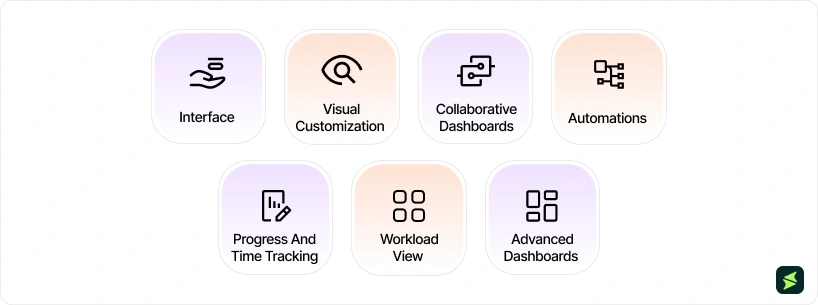
- Interface: monday stands out for its engaging interface, with custom fields, board types, and column types that offer a lot of flexibility in how data is organized
- Visual Customization: The intuitive columns and color-coded tabs make project tracking incredibly easy
- Collaborative Dashboards: Team members are able to move cards, comment on tasks, attach files, and track updates while coordinating on tasks
- Automations: monday’s advanced automation features are easy to customize with rules that follow an ‘if this, then that’ format
- Progress And Time Tracking: monday offers time tracking features across boards
- Workload View: Ideal for milestone breakdowns and assigning tasks, monday’s workload view makes scheduling projects incredibly straightforward
- Advanced Dashboards: As companies move to the standard and pro plans they can create dashboards combining up to 10 boards in 1 workspace, facilitating collaboration across teams
Pros And Cons
What sets monday apart from its competitors is its visually appealing interface. From drop down columns to progress bars and timelines, users can add extensive data to their sheet and customize it to their workflows.
monday’s notification system is considered one of its top features. When a team member completes a task it recognizes the interdependency and lets the next person in the queue know that they can start working. Plus, the advanced reporting features allow managers to set up custom dashboards that update with real-time changes in source data.
Business owners agree that:
That said, monday does have its shortcomings when it comes to project management features. Users complain about the inability to make subtasks for subtasks (a feature offered in Asana), and with the item and connection limits, even in the paid tiers. Additionally, it is more complicated to set up recurring tasks or use their guides.
Users add that:
Monday As Compared To Alternatives
All in all, monday offers a high functioning, more flexible alternative to Asana. It has one of the most extensive knowledge bases and a responsive support team. Depending on the scale of the company and the type of systems they’re working with, monday gives users free-range to set up their workspace.
This can be beneficial if customization is a priority for your organization, but it can be a handicap if you’re trying to build everything on a restricted budget or within a limited time frame. Much like Asana, monday does not offer financial management features so teams struggle when it comes to project accounting.
After using both options, one user said:
Plans And Pricing
monday.com pricing starts at $12/seat/month for its Basic plan. Further pricing plans include:
- Free: $0
- Standard Plan: $14/seat/month
- Pro Plan: $24/seat/month
- Enterprise Plan: Custom pricing
Disclaimer: Pricing is subject to change.
Key Aspects
User Interface
monday.com is built around a board structure where every row is a task, and every column is a data field, such as status, owner, priority, or deadline. Status values are color-coded, allowing teams to understand the work status and progress without opening individual tasks or moving between screens.
The interface is designed for fast scanning. The tool allows users to track progress directly from the board by reading across rows and interpreting column-based updates in real time.
What makes the interface flexible is how the same structure adapts to different workflows. A marketing calendar, sales pipeline, or product roadmap can all exist in the same grid format, with changes mainly happening in column types and labels rather than the overall layout.
Scalability
monday.com handles scale through a combination of centralized workspace structure, role-based administration, and performance controls designed for multi-team environments.
At the enterprise level, the tool provides admin controls such as user provisioning, permission hierarchies, audit logs, and security policies that allow IT teams to manage access across large organizations. These controls matter most in companies where hundreds or thousands of users need different levels of visibility across departments like marketing, operations, and engineering.
From a system performance perspective, Enterprise plans increase operational limits for heavy usage. For example, API rate limits are 10x higher than the Pro tier. It is important for teams that rely on external integrations, automated workflows, or custom internal tools that frequently read or push data into monday.com.
Dashboards can also aggregate data from up to 50 boards, which allows leadership teams to view performance across multiple departments. This is useful in organizations where work is distributed across many teams but still needs consolidated reporting for decision-making.

ClickUp is a multi-use PM tool that offers a lot of value for organizations who need to coordinate across multiple clients, projects, and teams. It’s especially good for high ticket projects where team members need to check off on numerous tasks a day.
Relatively affordable, ClickUp also offers extensive features in its free tier, making it highly recommended for startups or growing teams who need to set up a complete task management system that supports scalability.
Key Features Include:
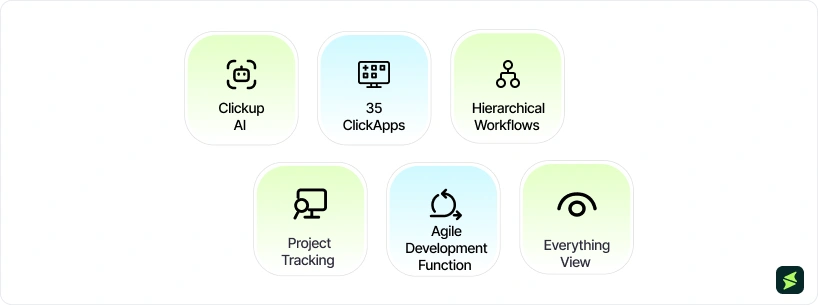
- Clickup AI: The built-in AI feature works incredibly well, especially when used alongside their wikis, which publish support articles and video tutorials
- 35 ClickApps: Teams can customize adjustable modules (ClickApps) to optimize their workflows, including custom fields, time tracking tools, sprints, goals, and dependencies
- Hierarchical Workflows: Nested subtasks and checklists create a hierarchical organization system that streamlines complex projects
- Agile Development Function: Features like sprint point systems and burndown charts make ClickUp an excellent choice for Agile teams
- Project Tracking: Workload views, Gantt charts, Milestones, and custom dashboards allow managers to monitor KPIs and track project progress
- Everything View: ClickUp offers teams a unified viewing option which combines the workflows for multiple teams and projects in one space, making it ideal for leaders to get a complete picture of the company’s progress
Pros And Cons
ClickUp software is a highly customizable, highly efficient project management solution that will appeal to companies in various domains. As a workflow organizer, ClickUp offers a lot of value for money, offering advanced features like scalable hierarchy, powerful automations, and superior project tracking.
Their Template Center covers a wide range of topics and categories like project management, team collaboration, marketing, software development, operations, HR, recruiting, and personal productivity.
The AI feature offers a lot of value depending on how teams use it. When combined with the company wiki, team members can ask the AI specific questions on company policy and protocols.
That said, ClickUp is the newest tool on this list, so it does come with the occasional bug. Their team is quick to update the app and resolve problems. However, they are constantly rolling out and testing new features. Another concern is that their workspace can occasionally feel cluttered.
As this user points out:
ClickUp As Compared To Alternatives
ClickUp offers an extensive feature set that is comparable to project management software like Asana or all–in-one work management systems like monday, but at a lower price point. Since ClickUp is a recently launched software it does come with frequent updates and occasional bugs; however, it is still a good option for startups and small businesses.
Plans And Pricing
ClickUp pricing starts at $10/user/month for its Unlimited plan. Further pricing plans include:
- Free Forever: $0
- Business: $19/user/month
- Enterprise: Custom pricing
Disclaimer: Pricing is subject to change.
Key Aspects
User Interface
ClickUp’s interface is organized around a left-hand sidebar that aligns everything, including Spaces, Lists, Docs, Dashboards, Chat, Goals, and Folders. The sidebar contains multiple menus, sub-menus, and interactive buttons and widgets, which makes it challenging to navigate on day one, particularly for less tech-savvy team members.
Most reviewers describe the interface as feature-rich and productivity-enhancing once familiar. Some note that it can appear cluttered and overwhelming for new users, especially those without prior project management tool experience.
Once set up properly, ClickUp shifts from being a complex interface into a highly structured workspace. Teams typically build it around defined Spaces for departments, standardized task hierarchies, and pre-configured views so that day-to-day work happens inside consistent templates rather than constant configuration changes. Without that setup discipline, the interface tends to feel fragmented and overloaded.
Scalability
ClickUp scales through its hierarchical workspace structure, i.e., Workspaces, Folders, Lists, Tasks, and Spaces. This allows departments to operate within the same account without their data bleeding into each other.
Users can define granular permissions at the Space, Folder, and List levels, ensuring teams only see information directly relevant to them. That layered access control is what makes ClickUp viable for organizations where marketing, engineering, and operations all need to work in the same platform with different visibility settings.
Some users report frequent glitches when running sophisticated automations, with the platform struggling to process complex chained rules in real time.
Choosing the best project management tool ultimately comes down to the specific needs of your team. If you’re trying to decide between Trello, Asana, monday.com, or ClickUp you need to consider the differences in features and approaches. Let’s walk through a use case for a sales team.
Use Case: Setting Up And Running A Sales Team
Taking the example of a sales team that needs to manage leads, track sales pipelines, achieve targets, and collaborate on pitches, let’s explore how these software can be used to monitor the overall project performance.
1. Trello
Trello is ideal for small sales teams that prefer a simple, visual tool to track leads and conversions.
Trello As Compared To Alternatives:
Trello’s strength is its simplicity and visual approach, making it easy to set up and manage. It’s a good option for teams who are short of time and want a quick solution. Collaboration is straightforward, with comments and attachments added to each card.
That said, compared to the other options on this list, Trello is less equipped to manage complex sales metrics, reporting, or detailed automations without extensive use of Power-Ups. It also lacks advanced features like built-in CRM or reporting.
2. Asana
Asana is a good option for medium-sized sales teams needing structured task management and basic automation without heavy customization.
Asana As Compared To Alternatives:
Asana excels in managing tasks with dependencies, subtasks, and detailed information for each lead. Its built-in automation features allow teams to easily set up rules for scheduled task movement. While Asana does offer basic reporting tools, such as task completion tracking and workload management, it lacks advanced sales-specific reporting.
3. Monday.com
monday.com is ideal for sales teams needing a highly customizable platform with strong data visualization and reporting capabilities.
Monday As Compared To Alternatives:
monday.com offers highly customizable boards and automations, allowing teams to tailor operations for specific workflows. It offers strong data visualization with customizable dashboards that provide insights into team performance and sales metrics
Additionally, advanced collaboration features, including updates and file sharing directly within tasks, make it easier for teams to work together on proposals and pitches.
4. ClickUp
ClickUp is a top choice for sales teams who need a highly flexible and feature-rich tool that can be customized to support complex workflows, reporting, and automation.
ClickUp As Compared To Alternatives:
ClickUp’s wide range of features, from task management to advanced reporting and automation, make it a powerful all-in-one tool. Its sprint and scrum tools are a unique advantage for sales teams using an Agile approach.
Choosing the right tool depends on your team’s complexity, customization needs, and preferred workflow.