

Last Updated
Overview
Brandwatch helps teams uncover consumer insights, manage social channels, and act on trends using AI-driven analytics across numerous sources. While its depth is best suited to mature data-driven teams, it remains a strong choice for enterprises, global brands, and agencies seeking scalable social intelligence and engagement in one unified platform.

Brandwatch Specifications
- Activity Tracking
- Reporting and Analytics
- Performance Tracking
- Collaboration Tools
Brandwatch Features
Consumer Intelligence
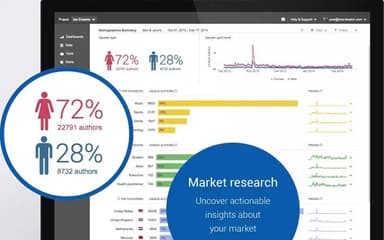
Brandwatch features tools to collect, analyze, and surface insights from historical and real-time consumer data across billions of online conversations and sources. Users can identify trends, sentiment shifts, and topic themes to understand how audiences perceive brands, products, and markets.
Social Media Management
This feature enables teams to publish content, schedule campaigns, and coordinate posts across connected social networks from a centralized content calendar. It includes automated engagement workflows, audience profiles, and performance tracking for organic and paid social activity.
Influencer Marketing
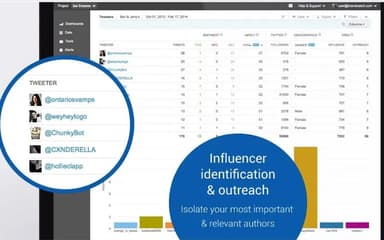
Brandwatch’s influencer marketing tools help discover, filter, and engage with creators and influencers. Users can maintain influencer directories with contact details, manage campaign deliverables, track performance metrics, and coordinate approvals and payments within one solution.
Media Intelligence And Insights
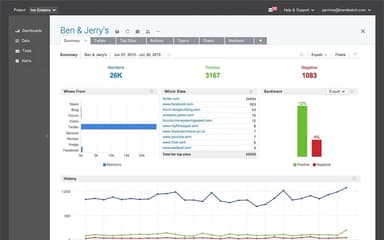
Brandwatch’s media intelligence tools collect and organize global media and social content, allowing teams to generate customized briefings, alerts, and analytical reports. This supports strategic decision-making based on brand visibility, competitor benchmarking, and topic coverage across multiple sources.
Pros And Cons of Brandwatch
Pros
Turns large-scale consumer data into actionable insights
Centralizes social engagement across multiple channels
Supports enterprise collaboration with advanced workflows
Cons
Best suited for mature, data-driven teams
May be more than needed for basic social monitoring
Brandwatch Reviews
Total 20 reviews
4
All reviews are from verified customers
Rating Distribution
5
Stars25%
4
Stars55%
3
Stars20%
2
Stars0%
1
Stars0%
Share your experience
Tanya S.
Financial Services, 51-100 employees
More than a year
“good for broader monitoring”
Pros
Coverage is strong across social media, news and forums which makes it really useful for broader monitoring. The query builder is flexible, the dashboards can be customized to different needs and the historical data is especially valuable. Reporting and export tools also do a solid job when it comes to sharing insights with other teams.
Cons
AI side feels like it's lacking especially compared with where the market seems to be going. The software still depends quite a bit on manual setup and analysis and the sentiment analysis can be hit or miss particularly with non-English content.
Rating Distribution
Ease of use
7
Value for money
8
Customer Support
9
Functionality
9
Alex Z.
Public Relations and Communications, 51-100 employees
More than a year
“smart themes and narratives”
Pros
The AI-generated themes and narratives for mentions are a real highlight. They do a really good job of sorting mentions from a given period into clear, distinct categories which makes everything much easier to review and understand.
Cons
The reporting period settings could be more flexible. There are times when I want to analyze a very specific date range and the platform doesn't allow that.
Rating Distribution
Ease of use
9
Value for money
7
Customer Support
8
Functionality
7
Aneri D.
Non-Profit Organization Management, 11-50 employees
Less than 6 months
“Efficient dashboad”
Pros
Getting a usable dashboard up and running was fairly quick thanks to the template library. Brandwatch comes with a strong selection of prebuilt components so it was easy to start visualizing data without having to build everything from scratch. There are plenty of chart types and layout options and in most cases we were able to find a component that matched the research question we were trying to answer. The Categories feature stood out as especially helpful since it turned a messy mix of conversation topics into clearly organized segments we could actually analyze. On a project covering five separate conversation areas across three species, that feature alone saved us a lot of time and created a level of structure that would have been extremely hard to replicate manually. Iris, Brandwatch's AI summarization tool, also came in handy when dealing with large volumes of mentions. It helped surface major themes quickly from bulk data which sped up the analysis stage and gave us a useful starting point for more detailed qualitative review.
Cons
Although the dashboard templates are strong overall, they can feel limiting in certain situations. One example came up when we tried to create a US state-level heat map. The dataset already included both city and state information but the map component only provided a global view and offered no way to zoom in or lock the display to a single country. We ended up building that visualization outside the platform which created extra work that could have been avoided. Giving users the ability to define a default geographic scope for maps or adding region-specific map options, would be a practical fix. Iris is helpful but it does repeat itself. When working across larger datasets, it often referenced the same mention to support several different insights which made it feel less like a precise analytical tool and more like a system identifying patterns just to generate output. It would be much stronger with better deduplication and clearer visibility into how many unique mentions are actually contributing to each summary. Another recurring frustration on the UI side was working with smaller or less prominent points on line charts. The hover tooltip often blocks the exact point you are trying to select which makes it harder to drill into quieter parts of a time series even though those periods can be just as important analytically as the obvious spikes. A click-to-pin tooltip or a scrollable mentions panel that opens from any chart point would make this much easier to use.
Rating Distribution
Ease of use
3
Value for money
5
Customer Support
4
Functionality
5
Frequently Asked Questions
What level of support does Brandwatch offer?
Brandwatch offers support via form submission and a dedicated help center.
What other apps does Brandwatch integrate with?
Brandwatch integrates with numerous platforms, including Dropbox, HubSpot, Salesforce, Shopify, Zendesk, Box, and more.
What language does Brandwatch support?
Brandwatch supports multiple languages, including English, Italian, Spanish, French, and German.
Does Brandwatch offer an API?
Yes, Brandwatch offers an API.
Does Brandwatch have a mobile app?
No, Brandwatch does not have a mobile app.
What types of pricing plans does Brandwatch offer?
The vendor offers three pricing plans with custom pricing: Consumer Intelligence, Social Media Management, and Influencer Marketing. Reach out for a flexible Brandwatch price quote.
Who are the typical users of Brandwatch?
Brandwatch is ideal for professionals working in financial services, media and entertainment, retail, technology, education, and more.