


Last Updated
Overview
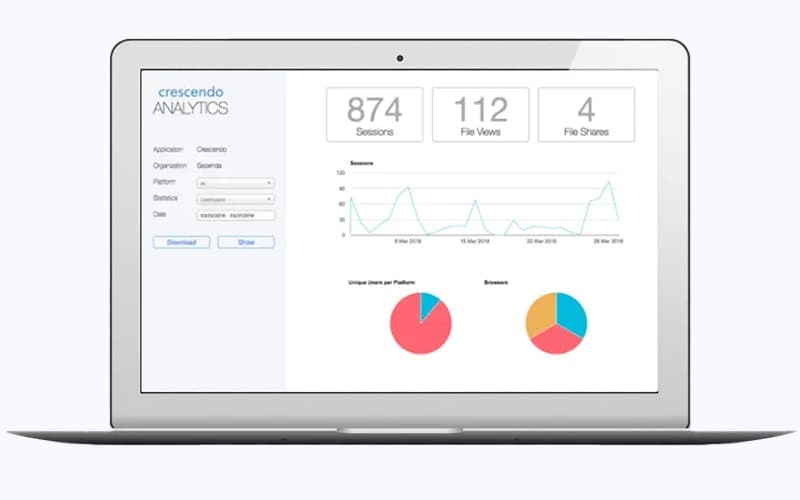
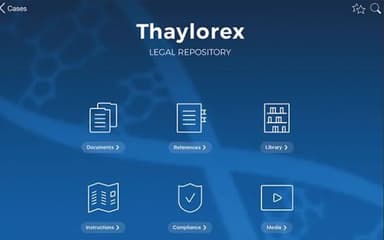
Crescendo helps sales teams deliver mobile presentations, organize content, and track engagement in real-time. While the web version doesn’t include all the app’s capabilities, Crescendo still provides centralized content management and analytics-driven insights. These features make it ideal for mid-sized to large enterprises seeking improved client interactions.
Crescendo Specifications
- Document Management
- Collaboration Tools
- Activity Tracking
- Reporting And Analytics
Crescendo Features
Flexible Content Access
The software simplifies content access by letting teams tag files directly within existing cloud tools. Tagged materials instantly appear in Crescendo without migration, reducing duplication. This approach keeps workflows familiar while enabling fast deployment, centralized organization, and effortless updates globally.
Custom Visual Themes
Crescendo provides ready-made visual themes for mobile devices, supporting consistent branding everywhere. Organizations can apply logos, icons, and design assets through a simple folder setup. Custom themes are easy to manage, helping teams deliver polished presentations that reflect brand identity.
Offline Content Access
When connectivity fails, offline storage keeps critical content accessible during meetings. Crescendo automatically downloads files to mobile devices in advance. This allows uninterrupted presentations, reliable reference access, and greater confidence when working in locations with unstable or unavailable internet.
Live Content Sync
The system provides real-time updates to help ensure presentation materials always reflect current cloud content. Files synchronize automatically across devices, removing the risk of outdated information. This helps teams present accurate data, maintain credibility, and respond confidently in fast-moving, information-sensitive business environments worldwide today.
Sales Enablement Tools
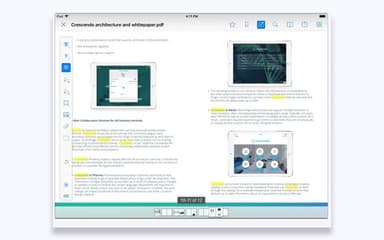
Crescendo comes with advanced sales enablement tools that connect mobile teams directly with cloud-based systems. Users can annotate documents, share files, search offline, and receive notifications. Analytics provide insight into content usage, supporting informed decisions and more effective engagement throughout the sales process cycle.
Pros And Cons of Crescendo
Pros
Provides up-to-date materials anytime, anywhere
Customizable and adaptable content distribution
Supports remote sales team collaboration
Cons
Lacks folder visualization instructions
Sharing annotated documents can be tricky
Crescendo Reviews
Total 11 reviews
4.9
All reviews are from verified customers
Rating Distribution
5
Stars91%
4
Stars9%
3
Stars0%
2
Stars0%
1
Stars0%
Share your experience
Anonymous
Computer Software, 500+ employees
Less than 6 months
“faster sales meetings”
Pros
Back when I was using this in my previous role as a Business Development Manager, it really helped speed up the way I presented content to prospects and clients during sales meetings. Having everything accessible from a tablet made it much quicker and more convenient to pull up the right materials on the spot.
Cons
There were occasional performance hiccups at times but they were fairly minor and never anything too serious.
Rating Distribution
Ease of use
8
Value for money
9
Customer Support
9
Functionality
8
Tyla R.
Chemicals, 51-100 employees
Less than a year
“Good building and storage features”
Pros
Getting started with the product felt very easy and the customer service team responds incredibly fast whenever help is needed. The building and storage features are also very user friendly which makes day-to-day use really comfortable.
Cons
Offline capability is important for my marketing work although I haven't explored that part properly yet and plan to look into it over the next few weeks. The image naming setup also took a bit of time to get used to.
Rating Distribution
Ease of use
10
Value for money
10
Customer Support
9
Functionality
10
Artem K.
Chemicals, 500+ employees
More than a year
“fast file sync”
Pros
Uploading files is as simple as dragging and dropping them into SharePoint, Google Drive or another storage service and they sync to users' devices almost instantly. It's incredibly fast and very convenient to use.
Cons
A few features such as push notifications, are only available with the white-label version.
Rating Distribution
Ease of use
10
Value for money
10
Customer Support
10
Functionality
9
Frequently Asked Questions
What level of support does Crescendo offer?
Crescendo provides support through phone, email, FAQs, and a resource center.
Does Crescendo offer an API?
Yes, Crescendo offers an API.
Does Crescendo have a mobile app?
Yes, Crescendo offers a mobile app for Android and iOS users.
What types of pricing plans does Crescendo offer?
Crescendo pricing is structured around two plans. i.e., the Standard plan starts at $15/month for a minimum of 10 licenses and is billed annually, and the Extended plan offers custom pricing tailored to advanced requirements and additional features. Get in touch for a personalized Crescendo cost estimate.
What other apps does Crescendo integrate with?
Crescendo integrates with OneDrive, Google Drive, SharePoint, Salesforce, and Box.
What language does Crescendo support?
Crescendo supports multiple international languages, including English.
Who are the typical users of Crescendo?
Crescendo features are used by organizations across multiple industries and sectors, including construction, healthcare, agribusiness, biotechnology, consumer goods, financial services, and aerospace.