


Dialpad Connect
Last Updated
Overview
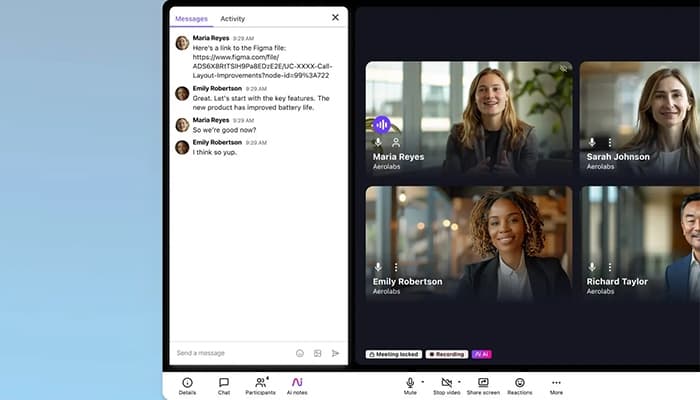
Dialpad Connect software unifies all business conversations on an AI-powered cloud platform, automating tasks, streamlining workflows, and keeping teams productive across any device, anywhere. While occasional call connectivity issues may arise, admins benefit from powerful monitoring tools with detailed call metrics to optimize performance and efficiency.
Dialpad Connect Specifications
- Activity Tracking
- Reporting and Analytics
- Email Integration
- Collaboration Tools
Dialpad Connect Features
HD Calls
Dialpad Connect ensures uninterrupted communication with a 100% uptime SLA, delivering consistently clear audio without dropped connections. Reliable call quality enhances professional interactions, keeping conversations smooth and effective in any business setting.
AI Recaps
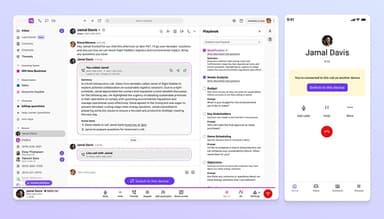
AI-generated summaries eliminate the need for manual call reviews, providing concise overviews and actionable next steps. Automated insights from each conversation improve efficiency, ensuring follow-ups are timely and well-informed.
Custom IVR
Custom IVR automatically sorts incoming calls based on predefined routing rules, ensuring organized conversation tracking. This feature improves response efficiency by instantly directing calls to the right teams or individuals.
Call Transfer
Incoming calls can be redirected to another team member with a single click, improving responsiveness. This functionality ensures inquiries reach the right person quickly, reducing hold times and enhancing customer experience.
Company Directory
Employees can be located instantly through a searchable directory, allowing for quick messaging, meeting scheduling, or direct calling. Streamlined access to colleagues enhances internal collaboration and communication efficiency.
Pros And Cons of Dialpad Connect
Pros
User customization for ringing and interface preferences
AI-powered call transcription and summaries
Call recording and insights for review and training
Admin monitoring tools with call metrics
Cons
Occasional call connectivity issues
Complex backend management for new employees
Limited WhatsApp Business integration
Dialpad Connect Reviews
Total 18 reviews
4.1
All reviews are from verified customers
Rating Distribution
5
Stars50%
4
Stars22%
3
Stars17%
2
Stars6%
1
Stars6%
Share your experience
Small-Business, 11-50 employees
“frustrating support experience”
Pros
Click-to-call works really well for reaching leads quickly and going through a list of contacts in sequence helps maintain steady productivity.
Cons
Support was where things fell short. Our experience with the CSAM wasn't very good and that made it hard to get prompt help or clear resolutions when problems came up. Faster responses and a more proactive customer service approach would make a big difference to the overall experience.
Rating Distribution
Ease of use
6
Value for money
6
Customer Support
3
Functionality
6
Mid-Market, 500+ employees
“handy crm sync and but glitchy”
Pros
For companies looking to avoid providing separate phones, this tool works well by offering communication features in one app and syncing with platforms like Salesforce.
Cons
At times, the app can be a little unreliable when it comes to call quality. It also gives recipients the option to unsubscribe from calls or texts which becomes a problem once they choose to do that.
Rating Distribution
Ease of use
5
Value for money
5
Customer Support
4
Functionality
6
Not Specified, N/A employees
“useful features and frustrating support”
Pros
Navigation across the platform feels simple and having call transcripts emailed along with detailed call history adds real value.
Cons
Once our company decided to move away from this platform, shutting down the account became far more difficult than it should have been. We ended up trying another provider, Quo and stayed with them mainly because the customer service experience here was so frustrating.
Rating Distribution
Ease of use
6
Value for money
6
Customer Support
5
Functionality
6
Frequently Asked Questions
Does Dialpad Connect have a mobile app?
Dialpad Connect offers a dedicated mobile application for Android and iOS devices.
What level of support does Dialpad Connect offer?
Dialpad Connect provides comprehensive support through multiple channels, including email/help desk, FAQs/forum, knowledge base, phone support, 24/7 live representatives, and chat
What language does Dialpad Connect support?
Dialpad Connect supports English.
What other apps does Dialpad Connect integrate with?
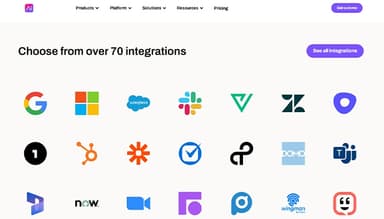
Dialpad Connect integrates with various third-party applications, including Salesforce, Office365, Zendesk, Google Workspace, OneLogin, Okta, HubSpot, and Zoho, enhancing workflow efficiency and ensuring smooth communication across business tools.
Does Dialpad Connect offer an API?
Yes, Dialpad Connect offers API access.
What types of pricing plans does Dialpad Connect offer?
Dialpad Connect offers a flexible pricing structure with three plans: Standard at $27 per user per month, Pro at $35 per user per month, and Enterprise with custom pricing. Request a detailed Dialpad Connect cost analysis to see which plan works best for you.
Who are the typical users of Dialpad Connect?
Dialpad Connect is widely used across retail, insurance, technology, professional services, health, real estate, legal, recruitment, education, and automobile industries, providing seamless communication solutions tailored to diverse business needs.