


Grain
Last Updated
Overview
Grain conversation intelligence records and analyzes sales calls to highlight key moments and pipeline trends. Although automated updates may need manual adjustments sometimes, the tool’s coaching scorecards, Customer Relationship Management (CRM) sync, and searchable insights improve visibility. Overall, it helps sales teams turn customer conversations into actionable data.
Grain Specifications
- Sales Automation
- Activity Tracking
- Reporting And Analytics
- Performance Tracking
What Is Grain?
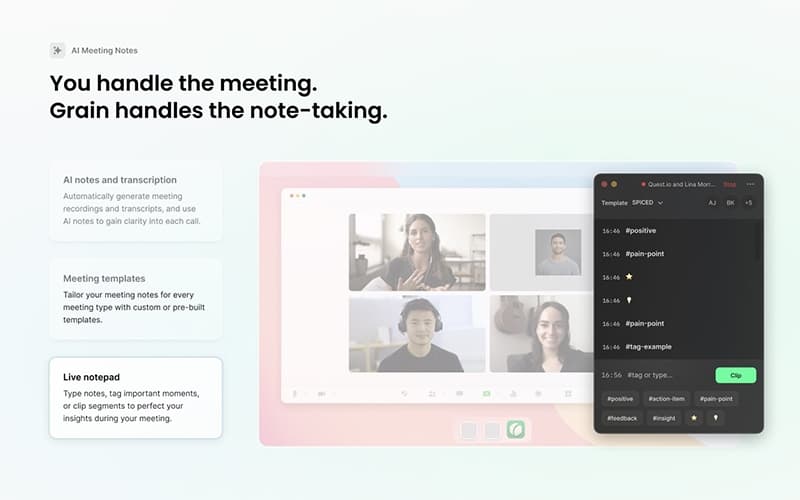
Grain is a conversation intelligence platform designed for sales teams to capture, analyze, and act on customer call insights. It automatically records meetings, identifies key moments, and logs summaries and action items to help sales leaders monitor deals and coach reps. Users can generate follow‑up content and organize call highlights so teams stay aligned on customer needs and pipeline status.
Grain Pricing
The software offers a starting price of $19/seat/month for its Starter plan. Other paid tiers include:
- Business: $39/seat/month
- Enterprise: Custom pricing
A free plan is also available with limited features.
Disclaimer: The pricing is subject to change.
Grain Integrations
The platform integrates with several third-party applications and systems, such as:
- Google Meet
- Microsoft Teams
- Zoom
- Salesforce
- HubSpot CRM software
- Slack software
- Zapier
Who Is Grain For?
Grain is well-suited for a wide range of industries and teams, including:
- Sales
- Product and research
- Customer success
- Recruiting and hiring
- Remote teams
Is Grain Right For You?
Sales teams often struggle to retain insights from customer conversations and efficiently track what matters most in deals. Grain helps by capturing every call, organizing key moments, and updating CRM records so teams can assess performance and pipeline trends. It is suited for mid‑market sales organizations focused on data‑driven coaching and deal progression. The platform is also SOC 2 Type II certified, and practices measures like Single Sign-On (SSO) and hosts data on Amazon Web Services (AWS) servers to ensure security.
Still doubtful if Grain software is the right fit for you? Connect with our customer support staff at (661) 384-7070 for further guidance.
Grain Features
Coaching And Performance Insights
Among the key Grain features, this capability tracks conversation data to measure performance metrics and generate coaching scorecards. Scorecards provide precise feedback and guidance. Insights highlight areas for improvement, helping sales teams refine skills and support effective development over time.
Pipeline And Deal Visibility
With this feature, the platform links sales conversations to CRM data. Deals can be analyzed using SPICED, highlighting successful patterns. Insights help teams monitor progress and support moving opportunities toward closed-won outcomes.
Automated Follow-Up
The software generates follow-up emails using meeting context and SPICED data. Meeting summaries sync instantly to CRM systems. This feature helps account executives save time while keeping records organized and actionable.
Pros And Cons of Grain
Pros
Support team provides responsive, helpful assistance
Automated insights drive effective team coaching
Converts meeting data into analyzable insights
Cons
Smart tags occasionally miss specific call phrases
Sometimes challenging to re-invite Grain to meetings
Grain Reviews
Total 10 reviews
4.9
All reviews are from verified customers
Rating Distribution
5
Stars90%
4
Stars10%
3
Stars0%
2
Stars0%
1
Stars0%
Share your experience
Enterprise, 500+ employees
“Polished and simple to work with”
Pros
Right away the product feels polished and very simple to navigate. The interface is incredibly fluid and everything seems to be placed exactly where you'd expect it which makes using it feel natural.
Cons
There isn't much to complain about. It's a genuinely solid product. For a business like ours, where we need to record meetings from start to finish and rely on accurate, clear transcripts afterward, it handles the job really well. I haven't run into any real problems, except for one minor limitation: the Slack integration isn't ideal when it comes to sharing only specific meetings with specific people. Other than that, it's been excellent.
Rating Distribution
Ease of use
10
Value for money
9
Customer Support
9
Functionality
8
Small Business, 11-50 employees
“Meeting notes and translations really stood out!”
Pros
Being able to track a specific note from a meeting is easily the strongest part of it. I've also gotten a lot of value from the translated conversations and the whole platform feels very user friendly to use. Honestly, it's hard for me to imagine getting a better overall experience from another tool than what Grain provides.
Cons
There's really only one minor drawback and it doesn't come up often. When the conversation happens in a language other than English, like Hindi, the transcription accuracy drops a bit. That's the only area I'd want to see improved.
Rating Distribution
Ease of use
9
Value for money
10
Customer Support
9
Functionality
9
Small Business, 11-50 employees
“customer clips that save time”
Pros
Working in enablement and learning design, it gives me back hours every single week. Auto transcription lets me stop scrambling to write notes during client calls and pay attention to the conversation instead. I also rely on clips and stories to share real customer moments with my team which turns everyday conversations into useful coaching material without needing extra editing. The transcript search is more valuable than it gets credit for too, being able to pull up exactly what a customer said weeks later has changed the way I build programs.
Cons
Once the number of recordings starts growing, keeping everything organized can get pretty messy. There really isn't a good built-in way to structure content by project or client unless you handle it manually with tags. I'd also really like screen recording without having to invite Grain into a live call first because that would make it a lot more useful for async work and demos.
Rating Distribution
Ease of use
9
Value for money
10
Customer Support
9
Functionality
7
Frequently Asked Questions
What other apps does Grain integrate with?
The platform integrates with various third-party applications and systems, including Google Meet, Microsoft Teams, Zoom, Salesforce, HubSpot, Slack, and Zapier.
Does Grain offer an API?
Yes, Grain offers an API.
Does Grain have a mobile app?
No, Grain does not offer a mobile app.
What language does Grain support?
The software supports multilingual capability, including English.
Who are the typical users of Grain?
Grain is ideal for a variety of industries and teams, including sales, product and research, customer success, recruiting and hiring, and remote teams.
What types of Grain price plans are available?
The software has a starting price of $19/seat/month for the Starter plan. Other paid tiers include the Business plan at $39/seat/month and an Enterprise plan with custom pricing. A free plan with limited features is also available. Contact us to request a personalized Grain cost quote based on your institution's requirements.
What level of support does Grain offer?
The platform provides support via email and help center.