


LinkedIn Sales Navigator Software
Last Updated
Overview
LinkedIn Sales Navigator software empowers businesses to generate quality leads and strengthen business relationships. While the auto-renewal policy lacks transparency and flexibility, the software provides valuable insights for better prospecting. Its advanced search filters, real-time alerts, and AI-driven recommendations streamline sales efforts and foster meaningful connections for business growth.
LinkedIn Sales Navigator Software Specifications
- Lead Management
- Contact Management
- Activity Tracking
- Reporting and Analytics
LinkedIn Sales Navigator Software Features
Advanced Search
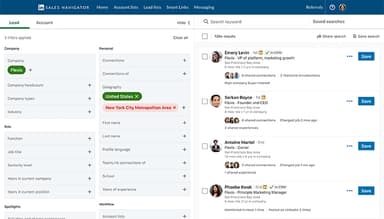
This feature lets users quickly find the right leads using over 50 smart filters. It simplifies prospecting by narrowing searches based on specific criteria, ensuring sales teams connect with high-value prospects faster and more efficiently.
Lead Finder
The solution automates lead prospects by using AI and LinkedIn’s vast network. It helps sales teams discover new opportunities, find hidden connections, and unlock fresh sales paths, making lead generation smarter, faster, and more effective.
Relationship Explorer
LinkedIn Sales Navigator software also maps out the best strategies for target accounts by analyzing relationship signals, shared experiences, and key personas. Furthermore, it uncovers hidden allies, catchy introductions, and perfect timing to engage with potential customers more effectively.
CRM Integrations
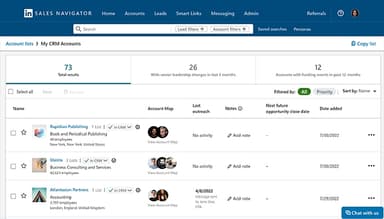
This feature keeps CRM data current by flagging outdated records, adding key contacts, and syncing important business information. It also directly integrates Sales Navigator’s insights into your CRM, saving maximum time and improving overall workflow efficiency.
Key Decision-Maker Alerts
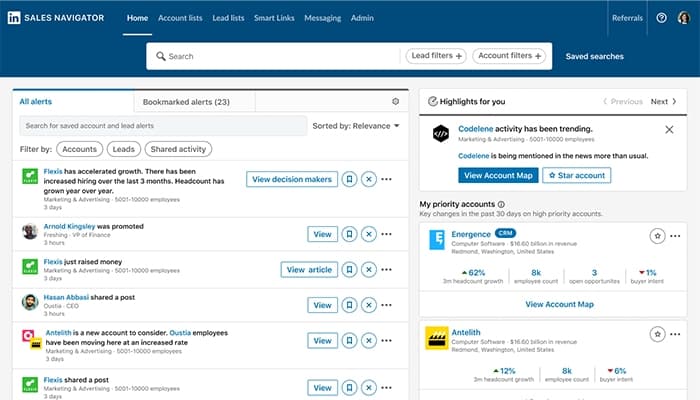
LinkedIn Sales Navigator software supports real-time alerts on key changes, such as job moves and promotions. It helps sales teams reach decision-makers at the right time when they are most open to new conversations and business opportunities.
Account IQ
This AI-powered feature creates smart company summaries, helping sellers quickly understand target accounts and prepare for meetings like a trusted advisor. Furthermore, it cuts research time and ensures meaningful and insight-driven conversations with prospects.
Pros And Cons of LinkedIn Sales Navigator Software
Pros
The InMail feature allows seamless messaging prospects without being connected
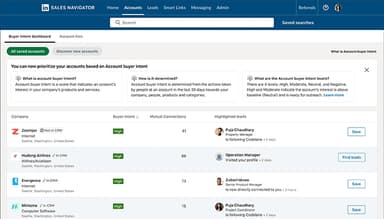
Provides buyer intent visibility and job change tracking
Helps sales teams map accounts and identify key stakeholders
Offers insights about target companies for better prospecting
Cons
The interface could be more simplified as it might be a bit confusing for newcomers, according to some software users
Some users suggest that it could be helpful if the auto-renewal policy could be more transparent and flexible
Should add consistent updates, such as only a few new features were added lately
LinkedIn Sales Navigator Software Reviews
Total 14 reviews
4.5
All reviews are from verified customers
Rating Distribution
5
Stars57%
4
Stars36%
3
Stars7%
2
Stars0%
1
Stars0%
Share your experience
Human Resources, 101-500 employees
More than a year
“The essential guide for sales every day”
Pros
Using this tool daily has made searching for new businesses and expanding my network so much easier. It's well organized and essential for anyone in sales.
Cons
Sometimes, the platform can be difficult to use due to the many options and search filters, making it hard to find what you're looking for. However, with practice and patience, it becomes more manageable.
Rating Distribution
Ease of use
9
Value for money
8
Customer Support
8
Functionality
8
Computer and Network Security, 51-100 employees
Less than a year
“A helpful tool for finding the right person”
Pros
This is such an easy-to-use tool and integrated with LinkedIn, it helps me find professionals in the business ensuring stronger relationships.
Cons
Finding the correct person or contact details isn't always possible.
Rating Distribution
Ease of use
10
Value for money
10
Customer Support
10
Functionality
9
Staffing and Recruiting, 500+ employees
Less than 6 months
“Good for managing recruitment processes”
Pros
They really provide some crucial information about people and companies which is extremely useful.
Cons
Pulling reports can be a bit clunky but overall, the service is really good.
Rating Distribution
Ease of use
10
Value for money
10
Customer Support
10
Functionality
10
Frequently Asked Questions
What other apps does LinkedIn Sales Navigator software integrate with?
LinkedIn Sales Navigator software integrates with various apps, including Tableau, Microsoft Dynamics 365, Salesforce, and Oracle CX Sales.
What types of pricing plans does LinkedIn Sales Navigator software offer?
The LinkedIn Sales Navigator cost ranges in three custom plans: Core, Advanced, and Advanced Plus. Get a tailored quote specified to your business requirements.
Who are the typical users of LinkedIn Sales Navigator software?
The typical LinkedIn Sales Navigator software users are sales professionals and teams looking to connect with potential B2B buyers.
Does LinkedIn Sales Navigator software offer an API?
Yes, LinkedIn Sales Navigator software offers an API.
Does LinkedIn Sales Navigator software have a mobile app?
Yes, LinkedIn Sales Navigator software has a mobile app for Android and iOS users.
What level of support does LinkedIn Sales Navigator software offer?
LinkedIn Sales Navigator software offers support through live chat, email, a help center, a knowledge base, and ticket submission.
What language does LinkedIn Sales Navigator software support?
LinkedIn Sales Navigator software supports English, German, Spanish, French, Chinese, Dutch, and Portuguese languages.