



Last Updated
Overview
Paperflite streamlines content management, helping teams organize, share, and track assets effectively. Although it offers limited CRM integration options, the software is lauded for its simplicity and easy navigation. Moreover, Paperflite features are user-friendly and support seamless communication with prospects, driving better engagement for marketing and sales teams.


Paperflite Specifications
- Lead Management
- Sales Pipeline Management
- Contact Management
- Sales Automation
Paperflite Features
Content Discovery
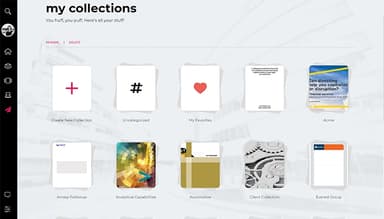
Paperflite empowers users to easily find and access relevant content. It is equipped with personalized content libraries, smart search capabilities, and curated updates. It enables sellers to quickly locate the best materials to enhance their sales efforts without wasting time.
Content Distribution
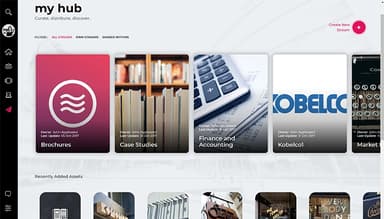
This robust feature enables easy sharing of content across various platforms, like Gmail and WhatsApp. It offers secure links and intuitive sharing options. It helps sales teams distribute materials directly from their preferred tools, ensuring seamless communication and engagement.
Content Experience
The software can create personalized microsites that showcase their content attractively. Paperflite helps transform standard attachments into visually appealing storyboards. It streamlines engagement between sellers and buyers effectively, making a memorable impression during interactions.
Content Analytics
Its analytical data assists users in understanding their content's impact on sales. Users can track their engagement and get real-time data to map out a better marketing and sales strategy. Furthermore, its meaningful data drives informed decisions on content creation and methods to grow revenue.
Content Intelligence
It equips teams with valuable insights to shape their content strategies. It helps in analyzing search patterns, engagement metrics, and performance data. This diverse approach results in cohesive marketing leads, ensuring their teams are equipped with meaningful resources for maximum outcomes.
Pros And Cons of Paperflite
Pros
Robust version control features
Seamless content-sharing options
Simple to learn and navigate
Basic contact management features
Cons
Lacks bulk edit capabilities
CRM integration options are limited
Limited technical customization
Paperflite Reviews
Total 18 reviews
5
All reviews are from verified customers
Rating Distribution
5
Stars100%
4
Stars0%
3
Stars0%
2
Stars0%
1
Stars0%
Share your experience
Education, 11-50 employees
“Outstanding product with stunning user interface”
Pros
The user experience and interface are truly beautiful. It's very clean and simple for the user.
Cons
I think the reporting features could be improved to make them a bit more user-friendly.
Rating Distribution
Ease of use
10
Value for money
10
Customer Support
10
Functionality
8
IT, 500+ employees
Less than a year
“I highly recommend Paperflite for content management and sales enablement”
Pros
It is so easy to implement and has greatly helped our sales team manage content, collaborate, create content easily and deliver it to our target audience. After six months of use, it has significantly saved our team time on content management and creation.
Cons
The pricing could be a bit more affordable and enhancing the overall user experience would be great.
Rating Distribution
Ease of use
10
Value for money
8
Customer Support
6
Functionality
10
Banking, 500+ employees
More than a year
“Best document management security”
Pros
The standout feature of Paperflite is its user friendly interface. It's the most intuitive tool I've used and has streamlined our management process, saving countless hours and effort across the company.
Cons
It would be helpful to have more workshops on best practices and how to maximize the tool's potential for users.
Rating Distribution
Ease of use
10
Value for money
10
Customer Support
10
Functionality
10
Frequently Asked Questions
Does Paperflite offer an API?
Yes, Paperflite offers an API.
Does Paperflite have a mobile app?
Yes, Paperflite has a mobile app for Android and iOS users.
What language does Paperflite support?
Paperflite supports only the English language.
What other apps does Paperflite integrate with?
Paperflite easily integrates with HubSpot, Salesforce, Microsoft Dynamics, Freshsales, Pipedrive, Salesloft, and Eloqua.
What types of pricing plans does Paperflite offer?
Paperflite offers three pricing plans: Sales Content Management at $50/month/user (minimum five users), Clever Story starting at $500/month, and custom pricing for Design Studio. A 15-day free trial is available for new users. Check out the Paperflite price details for a suitable plan for your business requirements.
Who are the typical users of Paperflite?
Typical users of Paperflite include marketing and sales professionals and content creators involved with small startups and large enterprises.
What level of support does Paperflite offer?
Paperflite offers support through live chat, a knowledge base, email/help desk, and FAQs/forums.