


Quoter
Last Updated
Overview
Quoter software automates the quote-to-cash process for Managed Service Providers (MSPs) to ensure faster sales cycles and accurate pricing. While design customization options can be expanded, it significantly reduces administrative workload and empowers IT service providers to close deals with greater efficiency.
Quoter Specifications
- Sales Automation
- Reporting And Analytics
- Performance Tracking
- Email Integration
What Is Quoter?
Quoter is a cloud-based CPQ solution designed specifically for Managed Service Providers (MSPs) and Value-Added Resellers (VARs). The software centralizes the sales workflow by connecting directly to IT distributors for real-time stock and pricing visibility.
By automating the transition from proposal to payment, Quoter software allows sales teams to eliminate data entry errors and secure margins, which help businesses scale their revenue operations effectively.
Quoter Pricing
Quoter pricing starts at $149 per month. The entry-level plan, called Basic, includes unlimited users, cost and margin tracking, and distributor integrations. Additional pricing tiers are available, as outlined below:
- Standard: $289/month
- Pro: $429/month
- Enterprise: $569/month
Disclaimer: The pricing has been sourced from third-party websites and is subject to change.
Quoter Integrations
The software supports integration with multiple systems and platforms, such as:
- ConnectWise PSA
- HaloPSA
- Salesforce
- HubSpot CRM software
- Zoho CRM software
Who Is Quoter For?
Quoter is ideal for a wide range of industries and sectors, including:
- Service providers
- Sales
- IT
- Telecommunications
- SaaS
Is Quoter Right For You?
Quoter is the ideal fit for MSPs and VARs looking to automate their sales workflow and eliminate margin erosion. The platform combines real-time distributor integrations with efficient PSA synchronization to simplify the entire quote-to-cash cycle. Quoter holds an official ISO 27001 certification and a SOC 2 Type II attestation to ensure information security management.
Still unsure whether Quoter software is the right fit for you? Connect with our customer support staff at (661) 384-7070 for further guidance.
Quoter Features
Sales Automation
The platform fixes slow sales processes by using automation to remove manual steps and human mistakes. This helps teams manage more customer requests and close deals much faster than before. It turns a messy workflow into a simple system that lets employees focus on winning more business.
Infinite Line Item Configurations
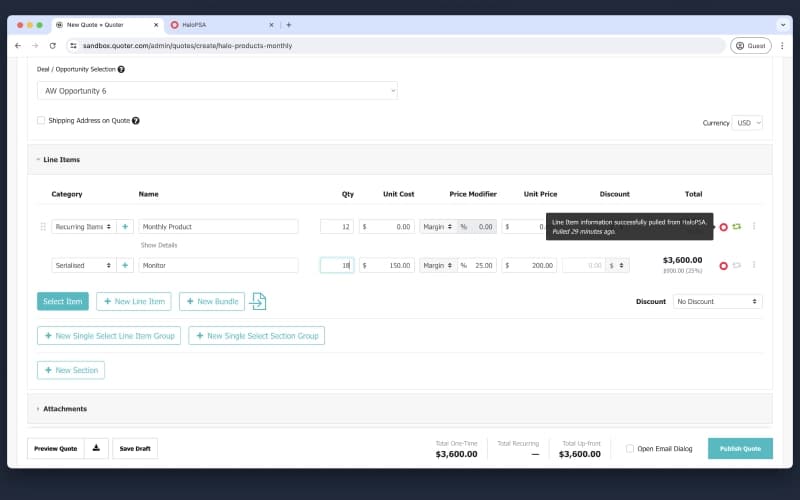
Users can set up standard rules for complex pricing so that every service or product stays consistent. The system handles special details like bulk discounts or extra fees automatically every time you build a quote. This allows the team to create accurate pricing for complicated jobs in just a few clicks.
Branded Quote Templates
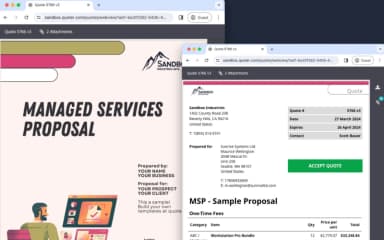
The software uses professional layouts that handle all the design work and formatting for you. These templates make sure every proposal looks clean and matches the company style to impress potential clients. It allows anyone to send out a high-quality document without needing special design skills or extra time.
Automated Oversight And Delegation
Managers get an automatic alert whenever a staff member creates a new quote for a customer. This gives leadership a chance to check the details and approve the work before the client ever sees it. It makes it safe to let more team members handle sales tasks while keeping everything accurate.
Intuitive Quote-to-Cash Workflow
The platform acts as a complete tool built to handle the specific ways that technology companies bill their clients. The interface is easy to use and helps explain the value of complex services to the person buying them. This keeps the whole process moving smoothly from the first offer until the final payment is made.
Pros And Cons of Quoter
Pros
Smooth and secure digital approval process for faster signatures
Rapid quote generation through intuitive and flexible templates
Automated data synchronization that replaces error-prone spreadsheets
Professional presentation with pre-loaded product descriptions
Accurate contact memory for fast and simple customer re-quoting
Cons
Formatting of the cover letter body could be more flexible to manipulate
Revision process currently requires creating a new version of a quote
Shipping and tax details could be included when copying quotes
Template pricing requires manual updates when product costs change
Quoter Reviews
Total 22 reviews
4.7
All reviews are from verified customers
Rating Distribution
5
Stars77%
4
Stars18%
3
Stars0%
2
Stars5%
1
Stars0%
Share your experience
Information Technology and Services, 11-50 employees
More than a year
“Quotes flexible with live tracking”
Pros
Quoter works really well for creating quotes because I can draft them, make changes, preview everything and keep updating the document before it's finally published. It's also really useful that I can include logos, signatures, payment options and a lot of other details directly inside quotes and documents.
Cons
One small thing is that I still like to personally confirm the email was sent. It does provide real time tracking, so you can see when someone opens it, clicks it and more, which is very helpful. Still I also prefer seeing it from my own inbox and it's nice that I can download the PDF and send it from there too.
Rating Distribution
Ease of use
9
Value for money
9
Customer Support
8
Functionality
10
Construction, 11-50 employees
Less than a year
“Discounts work without accounting mess”
Pros
Showing sales discounts without affecting the accounting books has been incredibly convenient. The layout is simple and very user-friendly, which makes the whole process simple to work through.
Cons
Something that could make it even better is broader company integration. It does a fantastic job with estimates but adding crew schedules, service tickets and project folders would help bring everything across the company into one connected system instead of spreading it out over multiple platforms.
Rating Distribution
Ease of use
9
Value for money
9
Customer Support
8
Functionality
8
Information Technology and Services, 1-10 employees
More than a year
“support stays reliable”
Pros
Quoter is very user friendly and the setup process was simple overall. Integrations were also painless to connect and the support team was excellent whenever help was needed.
Cons
The initial setup still took a bit of time and there was definitely a learning curve at the beginning but once everything was in place, it has been running reliably ever since.
Rating Distribution
Ease of use
8
Value for money
10
Customer Support
10
Functionality
9
Frequently Asked Questions
What language does Quoter support?
The platform currently supports the English language.
Does Quoter offer an API?
Yes, Quoter provides an API.
What other apps does Quoter integrate with?
The platform integrates with various software including HubSpot, Zoho, Salesforce, HaloPSA, and ConnectWise PSA.
What level of support does Quoter offer?
The platform provides support through phone and contact form.
What types of pricing plans does Quoter offer?
Quoter cost breakdown includes four plans: Basic ($149/month), Standard ($289/month), Pro ($429/month), and Enterprise ($569/month). Request a customized Quoter price plan for your business today!
Who are the typical users of Quoter?
Quoter features are designed for businesses in industries like telecommunications, SaaS, IT, sales, and service providers.
Does Quoter have a mobile app?
Information regarding a dedicated mobile app has not been specified.