


Last Updated
Overview
Equals software provides seamless data analysis solutions tailored to businesses of all sizes. Although template options for reports are limited, the platform is constantly evolving with new features. Its easy-to-use interface and robust collaboration tools make it perfect for teams seeking smarter, data-driven decisions, simplifying complex tasks for better outcomes.

Equals Software Specifications
- Data Visualization
- Customizable Dashboards
- Data Analysis and Reporting
- Scheduled Reporting
What Is Equals Software?
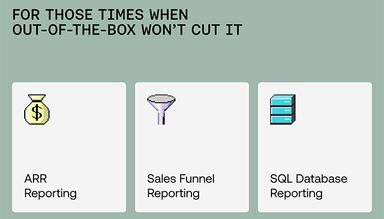
Equals software is designed for teams and businesses looking for robust data analysis and visualization tools. It provides an easy-to-use interface for analyzing complex data and collaborating effectively. Its platform regularly updates with new features, helping businesses streamline decision-making processes. Equals software is an excellent choice for a wide range of industries to uncover insights and optimize workflows effortlessly for ARR reporting, sales funnel reporting, and SQL database reporting.
Equals Pricing
The Equals cost for seats is at $39/month/seat along with three following connector plans:
- Essential Connectors: $99/month
- Standard Connectors: $299/month
- Enterprise Connectors: Custom pricing
Get a tailored pricing estimate that suits your business requirements and budget.
Disclaimer: Prices are subject to change.
Equals Integrations
Equals Software offers integrations with the following apps:
- Salesforce
- Stripe
- HubSpot
- Snowflake
- QuickBooks
- Xero
- Zendesk
Who Is Equals Software For?
Equals Software helps startups and small and medium-sized B2B businesses across various industries, including:
- Technology
- Healthcare
- Fintech
- Event management
- Customer communications
- Marketing
Is Equals Software Right For You?
Equals Software is a viable choice if you're looking for an easy way to sync, analyze, and visualize data without needing complex tools or engineers. Its user-friendly features like spreadsheets, dashboards, and AI Assist help streamline data workflows for better insights and decision-making. Several users laud the software for its flexible and easy-to-use tools and precise output. Moreover, it is highly secure as it complies with a range of security standards, including SOC 2 Type II compliance. That’s why leading businesses like Notion, Atlassian, and Stripe go for Equals software.
Still doubtful whether Equals Software is the one for you? Contact us at (661) 384-7070 for further professional guidance from our team of experts.
Equals Software Features
Warehouse
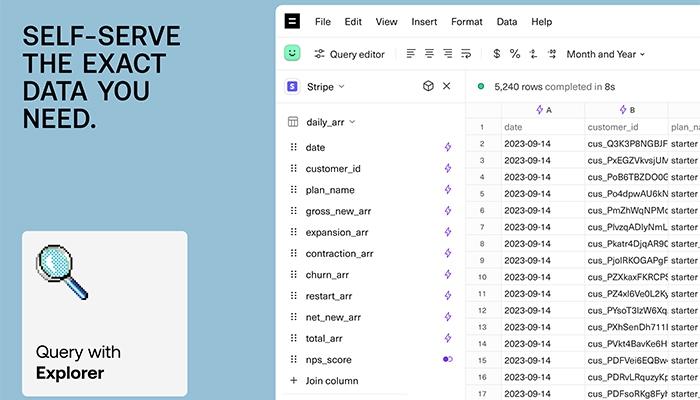
This feature allows users to sync and transform raw data into clean, analysis-ready tables. It also supports connectors for platforms like Stripe and Salesforce, helping users to easily convert raw data into structured views. It brings seamless data management with joins, dependencies, and permission controls for secure access.
Spreadsheets
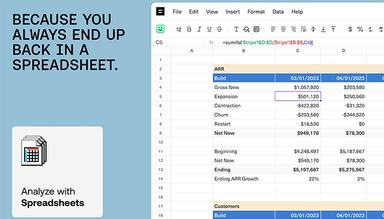
The software is quick to streamline query and analysis of live data directly in spreadsheets, with or without SQL. It supports Excel-based formulas, pivot tables, and dynamic charts. It enables users to automate queries, create calculated columns, and use SQL Editor or Query Builder for seamless data analysis and reporting.
Dashboards
Equals software enables users to instantly turn spreadsheets into interactive dashboards with customizable charts, tables, and AI-generated summaries. It includes filters, custom branding, and easy sharing via Slack or email. So, users can securely share dashboards with anyone via a link, keeping reports up-to-date effortlessly.
AI Assist
The feature provides AI-powered tools to simplify data analysis to generate formulas, fix broken queries, and support easy-to-understand explanations. It also allows users to customize charts with natural language and automatically create dashboards that organize and summarize spreadsheet data, making tasks faster and more intuitive.
Pros And Cons of Equals Software
Pros
Simple interface for data presentations
Quick setup and easy implementation
Automates data updates and reports
Constantly evolving with new features
Cons
Not enough support for non-technical users, according to some software users
Template options for reports are limited
Occasionally, some users have noted glitches while handling large data sets
Equals Software Reviews
Total 10 reviews
5
All reviews are from verified customers
Rating Distribution
5
Stars100%
4
Stars0%
3
Stars0%
2
Stars0%
1
Stars0%
Share your experience
Vladislav C.
Not Specified, 11-50 employees
Less than a year
“It enhances our reports in Intercom”
Pros
The ability to sync data from Intercom and the flexible table functionality are amazing features. The support and onboarding are also excellent.
Cons
The interface isn't the most user friendly and can be a bit confusing for beginners.
Rating Distribution
Ease of use
9
Value for money
10
Customer Support
10
Functionality
10
Zvi B.
Real Estate, 11-50 employees
Less than a year
“It is the perfect combination of your datastore and Excel”
Pros
I love that we can view, manipulate and assemble our live data just like we would in an Excel spreadsheet!
Cons
Since its still an early stage startup, there are bound to be some growing pains.
Rating Distribution
Ease of use
10
Value for money
10
Customer Support
10
Functionality
10
Arjun P.
Not Specified, 11-50 employees
Less than a year
“The ideal mix!!! Excel's ease with the live updates of a database”
Pros
After trying various platforms like Domo, Power BI and Tableau, I finally found Equals. I was able to tie together two Stripe accounts, two currencies, two products, six pricing plans, two resellers and two usage-based platforms to create a simple logo retention and revenue retention chart. The best part was the expert support from Equals, where a data specialist helped me integrate everything with our existing databases in just 10 hours. They even set up a Slack group for continuous support. I use Equals multiple times a week!!!! it's a solid 10 out of 10. They're just getting started and are already impressive.
Cons
I was hoping for a filters feature and while they're working on it, I'd love to see it fully implemented. Getting non engineers on my team to use it would be much easier with this feature, something like Tableau does really well.
Rating Distribution
Ease of use
10
Value for money
10
Customer Support
10
Functionality
9
Frequently Asked Questions
Does Equals Software offer an API?
Yes, Equals Software provides API access.
Does Equals Software have a mobile app?
No, Equals Software does not have a mobile app.
What language does Equals Software support?
Equals Software supports only the English language.
What types of pricing plans does Equals Software offer?
The Equals price range starts at $39/month per seat by offering three connector plans: Essential Connectors for $99/month, Standard Connectors at $299/month, and custom pricing for Enterprise Connectors, tailored to meet specific business needs.
What other apps does Equals Software integrate with?
Equals Software seamlessly integrates with QuickBooks, Zendesk, HubSpot, Snowflake, Stripe, Xero, and Salesforce.
Who are the typical users of Equals Software?
Typical users of Equals Software are professionals in startups and small and medium-sized B2B businesses of different industries, such as marketing, technology, fintech, e-commerce, healthcare, software development, and several others.
What level of support does Equals Software offer?
Equals Software offers support through a knowledge base, live chat, email, and a Slack community.