


Last Updated
Overview
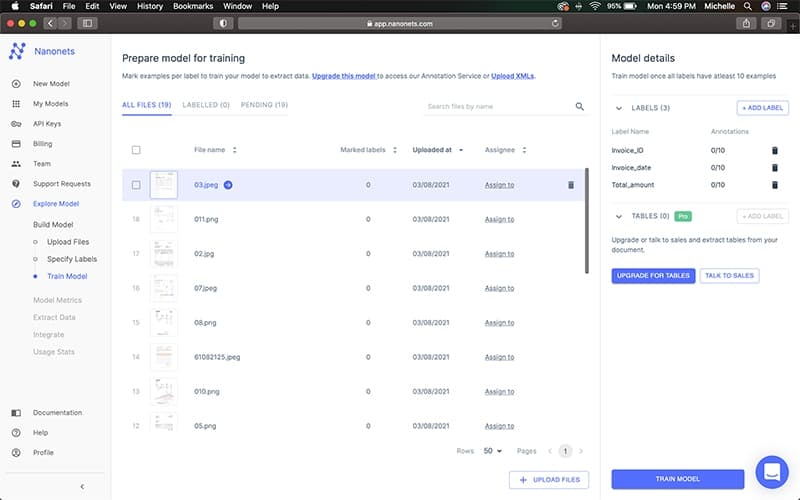
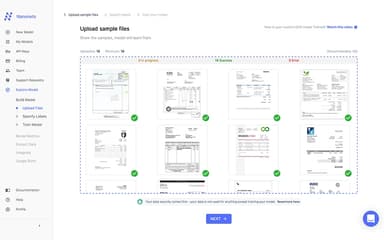
Nanonets is an AI-powered platform that automates image recognition and document data extraction, helping businesses streamline workflows. It offers scalable solutions for real-time detection, classification, and OCR tasks. While it requires some customization for specific needs, Nanonets simplifies AI integration, improving operational efficiency and reducing manual processing.

Nanonets Specifications
- Visual Recognition
- Automation
- Predictive Capabilities
- Defect Detection Using Image Analysis
Nanonets Features
Data Extraction AI
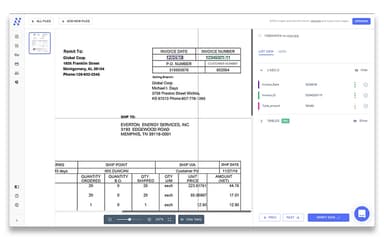
Nanonets automatically identifies and extracts critical data from various types of documents like invoices, receipts, and contracts. The AI eliminates the need for manual data entry, significantly speeding up document processing. It ensures high accuracy by reducing human errors, streamlining workflows, and allowing businesses to save time and reduce costs.
Classification AI
Nanonets categorizes documents based on their content, such as distinguishing between invoices, receipts, and purchase orders. It automatically organizes documents into predefined categories, making them easy to retrieve when needed. This feature reduces clutter, minimizes misfiling, and helps businesses efficiently manage large volumes of documents.
Checkbox And Barcode Detection AI
Nanonets scans documents to accurately detect checkboxes and barcodes. It automatically fills out checkboxes and extracts information from barcodes, which is especially helpful for forms and invoices. This feature enhances the document processing workflow by reducing the need for manual input and improving overall efficiency.
Signature Detection
The Signature Detection feature of Nanonets software verifies signatures within documents to ensure authenticity and compliance. It automatically identifies and checks the validity of signatures, ensuring that all necessary documents are correctly signed. This feature helps businesses maintain compliance with legal and regulatory requirements, safeguarding against errors in contract management.
Analytics
Nanonets software offers an Analytics feature that provides businesses with detailed reports on the performance of their data extraction processes. It tracks key metrics such as extraction speed, accuracy, and volume. These insights enable businesses to identify areas where they can optimize document processing workflows for improved efficiency and reduced errors.
Pros And Cons of Nanonets
Pros
High accuracy in data extraction, leading to better performance
User-friendly interface, making it easy to navigate and use
Time-saving automation that improves operational efficiency
Exceptional customer support, providing timely and helpful assistance
Seamless integration with various systems and applications
Cons
Advanced workflow setup may require some time to fully master for more complex tasks
Model training for unique document types can be a bit time-consuming
File management features might feel somewhat limited for users with more extensive needs
Occasional OCR mapping errors may impact accuracy in specific, complex cases
Nanonets Reviews
Total 21 reviews
4.7
All reviews are from verified customers
Rating Distribution
5
Stars67%
4
Stars33%
3
Stars0%
2
Stars0%
1
Stars0%
Share your experience
Joe
Computer Games, 1-10 employees
Less than 6 months
“Makes extracting invoicing data easy”
Pros
It is an excellent AI for processing documents especially when it comes to invoicing.
Cons
There are varying training times which causes issues and I also noticed occasional glitches.
Rating Distribution
Ease of use
7
Value for money
7
Customer Support
6
Functionality
7
David
Medical Devices, 101-500 employees
Less than a year
“Very well-designed”
Pros
It is a well designed tool for extracting data from documents like PDFs and converting it into medical forms. Plus it has helped me get accurate information quickly and without errors. The support team is also fast and friendly in their responses.
Cons
There is nothing that I dislike. It is a great tool with good performance.
Rating Distribution
Ease of use
8
Value for money
8
Customer Support
10
Functionality
10
Olivia
E-Learning, 51-100 employees
Less than 6 months
“Made data extraction fast”
Pros
Nanonets excels at automating data extraction with impressive accuracy. The AI powered OCR technology cuts down on manual data entry which saves me both time and effort. Also its API integrations make it easy to incorporate into existing workflows.
Cons
I feel like the pricing structure could be more flexible for smaller businesses and some customization options need technical know how.
Rating Distribution
Ease of use
9
Value for money
9
Customer Support
9
Functionality
9
Frequently Asked Questions
Does Nanonets offer an API?
Yes, Nanonets offers an API.
What types of pricing plans does Nanonets offer?
Nanonets offers a Pay-as-you-go model, with users starting with $200 in credits. For larger needs, there are volume-based pricing options and custom enterprise solutions available. Users can request a detailed Nanonets cost analysis.
What languages does Nanonets support?
Nanonets supports over 40 languages, including English, Spanish, French, German, Arabic, and Chinese.
Who are the typical users of Nanonets?
Nanonets is typically used by businesses in industries like retail, logistics, and healthcare.
What other apps does Nanonets integrate with?
Nanonets integrates with multiple platforms and services, including Salesforce, QuickBooks, Google Drive, Zapier, Dropbox, Microsoft SharePoint, and Notion Software.
Does Nanonets have a mobile app?
No, Nanonets does not have a general mobile app. However, it offers a specific app for scanning and managing receipts, available on Android devices.
What level of support does Nanonets offer?
Nanonets offers email support, ticket-based support, and dedicated customer success managers for enterprise clients.