


AutoLeap
Last Updated
Overview
AutoLeap simplifies auto repair shop management with smart tools for scheduling, invoicing, and customer tracking. Although the system offers limited templates for reports, its dynamic and customizable features ensure flexibility. AutoLeap helps to stay organized, boost efficiency, and enhance customer satisfaction with a flexible platform built for modern auto repair businesses.
AutoLeap Specifications
- Invoicing & Billing
- Accounting & Payroll Integration
- Inventory Management
- Online Parts Ordering
AutoLeap Features
Scheduling
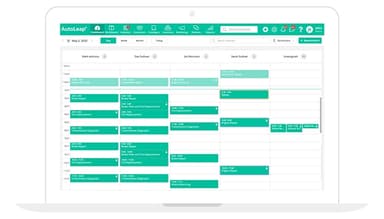
This feature gives auto repair shops a flexible calendar with real-time updates, drag-and-drop scheduling, and automated reminders. It helps users stay organized and keep customers engaged effortlessly.
Digital Inspections
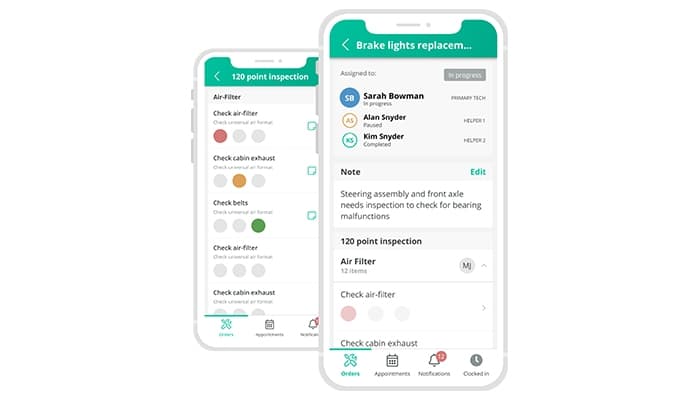
It helps in building trust with customers through detailed digital inspections. It enables technicians to add photos, videos, and notes to reports, making it easy for customers to see what’s needed and approve services online.
Inventory Management
This feature helps keep track of every part without hassle. It assists users in monitoring stock levels, identifying low inventory, and connecting multiple warehouses with the help of real-time updates and easy reordering.
Invoices
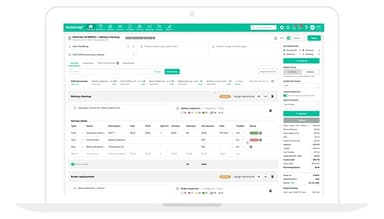
Turn estimates into invoices in just a few clicks! Send invoices digitally, track payments in real-time, and sync with QuickBooks for seamless accounting. Get accurate financial records and profitability insights without the manual work.
Reporting
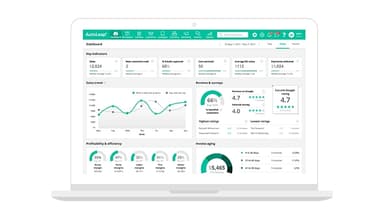
This powerful feature enables users to make wiser decisions with real-time data. It allows them to track technician efficiency, monitor sales trends, optimize inventory, and simplify tax reporting to keep their shop running smoothly.
Pros And Cons of AutoLeap
Pros
Dynamic and customizable system
Easy remote access anywhere
Smooth and simple transition process
Integrated features streamline workflow
Cons
Opens a new window frequently
Limited templates for reports
Requires constant follow-ups sometimes
AutoLeap Reviews
Total 14 reviews
4.8
All reviews are from verified customers
Rating Distribution
5
Stars79%
4
Stars21%
3
Stars0%
2
Stars0%
1
Stars0%
Share your experience
Manager Midas Auto Center, 11-50 employees
“User-friendly platform to explore”
Pros
I love how everything I need to complete service invoices is all in one place. Super convenient!
Cons
It's web-based but I've noticed there can be some lag at times when processing or entering data.
Rating Distribution
Ease of use
9
Value for money
10
Customer Support
10
Functionality
9
Small-Business, 11-50 employees
“Incredible support compared to others”
Pros
The service is top-notch and it's always great to know I can get help whenever I have questions. Makes everything feel way easier.
Cons
Since it's new to our company, I've found getting up to speed to be pretty steep.
Rating Distribution
Ease of use
7
Value for money
6
Customer Support
8
Functionality
8
Small-Business, 11-50 employees
“Learning something new”
Pros
The app is web-based, so I don't have to rely on a server. The other day, when our server went down, I just opened my browser and kept working like nothing happened. I also use the chat feature a lot, I'm in there at least once a day and the team is quick to respond and always super helpful.
Cons
This is a whole new system for me, especially after using a different platform for over 20 years. That old system was custom-tailored to our business, so it was a big shift. It's working with us, though to help us gather and organize the data we need to track our business performance and meet our goals.
Rating Distribution
Ease of use
8
Value for money
8
Customer Support
9
Functionality
8
Frequently Asked Questions
Does AutoLeap offer an API?
No, AutoLeap does not offer an API.
Does AutoLeap have a mobile app?
No, AutoLeap does not have a mobile app.
What language does AutoLeap support?
AutoLeap supports the English language only.
What types of pricing plans does AutoLeap offer?
AutoLeap cost come through Essentials, Pro, Pro Plus, and Multi-Shop plans.
What other apps does AutoLeap integrate with?
AutoLeap integrates with MOTOR, CARFAX, QuickBooks, PARTSTECH, Repairlink, Nexpart, and TireHub to streamline operations and enhance efficiency for auto repair shops.
Who are the typical users of AutoLeap?
Typical users of AutoLeap are the professionals attached to tire shops, specialty shops, and general repair shops.
What level of support does AutoLeap offer?
AutoLeap offers phone, live chat, email/helpdesk, FAQs, and knowledge base support.