


Help Lightning
Last Updated
Key Takeaways
Generated from the text of customer reviews
Help Lightning is a remote visual collaboration platform that uses AR features like combined video streams and 3D annotations for interactive problem-solving. While users report that remote experts cannot directly call a user’s phone number, forcing reliance on SMS links, it is praised for its easy-to-use real-time collaboration tools that make remote training effective across locations.
Our Verdict
Help Lightning is a valuable platform for field service teams needing remote visual assistance to reduce travel, improve resolution speed, and increase first-time fix rates. Users see its pricing as enterprise-level with strong ROI in high-usage environments, though it may feel costly for smaller teams due to its specialized positioning. We recommend it for organizations with complex remote support needs.

Help Lightning Specifications
- Interactive Voice Response (IVR)
- Call Recording
- Call Monitoring
- Call Reporting And Analytics
What Is Help Lightning?
Help Lightning software is a cloud-based, enterprise-wide AR platform that delivers rapid visual assistance by connecting users with remote experts. It features advanced tools like AI speed-assist, spatial computing, patented merged reality, curated knowledge resources, AI value analytics, and automated visual procedures to support guided troubleshooting and efficient self-service resolution.
What Is Help Lightning Best For?
Help Lightning is best known for its Hyper-Quick Merged Reality technology that enables extremely fast and accurate remote expert assistance. The platform allows two-way, side-by-side video collaboration where experts can guide users in real time using live hand gestures, visual overlays, and AR-enabled instructions. It supports interactive troubleshooting, step-by-step demonstrations, and the ability to virtually ‘work’ on real equipment together. By merging digital guidance with physical environments, Help Lightning helps teams resolve complex issues faster, reduce on-site visits, and improve first-time fix rates across field service and support operations.
How Much Does Help Lightning Cost?
Help Lightning has a starting price of approximately $75,000 with 200 licenses per year as per industry benchmarks.
Along with the base subscription price, users should keep the following potential costs in mind:
- Implementation: $10,000–$75,000 for mid-market deployments and $75,000–$250,000+ for large enterprise rollouts involving complex workflows and integrations
- Integration: $5,000–$50,000 depending on the number of systems connected
- Training And Onboarding: $2,000–$20,000 depending on team size, number of field technicians, and required hands-on AR workflow training
- Advanced Configuration And AR Workflow Design: $5,000–$40,000 for setting up guided troubleshooting flows, reusable AR instruction libraries, and role-based support structures
- Analytics And Advanced Feature Add-ons: $3,000–$25,000 annually for enhanced reporting, session recording, and performance intelligence modules
Users generally view Help Lightning’s pricing as enterprise-level, with many associating it with strong ROI given its ability to reduce on-site travel, speed up issue resolution, and improve first-time fix rates through remote visual assistance. Reviewers and market feedback suggest the platform delivers strong value for organizations with high field service or technical support demands, where the reduction in travel and downtime helps justify the investment. However, some users indicate that the pricing may feel high for smaller teams or lower-volume use cases, particularly since it is positioned as a specialized, advanced remote support solution rather than a lightweight or entry-level tool.
Disclaimer: Pricing references are based on publicly available third-party information and industry benchmarks. Actual costs may vary.
Help Lightning Integrations
Help Lightning integrates with various third-party applications, including:
How Does Help Lightning Work?
Log in to Help Lightning to access its Merged Reality-powered remote assistance platform. Follow the steps below to use its core features:
- Start a remote visual assistance session that connects experts and users through live video collaboration for real-time problem solving
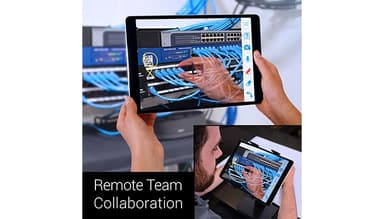
- Enable Hyper-Quick Merged Reality, where two live video streams are combined into a shared virtual workspace for side-by-side interaction
- Use live hand gestures, visual instruction overlays, and AR-enabled annotations to guide troubleshooting directly on real equipment
- Access curated quick knowledge, including guided visual aids and supporting materials, to accelerate troubleshooting and decision-making during sessions
- Collaborate in a merged environment that blends real-world interactions with digital instruction for precise remote assistance
- Support hands-on troubleshooting using real tools and equipment while being guided remotely through spatially aware visual instructions
- Leverage AR spatial understanding and annotations to improve clarity, accuracy, and context during complex issue resolution
- Utilize integrated visual guidance capabilities to streamline service workflows, improve resolution speed, and strengthen overall service performance
Who Is Help Lightning For?
Help Lightning benefits various industries and sectors, including:
- Medical and scientific equipment
- Telecommunications
- Manufacturing
- Distribution and logistics
- Office equipment
- Energy and utilities
- Food and beverage equipment
Help Lightning Use Cases
Based on our analysis of Help Lightning’s features and product positioning, we have identified key scenarios where the platform is commonly used by field service teams, technical support groups, and enterprise organizations for remote assistance, troubleshooting, and visual collaboration:
1. Healthcare Equipment Providers Supporting Hospital Device Operations
Healthcare equipment providers and medical technology teams manage complex devices that require precise setup, maintenance, and troubleshooting across multiple hospital locations. Delays in resolving issues can disrupt clinical workflows, while coordinating on-site expert visits is often time-consuming and resource-intensive. Help Lightning enables real-time remote visual assistance through its Merged Reality platform, allowing experts to guide hospital staff instantly using live video collaboration, AR annotations, and visual instructions to support setup, troubleshooting, and maintenance without requiring physical visits.
2. Beverage Equipment Manufacturers Optimizing Field Service Operations
Beverage equipment manufacturers and service organizations manage complex dispensing systems that require fast troubleshooting, technician training, and consistent maintenance across distributed customer locations. These operations often face challenges such as frequent equipment downtime, travel-heavy service models, and delays in resolving technical issues due to limited access to expert support in the field. Help Lightning enables these teams to provide real-time remote visual assistance using its Merged Reality platform, allowing experts to connect instantly with field technicians and guide them through repairs, installation, and diagnostics. Through live video collaboration, AR-based annotations, and shared visual guidance, specialists can help resolve issues faster, reduce unnecessary site visits, and improve technician effectiveness in the field.
3. Industrial Food Processing & Inspection Equipment Providers Supporting Global Field Service
Help Lightning is useful for industrial food processing and inspection equipment providers that manage highly specialized machinery used across global production facilities, where downtime and technical issues can directly impact production continuity and quality control. These organizations often struggle with delays in dispatching expert technicians to remote sites, along with challenges in ensuring consistent troubleshooting across diverse field teams. Help Lightning enables real-time remote visual assistance through its Merged Reality platform, allowing experts to guide on-site technicians through installation, calibration, maintenance, and repair procedures. Using live video collaboration, AR-based annotations, and interactive visual instructions, specialists can diagnose issues faster, support complex adjustments, and reduce the need for on-site expert travel while improving service consistency across global operations.
4. IT Services & Managed Technology Providers Supporting Enterprise Clients
The platform is well-suited for IT services and managed technology providers that support large enterprise environments where resolving complex hardware, network, and infrastructure issues often requires specialist intervention across distributed client sites. These organizations frequently face challenges such as delayed issue resolution, high dependency on on-site visits, and difficulty scaling expert support across multiple locations. Help Lightning enables real-time remote visual assistance through its Merged Reality platform, allowing experts to connect instantly with on-site technicians and guide them through troubleshooting, system setup, and maintenance tasks. Using live video collaboration, AR annotations, and shared visual guidance, teams can diagnose issues faster, reduce travel requirements, and improve consistency in enterprise IT support delivery.
Is Help Lightning Right For You?
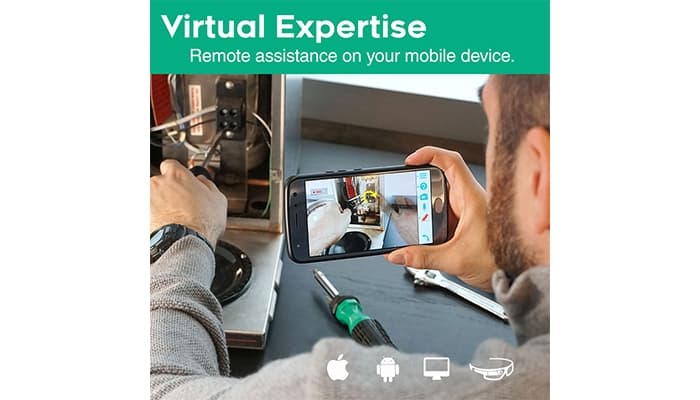
Help Lightning is a versatile tool that enhances virtual support and training, delivering cost savings without sacrificing quality. Its user-friendly interface and camera-in-camera feature allows technicians to troubleshoot remotely, saving travel costs and improving guidance. It ultimately reduces hardware issue resolution time and enhances the end-user experience. The platform also prioritizes data security through ongoing vulnerability testing, continuous system updates, and protective measures designed to safeguard user information and maintain secure remote collaboration.
Are you still trying to figure out Help Lightning? Contact us at (661) 384-7070 and get expert assistance from our team regarding any further queries.
Help Lightning Features
AI Speed-Assist
Help Lightning's AI capabilities enhance remote support with tools like VoiceScript AI for transcription, IntelliAssist AI for real-time troubleshooting, ClearSight AI for visual analysis, and SmartFolders and SmartTags AI for efficient asset management and procedural guidance.
Merged Reality (MR)
A patented mixed-reality video collaboration experience enables experts to work alongside those needing assistance. It features live gestures, visual instructions, 3D annotations, and seamless document examination, allowing experts to respond 11 times faster than AR-only solutions.
Remote Guided Visual Procedures
Remote automated guided visual procedures enhance service and communication speed, offering instant self-help and expediting resolutions. These procedures support implementation, inspection, and diagnosis, resulting in faster problem-solving, reduced costs, and increased efficiency.
Knowledge Management
Manufacturers and service organizations enhance communication by sharing curated knowledge, including images and documents, for installation and troubleshooting. This system provides pre-labeled information and guided visual procedures for offline use by field service engineers and technical support representatives.
Collaboration
Help Lightning features specialized capabilities for ultra-low bandwidth and offers comprehensive chat and messaging functions. It enables quick, accurate communication in noisy environments and retains valuable bidirectional information exchanged during and after fast-help calls.
Industry 4.0 Visualization
Manufacturers and industrial teams use AR-based visualization to quickly locate and identify faulty equipment in complex, multi-asset environments using mobile devices or smart glasses. The system provides real-time access to enterprise knowledge sources such as experts, knowledge bases, and IoT data, along with live system insights. This helps users understand asset location, status, and history more clearly, improving troubleshooting speed and reducing downtime.
Pros And Cons of Help Lightning
Pros
Strong visual collaboration tools that enhance remote troubleshooting and support
The platform is simple to deploy, with no hardware requirements and low setup effort for standalone use
It helps reduce downtime by shortening support calls and minimizing on-site visits from field technicians
It is very easy to use, with a consumer-style interface that requires no training for end users
Cons
The software may slow down some computers, especially those with insufficient RAM or a weak video card
Users report that remote experts cannot directly call a user’s phone number, which slows down the connection process
Help Lightning Reviews
Total 10 reviews
5
All reviews are from verified customers
Rating Distribution
5
Stars100%
4
Stars0%
3
Stars0%
2
Stars0%
1
Stars0%
Share your experience
Healthcare, 500+ employees
More than a year
“Great remote support and delivering value”
Pros
Help Lightning is incredibly user-friendly, which is essential when working with customers who may not be familiar with the technology. It allows for immediate session initiation without requiring the end user to download any apps, speeding up the time it takes to deliver solutions. The merged reality feature also enables side-by-side coaching while remote, contributing to significant savings by avoiding unnecessary dispatches.
Cons
Adding translation features would help expand the product's global reach although the user interface is already simple and friendly enough for most users.
Rating Distribution
Ease of use
10
Value for money
10
Customer Support
10
Functionality
9
Manufacturing, 101-500 employees
More than a year
“Excellent product for entering the world of merged reality”
Pros
Help lightning has really made it simple to work with techs and customers to explain and troubleshoot CNC control-related issues. This tool allows me to bypass step by step instructions and gives me real-time feedback, enabling quick resolution of customer issues that would have otherwise taken hours via email and screenshots.
Cons
We occasionally face signal strength issues, which causes connections to not always work as expected. This can be a barrier to broader company adoption.
Rating Distribution
Ease of use
8
Value for money
9
Customer Support
10
Functionality
10
Education, 500+ employees
More than a year
“A fantastic product!”
Pros
The power of Help Lightning is remarkable. Its ability to conduct remote teaching, training, repairs, and guidance is extraordinary. It's easy to use, and it's especially powerful for complex tasks when two people are in different locations. It's a must-have tool, and well worth the investment.
Cons
There's nothing I would change and I'm very satisfied with everything the platform offers.
Rating Distribution
Ease of use
10
Value for money
10
Customer Support
10
Functionality
10
Frequently Asked Questions
Does Help Lightning offer an API?
Yes, Help Lightning provides API access.
What language does Help Lightning support?
Help Lightning provides multilingual support through English, Spanish, Portuguese, French, German, Italian, Chinese (Simplified), Japanese, and Korean.
What other apps does Help Lightning integrate with?
Help Lightning integrates with several third-party applications, including ServiceNow, ServicePower, Salesforce, Genesys, and IFS.
Does Help Lightning support mobile devices?
Yes, Help Lightning offers a mobile app for both iOS and Android users.
What types of pricing plans does Help Lightning offer?
Help Lightning price typically starts at around $75,000/year for approximately 200 licenses, based on industry estimates. Users can request a custom Help Lightning cost quote.
Who are the typical users of Help Lightning?
Help Lightning benefits various industries, including medical and scientific equipment, manufacturing, telecommunications, distribution and logistics, office equipment, energy and utilities, and food and beverage equipment.
What level of support does Help Lightning offer?
Help Lightning provides various support options, including Chat, Email/Help Desk, Phone Support, FAQs/Forum, and Knowledge Base.