


Orum
Last Updated
Overview
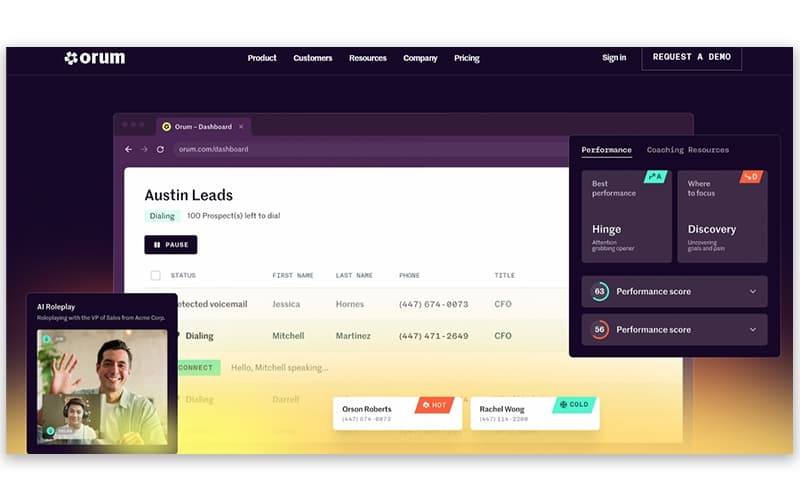
Orum is a conversation engine that automates outbound calls to accelerate pipeline generation. It eliminates manual tasks, connecting reps to live prospects instantly. Despite the absence of a native mobile app, its ability to triple conversation volume makes it a powerful investment. Overall, Orum drives immense sales efficiency.



Orum Specifications
- Call Recording
- Call Monitoring
- Call Reporting and Analytics
- CRM Integration
Orum Features
Data Enrichment
Orum automatically validates contact data and appends new phone numbers to your existing lists. This feature filters out disconnected lines and identifies accurate direct dials, ensuring sales representatives focus solely on valid prospects to maximize connection opportunities and minimize wasted effort.
Voicemail Sequencer
This automation feature enables users to leave pre-recorded, personalized voicemails with a single click. By removing the need to manually recite messages for every unanswered call, it streamlines outreach and ensures consistent messaging, significantly improving callback rates and daily rep productivity.
Smart Lists
The software provides deep visibility into sales performance through real-time dashboards and detailed reports. Managers can track key metrics like connect rates and objection handling, allowing them to identify trends, benchmark rep success, and make data-driven decisions to optimize future calling campaigns.
Reporting And Analytics
The platform integrates with Customer Relationship Management (CRM) dynamic lists to automatically prioritize high-value prospects based on engagement signals. This ensures representatives always dial the most promising leads first, leveraging AI to organize workflows and significantly boost connect rates by targeting the right contacts.
Pros And Cons of Orum
Pros
Explosive productivity gains for outbound teams
Seamless bi-directional CRM synchronization
Accurate voicemail and machine detection
Cons
Occasional audio latency or delays
Lacks a dedicated mobile app
Orum Reviews
Total 45 reviews
4.8
All reviews are from verified customers
Rating Distribution
5
Stars80%
4
Stars18%
3
Stars2%
2
Stars0%
1
Stars0%
Share your experience
Computer Software, 11-50 employees
“powerful outbound dialing”
Pros
The dialing tools are quite solid and make outbound calling much more efficient and manageable.
Cons
There are times when the call audio has some delay or latency and that can make conversations harder to carry on naturally.
Rating Distribution
Ease of use
8
Value for money
9
Customer Support
10
Functionality
9
Not Specified, 500+ employees
“Productivity boost”
Pros
This has made a noticeable difference in how productive our SDRs are, helping them get through more calls in a much more efficient way. The workflow feels very organized since reps really only need to jump in when someone actually answers. One of the best parts is the feedback after every connected call because the AI generated notes give SDRs a real opportunity to learn, adjust and keep improving. The coaching tools have also been very valuable especially from my perspective as an SDR leader since they make it much easier to review performance and provide targeted guidance. I also appreciate being able to go through colleagues' calls which adds another layer of learning for the team. From a leadership standpoint, it's also fairly simple to use, we were able to get started after just one enablement session.
Cons
That said, there have definitely been moments when the AI hasn't been fully accurate. A few times even when a call lasted three to five minutes, it failed to capture notes or it generated notes but still labeled the call as not connected. So there are occasional glitches here and there although nothing I'd consider a major problem.
Rating Distribution
Ease of use
9
Value for money
8
Customer Support
8
Functionality
7
Information Technology and Services, 500+ employees
“Automates our entire workflow”
Pros
Right away the power dialer feels truly hands free and incredibly fast. Unlike other "power dialers" that still make reps click between calls this one automates the whole workflow by moving through dial trees, recognizing voicemails and jumping to the next number without any delay.
Cons
The AI features still need improvement. It's "AI Voice Detection" sounds impressive in a demo but in actual use there's a noticeable lag. The system dials several lines at once and listens briefly to decide whether it's a person or voicemail and that pause can make you miss the start of a conversation. Orum Enriched also falls short. Although the data enrichment tools are included in the plan, the quality and accuracy aren't on par with a dedicated enrichment platform. You still end up depending on outside data sources to be confident you're calling the right numbers.
Rating Distribution
Ease of use
9
Value for money
8
Customer Support
8
Functionality
7
Frequently Asked Questions
What types of pricing plans does Orum offer?
The platform offers two plans, Launch and Ascend, both with pricing customized to users’ specific needs. You can also request a personalized Orum price quote now.
Who are the typical users of Orum?
Businesses across various industries, including insurance, telecommunications, financial services, recruiting and staffing, and real estate, benefit from Orum features.
What other apps does Orum integrate with?
The software integrates with a range of systems and platforms, including HubSpot, Slack, Salesforce, Salesloft, and Apollo.
What language does Orum support?
The platform is primarily available in English, German, Spanish, etc.
What level of support does Orum offer?
The software offers a help center and chat support.
Does Orum offer an API?
Yes, Orum software provides an API.
Does Orum have a mobile application?
No, it does not offer a mobile app.