


VCC Live
Last Updated
Overview
VCC Live software empowers your contact center with advanced features like IVR, real-time statistics, predictive dialer, and VCC Live Pay. While setting up some functions can be complicated, extensive customization options offered by VCC Live ensure that business needs are always prioritized. Most importantly, it enhances efficiency, productivity, and customer satisfaction.
VCC Live Specifications
- Interactive Voice Response (IVR)
- Call Recording
- Call Monitoring
- Call Reporting and Analytics
What is VCC Live?
Overview
VCC Live is a versatile cloud-based contact center solution designed for businesses of all sizes. It offers IVR, predictive dialer, VCC Live Pay, and Omnichannel communication. It is extremely useful for industries/sectors like banking, insurance, healthcare, and retail. VCC Live has strong integration capabilities and real-time analytics, helping enhance operational efficiency, agent productivity, and customer satisfaction. VCC Live is a tailor-made platform to provide comprehensive support to your business.
VCC Live Pricing
- Essentials
- Advanced
- Multichannel
- Enterprise
Users can get pricing according to your business requirements.
VCC Live Integrations
VCC Live integrates with various third-party applications such as:
- Salesforce
- Dialogflow
- Zapier
- Hubspot
- Docusign
- Looker
Who Is VCC Live For?
VCC Live covers a wide range of industries and sectors, including:
- Healthcare
- Retail
- Banking
- Insurance
- Consumer Lending
- BPO
Is VCC Live Right For You?
VCC Live is an excellent choice for a comprehensive, customizable contact center solution. It offers robust features like predictive dialing, ACD, CRM integration, and real-time dashboards to enhance efficiency and customer satisfaction. Moreover, it is trusted by giants like Vodafone, Whirlpool, UNICEF, and Sun Finance, so you can feel comfortable with your decision.
Still unsure whether VCC Live is the perfect choice? Call our customer service team at (661) 384-7070 so that we can help you make a better decision.
VCC Live Features
Predictive Dialer
This feature boosts outbound campaigns by auto-dialing multiple numbers and connecting agents only when calls are answered. It boosts talk time to 45 minutes per hour and cuts abandoned call rates to under 3%, ensuring efficient call handling.
Automatic Call Distribution (ACD)
It helps users improve customer experience by swiftly connecting callers to the most suitable agents according to predefined rules. It effectively manages high call volumes and uses skills-based routing to enhance first-contact resolution.
Contact Center Dashboard
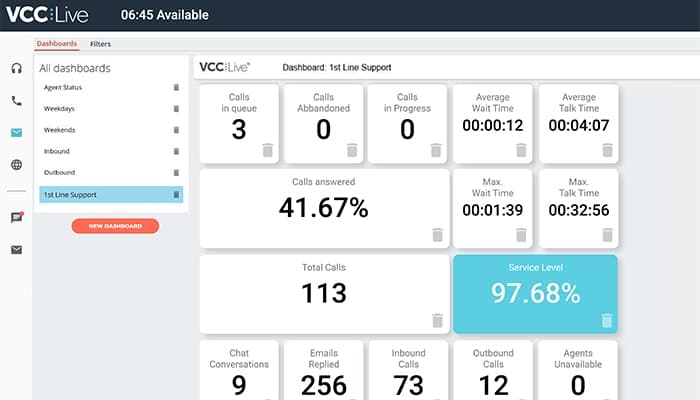
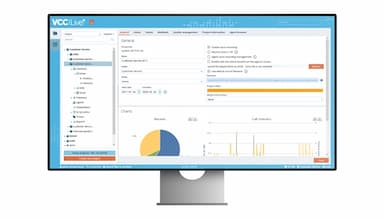
This feature enables users to monitor real-time performance with a highly customizable dashboard. It provides a holistic view of contact center activities, allowing the managers to track various KPIs and swiftly react to potential issues.
Auto Dialer
This advanced feature helps users manage phone calls efficiently by automating the dialing process. It supports various dialing modes, such as outbound IVR, power, or predictive dialing, to maximize the number of calls handled.
CRM Integration
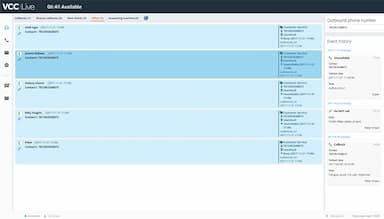
This powerful feature allows users to integrate seamlessly with existing CRM systems, providing agents with complete customer information for more personalized interactions. It synchronizes contact lists and campaign data, ensuring agents have all necessary information at their fingertips.
Pros And Cons of VCC Live
Pros
Intuitive user interface
Fully cloud-based
Customization options
Excellent support
Cons
Complicated setup for some functions
Missing minor functionalities
Call issues in some countries
VCC Live Reviews
Total 19 reviews
4.7
All reviews are from verified customers
Rating Distribution
5
Stars79%
4
Stars16%
3
Stars5%
2
Stars0%
1
Stars0%
Share your experience
Finance, 1-10 employees
More than a year
“Great contact center for financial institutions”
Pros
I find it easy to use, with an easy user interface and lightningfast support.
Cons
Some functions can be a bit more complicated to set up but technical support is always there to help me.
Rating Distribution
Ease of use
9
Value for money
10
Customer Support
10
Functionality
10
Retail, 51-100 employees
More than a year
“It is the BEST software”
Pros
It's easy for me to use and the helpdesk team is very helpful. I can find everything I need in this software for a call center.
Cons
The software is expensive and sometimes I experience server problems.
Rating Distribution
Ease of use
10
Value for money
8
Customer Support
9
Functionality
10
Healthcare, 500+ employees
More than a year
“Very easy to learn but crashes often”
Pros
I find it easy to learn and use in a call center setting.
Cons
Connectivity can be spotty at times, and the software tends to freeze or crash easily.
Rating Distribution
Ease of use
5
Value for money
6
Customer Support
6
Functionality
6
Frequently Asked Questions
Does VCC Live offer an API?
Yes, VCC Live offers an API.
Does VCC Live support mobile devices?
No, VCC Live does not support mobile devices.
What other apps does VCC Live integrate with?
VCC Live integrates with Zapier, Hubspot, WhatsApp, Looker, Salesforce, Dialogflow, and Docusign.
What language does VCC Live support?
VCC Live supports English, German, Polish, Romanian, and Hungarian languages.
What types of pricing plans does VCC Live offer?
VCC Live cost is not mentioned on its website. It offers three plans, i.e., VCC Lite, VCC Startup, and VCC Enterprise, along with customized pricing.
Who are the typical users of VCC Live?
Typical users of VCC Live are healthcare, retail, banking, consumer lending, insurance, and BPO industries/sectors.
What level of support does VCC Live offer?
VCC Live provides support through phone, live chat, and email.