


ChiroTouch
Last Updated
Overview
Chirotouch offers end-to-end chiropractic practice management, aiding in workflows from scheduling to billing and analytics. Despite its popularity, some clinics may find the upfront investment steep or implementation time lengthy. However, its extensive capabilities from customizable notes to fully integrated payments justify the expense for most practices.
Overall Rating
Based on 1026 users reviews
4.1
Rating Distribution
Positive
76%
Neutral
16%
Negative
8%
Starting Price
Starting: $159
per month
ChiroTouch Specifications
- Appointment Management/Scheduling
- e-Prescriptions
- Lab Integration
- Patient Portal
ChiroTouch Features
Customizable SOAP Notes Templates
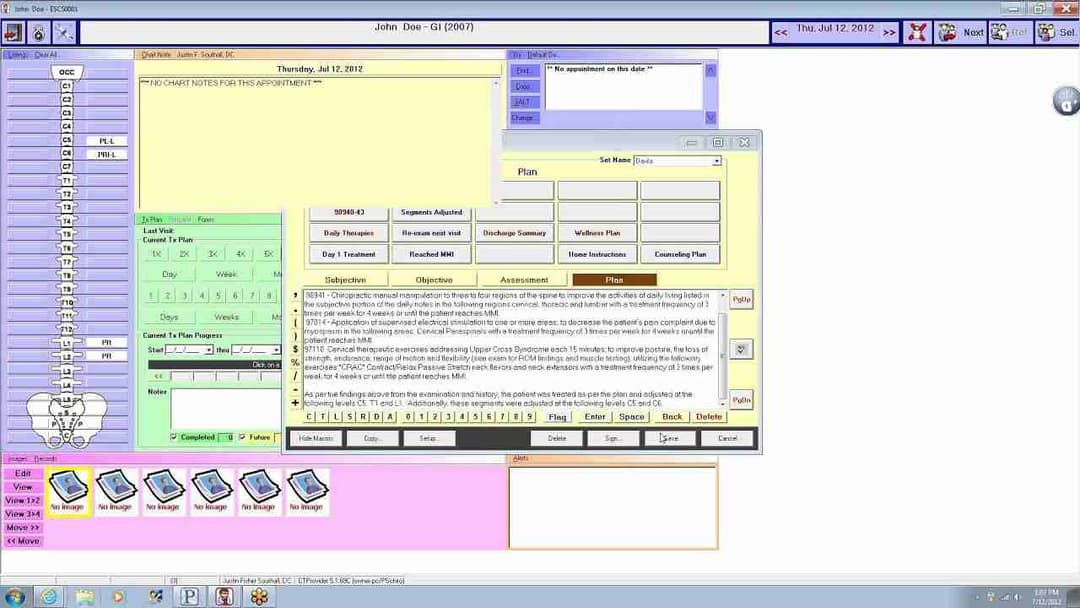
Chiropractors can create templates that include standard examination areas to quickly document the repetitive aspects of a patient visit. The templates are fully customizable with macros that allow practitioners to insert standard text or assessment responses with just one click. Templates can be edited over time as needs change.
Online Appointment Scheduling
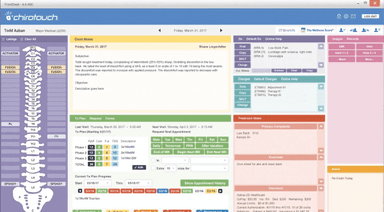
Patients have round-the-clock access to book and manage appointments through a digital calendar integrated with the practice system. Scheduling links can be added to the practice website and patient portal for convenience. No-shows are reduced through automated reminder communications via email and text. Detailed analytics provide insights into scheduling patterns to help optimize time allocation.
Integrated Payment Processing
ChiroTouch integrates securely with major credit card processors to facilitate in-person and online payments. Users can save patient payment details to simplify future transactions. Flexible payment plans can be established to breakdown large balances. Comprehensive payment histories are maintained for easy account reconciliation.
Claims Management Suite
This suite streamlines insurance billing workflows. Eligibility checks save time spent on verifying coverage. Electronic claim submissions are faster than paper billing. Automated ERA posting and claim status tracking saves hours of manual processing. Denied claims are organized in a work queue to facilitate appeals.
Customization Options
Providers can modify the dashboard to focus on priorities like active patients or upcoming appointments. Form templates accommodate unique intake needs. Macros populated standard responses to regions of a note with a click. Users personalize filters and display preferences according to preferences.
Analytics And Reporting
Key metrics related to productivity, revenue and patient experience are tracked. Insights include no-show patterns, top referring doctors and top billing codes. Collection reports pinpoint unpaid balances. Customizable templates facilitate periodic analysis of benchmarks and targets.
Pros And Cons of ChiroTouch
Pros
The software allows the user to securely store patient profiles
ChiroTouch makes administrative tasks like check-ins and billing management easier by automating them
The software provides a self-hosted version with all financials in one exclusive program
Cons
It can take some time for users to understand and fully utilize the software’s interface
The system can encounter errors in downloading information from previous modules or databases
ChiroTouch Pricing
ChiroTouch Core | ChiroTouch Advanced |
|---|---|
Starting: $159 per month | Custom Pricing |
|
|
Disclaimer: The pricing details were last updated on Sep 14, 2026 from the vendor's website. Please contact us for a tailored pricing list.
ChiroTouch Reviews
Total 1026 reviews
4.1
All reviews are from verified customers
Rating Distribution
5
Stars50%
4
Stars25%
3
Stars12%
2
Stars5%
1
Stars8%
Share your experience
Medical Practice, 1-10 employees
More than a year
“Flexible patient workflow win”
Pros
Patient management and documentation are where this software really shines. Note-taking is efficient and it does a great job of supporting proper compliance which matters a lot. One of its strongest points is how customizable it is. That flexibility lets you shape it around your practice very closely, including patient communication through email and text messaging.
Cons
Cost is the biggest drawback in my view since it takes a pretty significant investment to get on board. There's also definitely a learning curve and that's hard to avoid. The same high level of customization that makes it powerful can also make it more challenging to learn and set up.
Rating Distribution
Ease of use
10
Value for money
8
Customer Support
10
Functionality
10
Alternative Medicine, 1-10 employees
More than a year
“Helpful onboarding at first”
Pros
Getting started was helpful because the onboarding team walked me through the setup. That was pretty much the only area where I received useful assistance. After that, support mostly just searched CT Community and seemed unsure of how to actually handle issues.
Cons
Their billing has been inconsistent and I was overcharged for several months. Real support is basically absent and the support they do offer is entirely overseas. On top of that they hold your records hostage and will only complete a full data migration whenever they decide it's appropriate.
Rating Distribution
Ease of use
10
Value for money
10
Customer Support
8
Functionality
10
Medical Practice, 1-10 employees
Less than a year
“Reliable updates and standout support”
Pros
I have been using ChiroTouch since 2013 and have worked with many team members on different issues over the years. Out of all of them, one support person was by far the most helpful. One evening, he stayed very late after we had already left the office just to finish our update and make sure everything was running properly. Because of that extra effort, we were able to start work the next morning without any downtime at all which made a huge difference for a busy practice like ours. Overall, it's a user-friendly program and whenever someone asks for my software recommendation, this is the one I suggest.
Cons
Reporting section isn't my favorite part. A few reports are really good but others still need some improvement.
Rating Distribution
Ease of use
10
Value for money
10
Customer Support
10
Functionality
8
Frequently Asked Questions
What level of support does ChiroTouch offer?
ChiroTouch provides support through the ChiroTouch Community, offering live chat with the customer service team, help articles, and support ticket submissions.
Who are the typical users of ChiroTouch?
ChiroTouch is an EHRsoftware designed for chiropractic practices, including cash practice systems, insurance-based, and hybrid models.
What languages does ChiroTouch support?
ChiroTouch supports operations in English language.
Does ChiroTouch EMR support mobile devices?
Being an electronic health record, ChiroTouch offers an iOS app.
How much does ChiroTouch cost?
The software offers the following plans: ChiroTouch Core- starting at $159/month, and ChiroTouch Advanced- request a custom pricing.
How will chiropractic software help streamline my practice?
Our completely integrated EHR software is designed to streamline everyday tasks in your chiropractic practice like documentation, billing and scheduling. It provides an end-to-end experience to improve your patient care efficiency.
What type of pricing plans does ChiroTouch offer?
ChiroTouch offers pricing plans starting from $159/month.
Are patient profiles securely stored?
Yes, patient engagement tools within our electronic health record securely store all patient profiles and health records for over twenty years of compliance. Our customer service team ensures the utmost data security and confidentiality is maintained.
Is ChiroTouch free?
No, ChiroTouch is not free.
What other apps does ChiroTouch integrate with?
ChiroTouch comes completely integrated with services like CT Engage for patient engagement, CT InForms for intake forms, CT Payments for payment processing, and clearinghouses such as TriZetto and Change Healthcare for claims management.
Does ChiroTouch offer an API?
No, ChiroTouch does not provide an API.