


Asset Essentials
Last Updated
Overview
Asset Essentials software accelerates asset management, optimizes workflows, and plans asset lifespans. With its intuitive features, the software helps businesses enhance operational efficiency across various industries. From preventive maintenance to inventory control, Asset Essentials empowers teams to excel in maintenance endeavors. Transform your business’s asset management with Asset Essentials today.
Asset Essentials Specifications
- Work Order Management
- Maintenance Logs
- Purchasing
- Incident Management
Asset Essentials Features
IoT Remote Monitoring
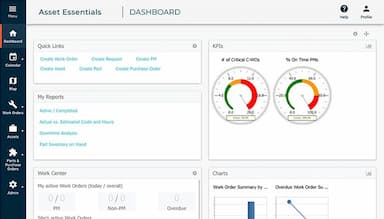
Asset Essentials CMMS software offers remote yet real-time tracking of asset health and performance. It helps businesses enhance preventive maintenance. They can reduce downtime and minimize repair costs by identifying issues before they escalate.
GIS Mapping Integration
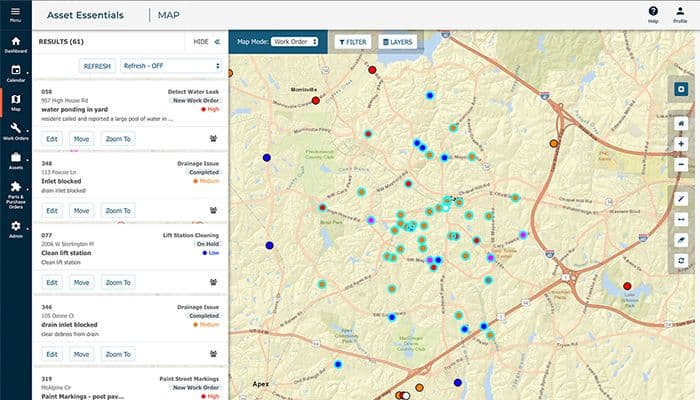
The software provides visual representations of assets and work orders on maps. Asset Essentials streamlines navigation, improves spatial awareness, and enhances resource allocation. Businesses can optimize their asset visibility across different facilities.
Mobile Work Order
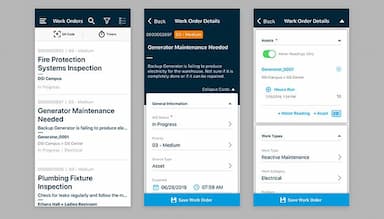
This feature empowers technicians to access and manage work orders from anywhere. It results in quick responsiveness, accelerated task completion, and fostered collaboration. Tools like remote transactions and barcode-scan assets enable maximum transparency.
Asset Inventory Management
It facilitates accurate tracking and control of assets throughout their lifecycle. By centralizing data and automating processes, Asset Essentials tools reduce overhead costs and ensure optimal resource utilization, leading to improved asset performance and ROI.
Pros And Cons of Asset Essentials
Pros
Automated updates
Easy to deploy
Customizable
Diverse range of tools
Efficient mobile app
Cons
There could be more integrations
Sometimes, loading is sluggish
Data storage space is limited, as per Asset Essentials reviews
Asset Essentials Reviews
Total 299 reviews
4.1
All reviews are from verified customers
Rating Distribution
5
Stars27%
4
Stars56%
3
Stars15%
2
Stars2%
1
Stars0%
Share your experience
Small Business, 11-50 employees
“Customized to my view!”
Pros
The training modules and sandbox mode have really improved how I use the product. I'm able to set up every detail so it reflects my personal customizations, which I love. It presents the data exactly the way I prefer to view it.
Cons
I do wish we had come across this earlier but I'm also mindful that worthwhile discoveries don't always happen overnight.
Rating Distribution
Ease of use
10
Value for money
10
Customer Support
10
Functionality
9
Small Business, 11-50 employees
“interactive layout with frustrating limits”
Pros
the layout is very interactive to use and it lets me locate whatever I need quickly so I don't end up confused by deep, complicated menus.
Cons
I wish I could tweak settings the way I want and it's frustrating that there's no option to assign multiple work orders at once.
Rating Distribution
Ease of use
8
Value for money
9
Customer Support
8
Functionality
7
Small Business, 1-10 employees
“Easily accessible but lags sometimes”
Pros
Being able to access the program from anywhere when I am traveling or away from the office is something I really value.
Cons
I do notice it becomes quite slow at times and having to rely on using it on our phones isn't the most convenient setup.
Rating Distribution
Ease of use
7
Value for money
8
Customer Support
8
Functionality
8
Frequently Asked Questions
Does Asset Essentials offer an API?
Yes, Asset Essentials offers an API.
What languages does Asset Essentials support?
Asset Essentials supports English.
What other apps does Asset Essentials integrate with?
Asset Essentials integrates with Blue Beam, SeeClickFix and MS Dynamics.
Does Asset Essentials support mobile devices?
Yes, Asset Essentials supports iOS and Android devices.
What types of pricing plans does Asset Essentials offer?
Only custom quotes of Asset Essentials pricing are available on request.
Who are the typical users of Asset Essentials?
Asset Essentials is used by manufacturing, education, and utilities industries.
What level of support does Asset Essentials offer?
Asset Essentials offers phone support, FAQs, help desk, email, and knowledge base.