


Fullbay
Last Updated
Key Takeaways
Generated from the text of customer reviews
Our Verdict
Overall Rating
Based on 217 users reviews
4.7
Rating Distribution
Positive
96%
Neutral
3%
Negative
0%
Starting Price
$188.00
per month
Fullbay Specifications
- Work Order Management
- Maintenance Logs
- Purchasing
- Incident Management
Fullbay Features
Estimates And Invoices
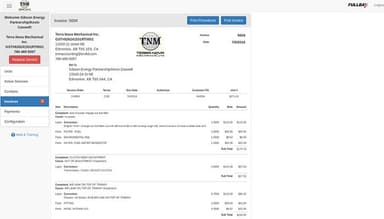
Fullbay offers an effortless generation of precise estimates that can be quickly sent for approval or be easily converted into invoices, enabling customers to review and approve them within seconds.
Service Order Workflow
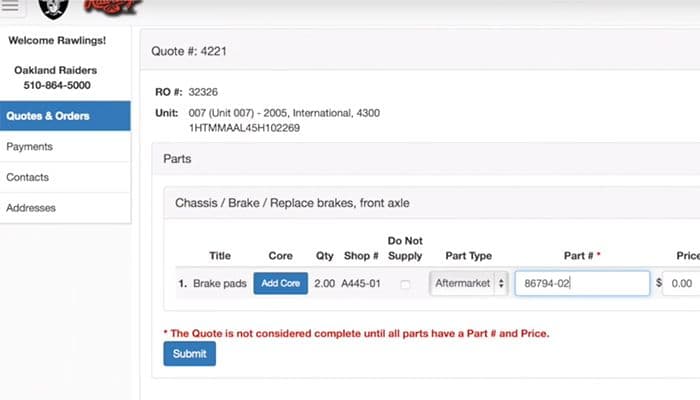
Fullbay offers a service order feature which helps customers submit their requests through their personalized portal. Fullbay enhances flexibility to customize alerts for each customer request, ensuring efficient management and a preference-based response.
Inventory Management
Fullbay provides a painless inventory management system that simplifies the way users handle parts and supplies. It helps maintain an up-to-date inventory across different locations, ensuring accurate tracking and management.
Reporting
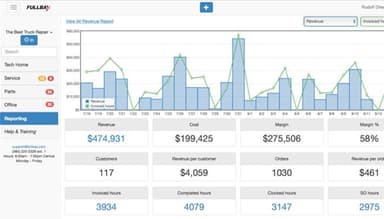
Fullbay's robust reporting features offer visibility into various aspects of a shop's work operations. By generating detailed reports, users can access useful data and insights to inspect and improve their business performance.
Customer Communication
Customer communication is an integral part of Fullbay's capabilities. Through a personal portal, all customers can easily keep track of repair and preventive maintenance statuses, make payments online and add contacts to facilitate communication via text or email.
Pros And Cons of Fullbay
Pros
User-friendly interface
Invoice reporting and tracking
Efficient customer portal
Cons
Limited filtering options in certain reports
Time sheet management can be cumbersome
Fullbay Reviews
Total 217 reviews
4.7
All reviews are from verified customers
Rating Distribution
5
Stars74%
4
Stars23%
3
Stars2%
2
Stars1%
1
Stars0%
Share your experience
Transportation/ Trucking/ Railroad, 101-500 employees
More than a year
“Simple fleet record access”
Pros
I rely on this as our internal system to monitor and keep records for our fleet of more than a hundred tucks. It's incredibly simple to sign in and pull up records to figure out what needs scheduling soon. Our technicians log in on their phones to check the jobs assigned to them and start working right away. Overall it's been a very good value and pretty easy to pick up, even though we haven't tapped into all of its capabilities.
Cons
Over the last five years I've only run into a single problem with this tool and it still hasn't been sorted out. The trouble lies with how it generates reports and I wish there were a printer-friendly version, I'm certain some reports exist but not the specific one I rely on. It looks great on the screen, yet when I print it, the output doesn't match the on-screen layout at all.
Rating Distribution
Ease of use
10
Value for money
8
Customer Support
10
Functionality
10
Automotive, 11-50 employees
More than a year
“Organized shop scheduling”
Pros
Managing our shop has become a lot easier since we started using this tool. I rely on the scheduling and maintenance management features to keep every task and appointment neatly organized and the live tracking for repairs and parts has cut down on so much back-and-forth and wasted time. The interface feels clean and simple so even team members who are new pick it up quickly. I also appreciate the platform's strong security and reliability, we haven't run into downtime or data loss which gives me real peace of mind.
Cons
The only real drawback I've noticed is the initial learning curve, it can take some time for new hires to get comfortable with all of the functionality but after a bit of hands-on use they usually settle in fine. A small number of reports could benefit from more customization settings although that hasn't been a major problem for us overall.
Rating Distribution
Ease of use
8
Value for money
10
Customer Support
10
Functionality
10
Not Specified, 11-50 employees
Free trial
“Easy platform navigation”
Pros
From my perspective, it's super easy to get around and I think that will encourage others to start using the platform too, it's amazing
Cons
Honestly I can't point to any downsides because I genuinely enjoyed using the platform and appreciated the benefits it offers
Rating Distribution
Ease of use
10
Value for money
10
Customer Support
10
Functionality
10
Frequently Asked Questions
What pricing plans does Fullbay offer?
Fullbay cost is estimated to start at $188/user/month. The platform offers Basic, Pro, and Elite, and Enterprise plans, with pricing available through a custom quote. Get in touch for a tailored Fullbay cost estimate.
Who is Fullbay typically used by?
Fullbay is used by owners, technicians, service managers, parts managers and office managers of trucks and trailers, private fleets, heavy equipment, mobile repair, towing, agriculture vehicles, emergency vehicles, construction vehicles and RVs.
What languages does Fullbay support?
Fullbay supports English.
Does Fullbay support mobile devices?
Yes, Fullbay is compatible with mobile devices.
Does Fullbay have an API?
Yes, API access is available.
What other apps does Fullbay integrate with?
Fullbay integrates with various third-party applications, including QuickBooks, MOTOR, DeiselMatic, FleetNet and Interstate Billing Service.
What level of support does the Fullbay offer?
Fullbay offers support through email, a help desk, phone support, chat, and a knowledge base.