


Calday Software
Last Updated
Overview
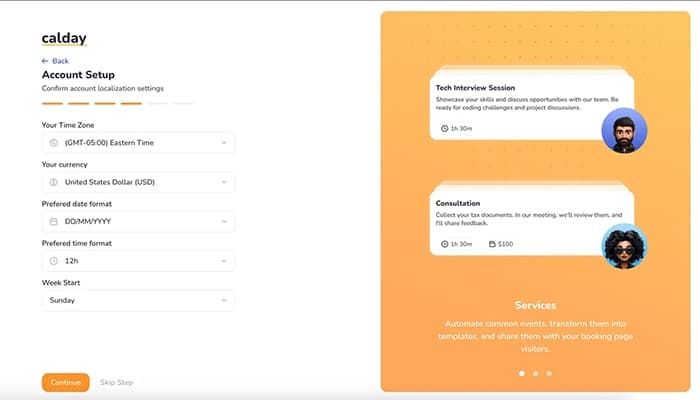
Calday software is a user-friendly appointment booking platform with robust features. It assists teams in managing appointments, scheduling meetings, and sending automatic reminders, making the process simple and efficient. Although payment options are still missing, users laud Calday software for its adaptability to any type and size of business.
Calday Software Specifications
- Real-Time Communication
- File Sharing & Management
- Document Management
- Task & Project Management
Calday Software Features
Calendar
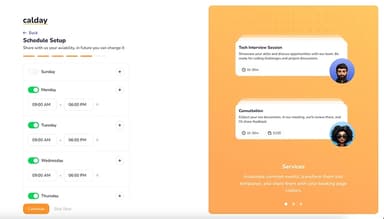
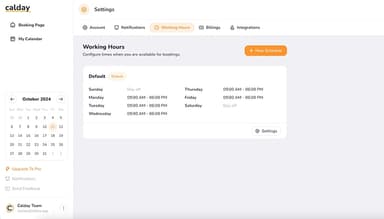
The feature streamlines schedule management to enable effortless online meeting arrangements and adjustments. Ideal for businesses across time zones, it helps prevent conflicts and ensures seamless coordination, all through an intuitive and user-friendly interface.
Calendar Synchronization
It helps manage availability across platforms, supporting integration with Google or iCloud calendars. Even on the free plan, users can sync one remote calendar to prevent scheduling conflicts and streamline coordination.
Instant Notifications
Calday software keeps sure that you stay organized with email alerts for updates and reminders for upcoming appointments. It helps clients and guests stay informed, reduces missed meetings, and enhances the reliability of your business.
Booking Page
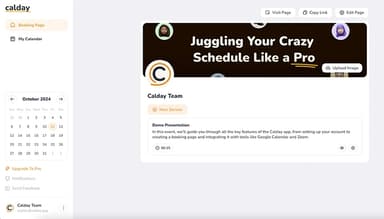
The personalized booking page streamlines scheduling, allowing clients and colleagues to easily book appointments. It also simplifies sales and booking processes by easily setting up your first event type, enhancing efficiency, and boosting profitability for your business.
Clients
This feature supports a database for effortless management, allowing easy client list creation and seamless appointment scheduling. Even with its free version, the software stands out as an excellent tool for unlimited appointments and meetings.
Pros And Cons of Calday Software
Pros
Easy to use interface, streamlining the scheduling process
Customizable booking page for personalized scheduling and availability
Automated reminders to reduce no-shows
Calendar syncing to avoid double bookings and conflicts
Cons
Limited integration options
Tools to accept payments/billing should be included, according to software users
Calday Software Reviews
Total 6 reviews
5
All reviews are from verified customers
Rating Distribution
5
Stars100%
4
Stars0%
3
Stars0%
2
Stars0%
1
Stars0%
Share your experience
Human Resources, 11-50 employees
More than a year
“Very precise and meets the requirements”
Pros
I really love how flexible it is. My business has some unique needs and it meets them with features like add-ons for services, which is incredibly helpful.
Cons
It would be really useful to have the option to create custom questions on the booking page. This would allow me to gather important information from clients right when they book, saving me time later on.
Rating Distribution
Ease of use
10
Value for money
10
Customer Support
10
Functionality
9
Not Specified, 11-50 employees
More than a year
“A great comprehensive software”
Pros
The built-in calendar is one of my favorite features. I use it to keep all my calendars in one place, which is super convenient. I connected both my Google and Apple calendars without any hassle and now I just send a link to clients for easy scheduling.
Cons
I'd love to see more calendar features like the ability to set recurring events or filter views. That would make managing my schedule much easier.
Rating Distribution
Ease of use
10
Value for money
10
Customer Support
10
Functionality
9
Not Specified, 51-100 employees
More than a year
“Highly effective and straightforward”
Pros
There's a lot to love about Calday!!! First it's so simple to use. The design is clear and clean and I figured everything out just minutes after starting. Second their support team is amazing. I had some issues with integrations and they fixed everything in just a few minutes.
Cons
It could definitely benefit from more integrations. For instance adding Paypal or Stripe would be great for processing payments directly from clients, streamlining the entire process.
Rating Distribution
Ease of use
10
Value for money
10
Customer Support
10
Functionality
9
Frequently Asked Questions
Does Calday software offer an API?
Yes, Calday software provides API access.
What language does Calday software support?
Calday software supports the English language.
Does Calday software offer a mobile app?
No, Calday software does not offer a dedicated mobile app.
What other apps does Calday software integrate with?
The software offers various third-party integrations, including Google Calendar, iCloud Calendar, Outlook Calendar, Zoom, and Google Meet.
What types of pricing plans does Calday software offer?
The Calday software cost comes in the following two plans: Free (for small businesses) at $0/month and Premium (for growing businesses) at $12/month. Its prices vary based on your preference for weekly, monthly, or annual billing options.
Who are the typical users of Calday software?
Calday software is typically used by service-based businesses, including barbers, hair salons, spas, and photographers.
What level of support does Calday software offer?
Calday software offers support through email.