


Last Updated
Overview
Cirrus Insight software is a comprehensive sales productivity platform with features like tracking email opens, clicks, and replies, one-click meeting scheduling, Salesforce email template merging, and syncing emails and calendar events. While some users consider the interface outdated, others value its smooth integration with popular platforms.

Cirrus Insight Software Specifications
- Real-Time Communication
- File Sharing & Management
- Document Management
- Task & Project Management
What Is Cirrus Insight Software?
Cirrus Insight software equips individuals, teams, and organizations with powerful Salesforce productivity and meeting automation tools. It seamlessly integrates with Gmail and Outlook, enabling users to sync activity data to Salesforce automatically, send personalized emails, and track email interactions directly from their inbox. With advanced scheduling features such as 1:1 meetings, team availability sharing, and intelligent buyer-staff matching, scheduling becomes effortless. Trusted by over 50,000 users worldwide, Cirrus Insight supports revenue growth and organizational success.
Cirrus Insight Software Pricing
The Cirrus Insight software price model comprises two tiers with unique pricing plans, including:
Salesforce Productivity
- Salesforce Sync: $14/user/month (billed annually)
- Pro: $21/user/month (billed annually)
- Expert: $49/user/month (billed annually)
Meeting Automation
- Scheduling: $14/user/month (billed annually)
- Scheduling+: $24/user/month (billed annually)
- Meeting AI: Coming soon (billed annually)
Disclaimer: Prices are subject to change.
Cirrus Insight Software Integrations
The software mainly integrates with Salesforce, and syncs with Gmail and Outlook.
Who Is Cirrus Insight Software For?
Cirrus Insight software is designed to support various professionals and industries and sectors, including:
- CRM admins
- Account executives
- Sales operations
- Sales managers
- Marketing experts
- Financial services
- Higher education
Is Cirrus Insight Software Right For You?
Cirrus Insight offers tools to boost sales team productivity by integrating Salesforce with Gmail and Outlook. Their solutions streamline customer data management, automate scheduling, and track interactions. The platform provides seamless user experiences, personalized booking, smart meeting insights, and a unified tech stack to enhance Salesforce adoption and minimize business risk.
Do you still need to learn about Cirrus Insight software? Call our team at (661) 384-7070 for expert guidance on your questions.
Cirrus Insight Software Features
Smart Scheduler
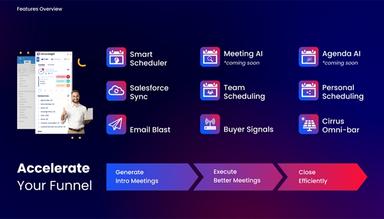
Smart Scheduler streamlines customer scheduling by matching them with the right staff in real-time based on skills, availability, and demand. It reduces delays, optimizes resources, and enhances efficiency, lead conversion, and customer satisfaction.
Calendar Scheduling
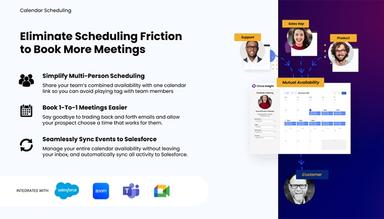
Cirrus Insight software simplifies scheduling by enabling users to share real-time availability via a single link, manage calendars from their inbox, coordinate team schedules, set meeting preferences, and send SMS reminders for seamless meeting management.
Attachment Tracking
Cirrus Insight's attachment tracking provides detailed document analytics, revealing who opens, reads, or shares your attachments. This insight helps prioritize engaged prospects, reduce deal friction, and guide timely, tailored follow-ups to close deals efficiently.
Meeting AI
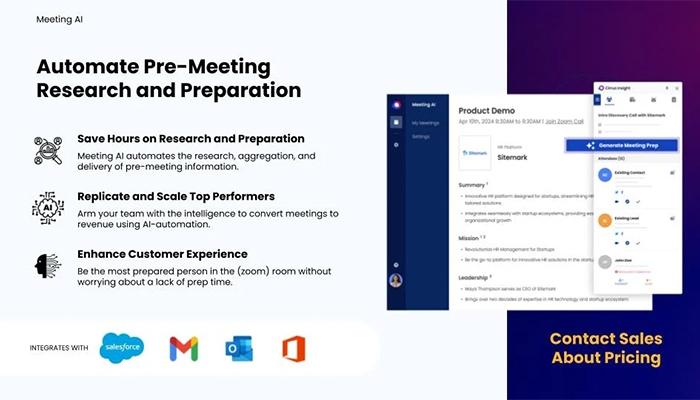
Meeting AI streamlines pre-meeting preparation by delivering automated insights on companies and contacts. It enables users to build meaningful connections, run efficient meetings, and focus on high-value interactions that drive sales and close deals effectively.
Pros And Cons of Cirrus Insight Software
Pros
Saves time with email logging to Salesforce
Provides in-depth statistics on email campaigns
Enables users to monitor email opens, update and create records
Cons
Inconsistent reminder logging
Lack of bulk processing
Cirrus Insight Software Reviews
Total 14 reviews
3.6
All reviews are from verified customers
Rating Distribution
5
Stars29%
4
Stars36%
3
Stars14%
2
Stars7%
1
Stars14%
Share your experience
Patti
Computer Software, 51-100 employees
More than a year
“A must-have tool for Salesforce”
Pros
CI integrates perfectly with Salesforce, letting us see client info and history directly in our email sidebar. It automatically logs meetings, tasks and emails which makes everything faster and more efficient. Plus the support team is amazing and always available to help with any issues or questions.
Cons
I have nothing major to share but at times when it tracks too much it ends up using more data storage in Salesforce.
Rating Distribution
Ease of use
10
Value for money
10
Customer Support
10
Functionality
10
Anonymous
Financial Services, 1-10 employees
More than a year
“Made email archiving simple”
Pros
Cirrus Insight turned a process for us that used to be manual into something automated, simple and hassle free.
Cons
At times updates need multiple steps to refresh the browser and ensure syncing is not interrupted which annoys us.
Rating Distribution
Ease of use
9
Value for money
10
Customer Support
9
Functionality
8
Melissa
Information Technology and Services, 51-100 employees
More than a year
“Very user-friendly”
Pros
This product makes syncing with Salesforce very smooth. Plus being able to create email templates and access them right from Gmail is proven quite beneficial for us. We have been using it for years and have not found anything better for what we need.
Cons
Well it is not a complaint but I feel like it is definitely better suited for Gmail users.
Rating Distribution
Ease of use
9
Value for money
8
Customer Support
10
Functionality
10
Frequently Asked Questions
Does Cirrus Insight software offer an API?
Yes, Cirrus Insight software provides API access.
What language does Cirrus Insight software support?
Cirrus Insight software supports the English language.
Does Cirrus Insight software offer a mobile app?
Cirrus Insight software offers a dedicated mobile app for Android and iOS devices.
What other apps does Cirrus Insight software integrate with?
The software primarily integrates with Salesforce, seamlessly syncing with both Gmail and Outlook.
What types of pricing plans does Cirrus Insight software offer?
The Cirrus Insight software cost structure offers a tiered pricing model with plans for Salesforce Productivity, including Salesforce Sync ($14/user/month), Pro ($21/user/month), and Expert ($49/user/month), and Meeting Automation with Scheduling ($14/user/month), Scheduling+ ($24/user/month), and the upcoming Meeting AI, all billed annually. Users can request a detailed analysis of the Cirrus Insight software price.
Who are the typical users of Cirrus Insight software?
Cirrus Insight is tailored for diverse professionals and industries, including CRM admins, account executives, sales operations, sales managers, marketing experts, and those in financial services and higher education.
What level of support does Cirrus Insight software offer?
Cirrus Insight software provides support through the help desk, chat, phone, email, a knowledge base, and FAQs/forums.