


ContactMonkey
Last Updated
Overview
ContactMonkey streamlines internal employee communication and newsletter creation through direct Outlook integration. While users occasionally note technical delays in reporting, its intuitive template quality and acclaimed customer support ensure efficient delivery. Overall, the platform is a structured solution for enhancing team productivity.
Overall Rating
Based on 26 users reviews
4.2
Rating Distribution
Positive
77%
Neutral
19%
Negative
4%
Starting Price
Custom Pricing
ContactMonkey Specifications
- Real-time Communication
- Calendar & Scheduling
- Integration With Other Tools
- Feedback Management
What Is ContactMonkey?
ContactMonkey is a multi-channel internal communications platform that helps organizations create, send, and measure employee messaging without leaving their inbox. The platform works directly inside Outlook and Gmail, and it reaches employees through SMS, Microsoft Teams, and SharePoint as well.
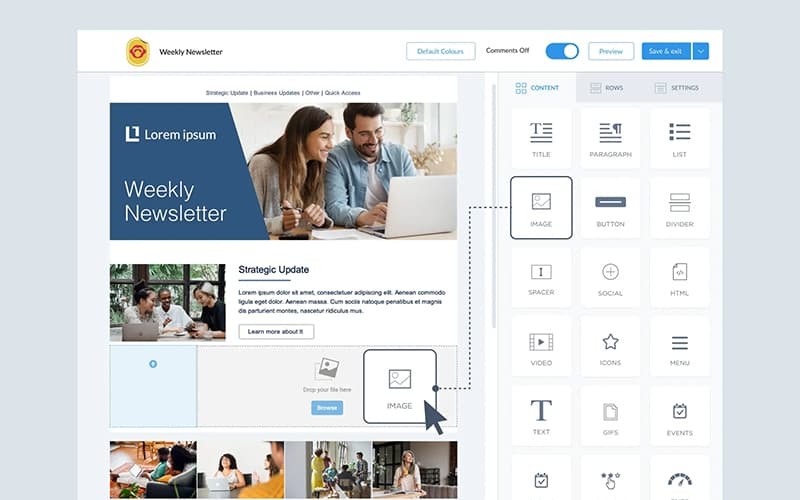
It features a drag and drop builder, which handles the design work. Furthermore, ContactMonkey lets staff build branded newsletters without coding help.
What Is ContactMonkey Best For?
This platform stands out for ConfidenceCheck, which is a pre-send review layer built into ContactMonkey's email editor. Before a message goes out, it scans for broken links, WCAG 2.1 accessibility gaps, and inconsistencies like placeholder text or mismatched dates. It can also be configured to flag an organization's own brand rules. This gives communication teams an extra review step for catching content, accessibility, and branding issues before an email reaches employees.
How Much Does ContactMonkey Cost?
ContactMonkey price starts at $2,500/year for its SMS Comms offering. The platform's core internal communications plans are custom-priced based on factors such as team size, sender seats, and recipient coverage. The plans include:
- Launch
- Grow
- Enterprise
Beyond the base price, buyers should consider the following cost driving factors as well:
- Implementation And IT Configuration: Can add 20%–50%+ of first-year subscription costs, based on industry benchmarks for more complex SaaS implementations
- Integration Development And Middleware: May add $105–$335/user annually
- SMS Message Volume: Can Start Around $0.0083/SMS Segment
- International SMS: Can reach $0.4734/Outbound SMS, based on current international SMS pricing benchmark
- Ongoing Integration Maintenance: Can add 15%–25% of initial integration costs annually, covering updates, troubleshooting, and changes to connected systems
Reviewers note mixed perspectives on ContactMonkey's value proposition. Some find the platform budget-friendly for email tracking and engagement analytics, while others report that pricing may not justify the value as its analytics capabilities do not fully align with their needs.
Disclaimer: The pricing is subject to change.
ContactMonkey Integrations
The platform integrates with several third-party systems, such as:
- Microsoft Outlook
- BambooHR
- Gmail
- Lano
- OpenAI software
- Microsoft Teams
- Microsoft SharePoint
How Does ContactMonkey Work?
Here's how you can get started with ContactMonkey and put its features to work:
- Log in to the ContactMonkey sidebar in Outlook or Gmail using your account credentials
- Sync employee data from your HRIS, Active Directory, or existing distribution lists
- Segment employees by department, role, location, or custom criteria
- Build the email or newsletter using the drag-and-drop template builder or the AI email builder
- Add merge fields, surveys, polls, or emoji reactions to personalize and engage recipients
- Run ConfidenceCheck to catch broken links, accessibility issues, and brand-rule violations before sending
- Schedule or send the campaign to your segmented audience across Outlook, Gmail, SMS, Teams, or SharePoint
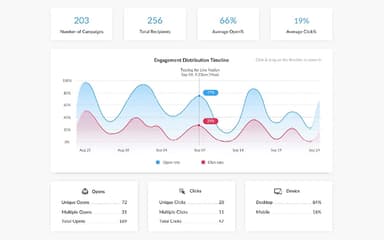
- Track opens, clicks, device type, and location from the analytics dashboard
Who Is ContactMonkey For?
ContactMonkey is well-suited for businesses across a wide range of industries and sectors, including:
- Food and beverage
- Retail
- Automotive
- Software as a Service (SaaS)
- Streaming technology
- Consumer electronics
ContactMonkey Use Cases
Based on our analysis of user reviews and ContactMonkey featuress, we have identified scenarios where this software is a good fit:
Global Organizations Reaching Employees In Multiple Languages Without Fragmenting Campaigns
ContactMonkey lets a single email display in up to four languages, with each recipient choosing their preferred version from a menu inside the email. This can work well for organizations translating HR policies or newsletters, since engagement is still tracked as one campaign instead of being split apart by language.
Retail And Warehouse Operators Reaching Frontline Staff Without Regular Email Access
A large share of frontline and field staff, such as warehouse or retail employees, rarely check a company inbox during their shift. ContactMonkey addresses this by extending internal messages beyond Outlook and Gmail to SMS. This way, time-sensitive updates can reach employees who are not sitting at a desk during the workday.
Communications Teams Consolidating Fragmented Design, Survey, And Reporting Tools
ContactMonkey combines an email builder, embedded surveys, and engagement analytics inside one platform connected to Outlook or Gmail. This makes it a strong fit for teams currently dealing with a separate design tool, a standalone survey platform, and manual reporting. That’s because ContactMonkey removes the need to move content and data between different systems.
Large Organizations Personalizing Company-Wide Updates For Different Employee Groups
Not every company announcement applies to every employee in the same way. This is where ContactMonkey's merge fields help communicators personalize a single send with details such as name, department, or location. So, one campaign can read as tailored to each recipient. This fits organizations that currently draft several versions of the same message for different teams.
Companies That Require Sign-Off Before Employee Emails Go Out
In regulated or larger organizations, a company-wide email often needs a second set of eyes, such as legal or a communications director, before it goes out. ContactMonkey's Approval Workflows let a sender submit a draft for review and route it to an approver, who can open the rendered email and approve or reject it without needing a ContactMonkey account.
Is ContactMonkey Right For You?
ContactMonkey is a strong fit for organizations that need to manage internal communications at scale, particularly those already working in Microsoft Outlook or Gmail. Its plans can scale from lean communications teams to enterprise environments, with segmentation, advanced analytics, HRIS integrations, global scheduling, and BI connections available as requirements become more complex.
Security is another consideration for larger organizations. ContactMonkey is SOC 2 Type 2 certified, supports GDPR requirements, and offers SSO through SAML 2.0 on its Enterprise plan. Its data is encrypted in transit and at rest, with AWS used for infrastructure.
Security is only one part of managing internal communications at scale. Organizations also need accurate employee data to ensure messages reach the right people as teams grow, employees change roles, or staff leave. ContactMonkey strengthened this area in May 2026, expanding its native HRIS integrations from six providers to 80+, including Workday, SAP SuccessFactors, BambooHR, ADP, UKG, and Rippling. The integrations can automatically sync employee data. This can help organizations keep audience lists current as employees join, change roles, or leave.
This makes ContactMonkey particularly suitable for mid-sized and enterprise organizations with frequently changing employee populations.
Still doubtful if ContactMonkey software is the right fit for you? Connect with us at (661) 384-7070 for further guidance.
ContactMonkey Features
Drag-and-Drop Email Builder
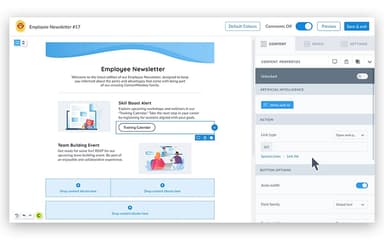
Email builder in ContactMonkey lets users create internal emails and newsletters. This can be done using drag-and-drop blocks, templates, reusable content, image editing tools, and desktop and mobile previews. It also supports AI-assisted content creation and real-time collaboration within email templates.
Audience Segmentation And Personalization
This feature group employees by department, seniority, geography, or custom lists. Users can then personalize content blocks for different groups and send targeted communications without having to create separate emails for every audience.
Employee Surveys And Feedback
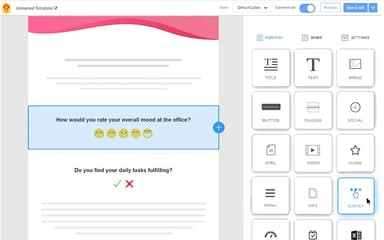
The built-in engagement tools allow users to add pulse surveys, eNPS surveys, custom polls, emoji reactions, star ratings, and comments to internal emails. Anonymous feedback and reusable survey templates are also available for different communication campaigns.
Bulk Email Sending At Scale
The software enables sending internal emails to thousands of employees at once, bypassing Outlook’s and Gmail’s recipient limits. This ensures fast, secure delivery directly from corporate inboxes while maintaining engagement and reliability.
Pages
This feature in ContactMonkey helps convert existing emails into branded and trackable web pages that can be hosted on the organization's own subdomain. Users can also create standalone pages for resources such as FAQ hubs, benefits guides, and policy documents. They can have views and unique visitors included alongside email analytics.
Pros And Cons of ContactMonkey
Pros
Makes internal newsletters easy to build
Turns email engagement into useful insights
Outlook integration fits existing workflows well
Templates make branded emails faster to create
Real-time read tracking helps gauge engagement
Cons
Large email lists can slow reporting
Formatting options can feel somewhat restrictive
Analytics sometimes require extra Excel work
ContactMonkey Pricing
Launch | Grow | Enterprise |
|---|---|---|
Custom Pricing | Custom Pricing | Custom Pricing |
|
|
|
Disclaimer: The pricing details were last updated on Sep 25, 2026 from the vendor's website. Please contact us for a tailored pricing list.
ContactMonkey Reviews
Total 26 reviews
4.2
All reviews are from verified customers
Rating Distribution
5
Stars54%
4
Stars23%
3
Stars12%
2
Stars8%
1
Stars4%
Share your experience
E-Learning, N/A employees
Less than a year
“Outlook integration is useless”
Pros
It was meant to work with desktop Outlook and it actually did for a few months before it suddenly stopped.
Cons
Now it barely works at all, keeps interfering with Outlook and has to be restarted constantly. It doesn't retain any data and even after being in touch with support for a month, nothing has been resolved. I paid for this product and at this point it feels completely useless.
Rating Distribution
Ease of use
1
Value for money
3
Customer Support
1
Functionality
3
Music, N/A employees
Less than 6 months
“Branding and tracking are fantastic”
Pros
Having separate templates for different kinds of communications has been a huge plus. I can customize everything and add branding so each message looks consistent, polished and official. Another feature I really appreciate is the tracking in ContactMonkey,it lets me see opens and sent emails which makes it much easier to understand how people are responding to my communications.
Cons
One thing that really bothers me is that if I log into another email account, it starts tracking that account too. For instance, if I check my personal email during lunch, I have to use an incognito window so it doesn't track that account as well. I'd much rather see it set up with account-by-account permissions instead of automatically accessing any email I sign into.
Rating Distribution
Ease of use
10
Value for money
10
Customer Support
9
Functionality
10
Writing and Editing, N/A employees
Free Trial
“So good”
Pros
Contact Monkey handled exactly what I needed and it was quick to pick up and use. It's also a popular choice among my friends and acquaintances who manage mailing lists, tracking and similar tasks.
Cons
Honestly I don't have any complaints. The only reason I stopped using it was because I needed to put my attention on my paying job instead of my side passion.
Rating Distribution
Ease of use
10
Value for money
10
Customer Support
10
Functionality
9
Frequently Asked Questions
Does ContactMonkey offer an API?
Yes, ContactMonkey offers an API.
Does ContactMonkey have a mobile app?
No, ContactMonkey does not offer a mobile app.
Who are the typical users of ContactMonkey?
ContactMonkey is well-suited for a wide range of industries and sectors, including food and beverage, retail, automotive, SaaS, streaming technology, and consumer electronics.
What other apps does ContactMonkey integrate with?
The platform integrates with several third-party applications and systems, including Outlook, BambooHR, Gmail, Lano, OpenAI, Microsoft Teams, and Microsoft SharePoint.
What level of support does ContactMonkey offer?
The platform provides support via ticket submission and help center.
What types of ContactMonkey price plans are available?
ContactMonkey costs $2,500/year for SMS Comms. However, its Launch, Grow, and Enterprise plans use custom pricing based on factors such as team size, sender seats, and recipient coverage. Contact us to request a personalized ContactMonkey cost quote based on your institution's requirements.
What language does ContactMonkey support?
The software offers multi-language email creation and translation capabilities, including English, French, German, and Chinese.