


Last Updated
Overview
Dialpad Meetings is an AI-powered video conferencing platform with real-time transcription and one-click joining to simplify collaboration. Though users may occasionally experience video quality fluctuations depending on internet stability, its high-definition audio and seamless browser-based experience make it a reliable, smart solution for modern business meetings without downloads.

Dialpad Meetings Specifications
- Real-Time Communication
- File Sharing & Management
- Integration with Other Tools
- Automation & Workflow
Dialpad Meetings Features
One-Click Meetings
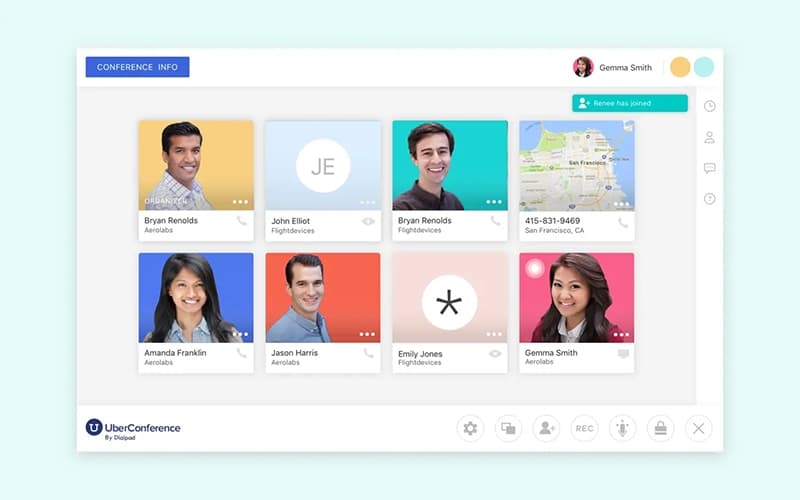
Dialpad Meetings allows users to join video conferences instantly from any browser or app with just a single click. This feature eliminates the need for downloads or PIN codes, streamlining the process for participants to connect effortlessly.
AI-Powered Productivity
With built-in artificial intelligence, the Dialpad Meetings features live transcription and automated call summaries. These tools help users focus on the conversation by capturing key points and action items in real-time, ensuring nothing is missed.
Unlimited Collaboration
Teams can enhance their workflow by sharing screens, whiteboarding ideas, and collaborating on files together within the meeting interface. This facilitates a more interactive and productive environment for brainstorming and project management.
Meeting Controls
Hosts are equipped with robust controls such as meeting lock, mute/unmute capabilities, and guest removal. These security features ensure that meetings remain private and orderly, giving organizers complete command over the session.
Post-Meeting Summaries
After a call ends, Dialpad Meetings automatically generates an email recap that includes transcripts, recordings, and action items. This ensures that all participants are aligned on the next steps and have easy access to the meeting's content.
Pros And Cons of Dialpad Meetings
Pros
Built-in AI provides real-time transcription and automated summaries
Delivers brilliant HD video quality with background noise reduction
Generous free plan allows unlimited meetings for small teams
Seamlessly switch active calls between desktop and mobile devices
Cons
New releases sometimes prolong project timelines
Extensive capabilities may initially overwhelm users
Dialpad Meetings Reviews
Total 50 reviews
4.4
All reviews are from verified customers
Rating Distribution
5
Stars60%
4
Stars30%
3
Stars4%
2
Stars4%
1
Stars2%
Share your experience
Anonymous
Not Specified, N/A employees
“AI recaps save time”
Pros
One feature I keep coming back to is Ghostwriter, the AI recaps and summaries tool. Instead of having to jot everything down manually, the itGPT-powered AI puts together a very accurate meeting summary for me. It automatically pulls out action items, like who is sending a proposal by Friday and also gives me a searchable transcript afterward. That alone cuts out around 10 to 15 minutes of admin work for every meeting which adds up quickly.
Cons
There are still some transcription misses with the Robotic feature. The AI does a great job overall but it is not flawless. It tends to have trouble with heavy accents, technical terminology or moments when multiple people are speaking at the same time. Every now and then, I have to go back and clean up parts of the automated summary because it misunderstood a product name or an industry-specific term.
Rating Distribution
Ease of use
10
Value for money
10
Customer Support
10
Functionality
9
Nick F.
Not Specified, N/A employees
“billing mess and broken calls”
Pros
Honestly I didn't find anything positive to take away. The technology felt clunky and unreliable, account management was a disaster and the call reporting was poor. There was also a noticeable lag when placing calls which led to customers hanging up. It ended up costing our outbound sales department thousands of dollars.
Cons
Dealing with their account management has been awful. We ended the contract correctly yet they still haven't been able to sort it out. We've been trying for more than six months to get a refund for charges they kept taking after cancellation. I would strongly advise against doing business with them because nothing seems to make them care.
Rating Distribution
Ease of use
1
Value for money
1
Customer Support
1
Functionality
1
Olga D.
Not Specified, N/A employees
“Reliable platform with a clean interface”
Pros
The platform has a really nice overall feel for me and the interface is easy to navigate. It's user-friendly and dependable most of the time which makes day-to-day use pretty comfortable.
Cons
Because our use case involved a lot of outbound lead calling, I really wish it had stronger predictive dialing to make that process more efficient.
Rating Distribution
Ease of use
8
Value for money
8
Customer Support
8
Functionality
7
Frequently Asked Questions
Does Dialpad Meetings have a mobile app?
Yes, Dialpad Meetings offers a mobile app.
What types of pricing plans does Dialpad Meetings offer?
Dialpad Meetings offers a Standard plan at $27/user/month, a Pro plan at $35/user/month, and an Enterprise plan with custom pricing. Contact us to get a Dialpad Meetings cost quote.
Does Dialpad Meetings offer an API?
Yes, Dialpad Meetings software offers an API.
What language does Dialpad Meetings support?
The platform supports multiple languages for its interface and offers real-time transcription in English, French, and Chinese.
What other apps does Dialpad Meetings integrate with?
Dialpad Meetings integrates with tools like Salesforce, Slack, Google Workspace, Microsoft Outlook, and Freshdesk.
What level of support does Dialpad Meetings offer?
Support includes a comprehensive Help Center and web support for all users, with phone support available for Business plan customers.
Who are the typical users of Dialpad Meetings?
Dialpad Meetings is ideal for remote and hybrid teams, sales and marketing professionals, HR and recruitment teams, customer support teams, small to mid-sized businesses, and consulting firms.