


Last Updated
Overview
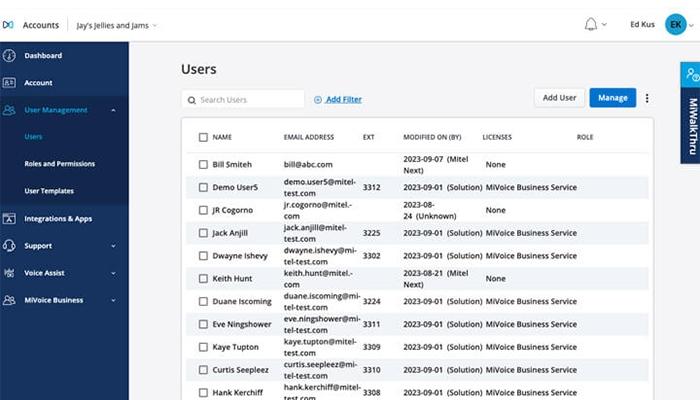
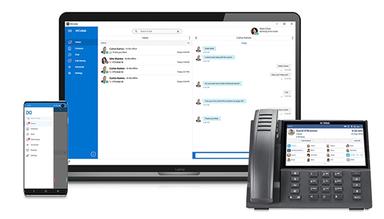
MiVoice Business software is designed to streamline business communications with exceptional flexibility and top-tier audio quality. While online training is limited, its fast installation ensures quick adoption without much hassle. This user-friendly platform supports remote work, mobile integration, and reliable call management, making it a solid choice for enterprises.
MiVoice Business Software Specifications
- Real-Time Communication
- File Sharing & Management
- Document Management
- Task & Project Management
What Is MiVoice Business Software?
Overview
MiVoice Business software caters to businesses of all sizes, providing a versatile communication platform that supports remote work, high-quality audio, and mobile app integration. It’s perfect for organizations seeking flexible, scalable solutions for collaboration and team communication. It comes with an easy setup, robust call features, and integration with IP phones. It ensures a seamless experience for enterprises aiming for efficient communication management.
MiVoice Business Software Pricing
MiVoice Business Software Integrations
MiVoice Business software has integration arrangements with over 60 different apps, such as:
- Zoom Workplace
- Salesforce Web CRM Connector
- Talkative
- Telia ACE
- Microsoft Dynamics CRM Connector
- Zendesk
- Red Box Quantify Recorder
Who Is MiVoice Business Software For?
MiVoice Business software is a tailor-made suite of solutions for various industries and sectors in:
- Education
- Field Services
- Financial Services
- Healthcare
- Hospitality
- Manufacturing
- Retail
Is MiVoice Business Software Right For You?
MiVoice Business software is ideal for businesses seeking reliable, flexible communication solutions. With features like seamless call routing, hot desking, and remote access, it supports teams of all sizes and enhances productivity. It offers easy installation and ensures quick adoption for smooth collaboration.
Still unsure whether MiVoice Business software is the right option? Call our professional customer support team at (661) 384-7070 for further assistance.
MiVoice Business Software Features
Single Number Reach
This essential feature empowers users to receive calls on several devices using a single phone number. It helps simplify communication and ensure that the user is always reachable.
Dynamic Extension
This feature allows calls to reach employees on any preferred device and ensures that users stay connected no matter where they are.
Hot Desking
MiVoice Business software offers this feature to help users access their settings from any phone within the organization. It is the perfect tool for allowing employees to log in and start working from any available desk.
Teleworker
Brings secure remote access to the company’s communication system, supporting seamless teleworking. It’s great for remote setups, giving employees the same access and functionality as if they were in the office.
Embedded Meet Me Conferencing
It offers efficient internal and external collaboration through built-in conferencing. It helps users easily set up conference calls for smooth communication between team members, partners, and clients, no matter where they are.
Pros And Cons of MiVoice Business Software
Pros
Fast installation and setup
Uptime up to 99.99% guaranteed
Reliable for remote call management
Cons
Setup requires significant configuration
Limited online training resources
MiVoice Business Software Reviews
Total 15 reviews
3.7
All reviews are from verified customers
Rating Distribution
5
Stars27%
4
Stars47%
3
Stars7%
2
Stars13%
1
Stars7%
Share your experience
Sylvain
Engineering, 51-100 employees
More than a year
“The ultimate solution for business telephony”
Pros
This is a versatile telephony solution: digital, analog and VoIP all together!
Cons
There are compatibility issues with certain products and equipment.
Rating Distribution
Ease of use
10
Value for money
8
Customer Support
10
Functionality
8
Zachary
Retail, 500+ employees
More than a year
“Good for basic functions”
Pros
After the initial setup, I find it very dependable with minimal downtime offering solutions for a variety of our needs.
Cons
The menus and setup can be challenging, with some areas being programmed differently than others within the same system.
Rating Distribution
Ease of use
7
Value for money
7
Customer Support
7
Functionality
7
Sammy
Transportation, 500+ employees
More than a year
“It's pretty easy to use”
Pros
It's convenient to connect with Outlook contacts in an easy way.
Cons
Occasionally the connection between outlook and Micollab needs to be reset in order to view contacts.
Rating Distribution
Ease of use
8
Value for money
8
Customer Support
8
Functionality
6
Frequently Asked Questions
Does MiVoice Business software offer an API?
Yes, MiVoice Business software provides API.
Does MiVoice Business software have a mobile app?
Yes, MiVoice Business software has a mobile app for Android and iOS users.
What language does MiVoice Business software support?
MiVoice Business software supports English, French, German, Dutch, Spanish, Swedish, Bulgarian, and Russian languages.
What other apps does MiVoice Business software integrate with?
MiVoice Business software integrates with a wide range of apps, including Zendesk, Talkative, Microsoft Dynamics CRM Connector, Zoom Workplace, Salesforce Web CRM Connector, Telia ACE, and Red Box Quantify Recorder.
What types of pricing plans does MiVoice Business software offer?
MiVoice Business software cost details are not available on its official website.
Who are the typical users of MiVoice Business software?
Organizations in the education, healthcare, financial services, hospitality, retail, manufacturing, and field services are typical users of MiVoice Business software.
What level of support does MiVoice Business software offer?
MiVoice Business software offers phone, live chat, email/helpdesk, FAQs/forums, and knowledge base support.