


WorkFlowy
Last Updated
Overview
WorkFlowy, a collaboration and productivity software, is designed around a minimalist, outline-based structure. Although the support may vary at times, it offers infinite nesting capability that allows for complex task breakdown with the lightning-fast quick capture feature. Furthermore, the ‘Kanban boards’ instantly visualize workflows, providing superior flexibility.
Be the first one to leave a review!
No review found

Starting Price
Free Forever
WorkFlowy Specifications
- File Sharing & Management
- Document Management
- Task & Project Management
- Calendar & Scheduling
What Is WorkFlowy?
WorkFlowy is a nested outlining platform that helps teams organize notes, tasks, and project information in one document. It lets a team share a specific part of an outline with chosen collaborators, who can view or edit that section without seeing the rest of the account. The person receiving the shared outline does not need a WorkFlowy account to open it. A single item can also be mirrored into more than one project, so it stays updated everywhere it's placed instead of being copied by hand.
Beyond this, the platform also includes ready-made templates for functions like engineering, product, and sales, so a team can start with a working structure instead of an empty page.
What Is WorkFlowy Best For?
One of the standout features of the WorkFlowy is ‘Mirrors’. It lets users display the same bullet in multiple locations, with edits automatically reflected across every instance. Teams can use this feature for tasks spanning multiple projects, shared checklists, or other information needed across different parts of the workspace. This removes the need to create and manually update separate copies of the same content.
How Much Does WorkFlowy Cost?
WavyFlowy price starts at $6.99/user/month, billed annually for WorkFlowy Teams plan. Notable features included in this plan are one-on-one team set up, auto backup to Dropbox, unlimited node creation, and unlimited file uploads. Pro plan costs $8.99/month (billed monthly). The vendor also offers a free Basic plan and a 7-day free trial of the Pro plan.
Besides these plans, the platform also provides free WorkFlowy Pro access for education.
In addition to the base fee, the users should also need to consider the following additional costs:
- API-Based Custom Integration Work: $300 to $1,500 one-time
- Zapier Subscription: $20 to $70/month
- Readwise Subscription: $8 to $10/month
Disclaimer: The pricing is subject to change.
WorkFlowy Integrations
WorkFlowy software supports integration with several third-party systems, including:
- Notion software
- Todoist
- YouTube
- Slack software
- Trello software
- Google Calendar
- Dropbox
How Does WorkFlowy Work?
Log in with your account to access the workspace and follow these steps to start organizing work:
- Create a new outline or open an existing one to begin structuring your work
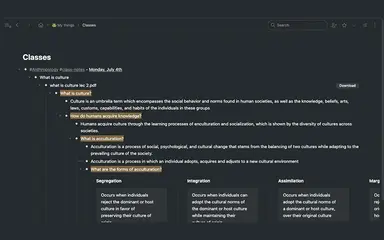
- Build nested lists by breaking a project down into tasks and subtasks under a single parent bullet
- Share specific branches with teammates and set view or edit permissions for each person
- Mention teammates using @ to notify them and bring their attention to specific items within a shared outline
- Convert task lists into boards or tables when a project calls for a different layout
- Set up mirrors to keep recurring items, such as a weekly agenda, synced across multiple projects
Who Is WorkFlowy For?
WorkFlowy serves businesses and professional teams across a range of industries, including:
- Education
- Real estate
- Non-profit
- Information technology
- Professional services
WorkFlowy Use Cases
Based on what we have analyzed from user feedback and WorkFlowy features, following are the key scenarios where this software is a good fit:
Businesses Coordinating A Shared Task Across Multiple Projects
A task that belongs to more than one project can end up duplicated across separate lists, with one copy falling behind as another gets updated. WorkFlowy’s Mirrors feature lets teams place the same task in multiple project locations, with edits reflected across every mirrored instance. Reviewers note that mirroring lets them maintain both a project view and a current view of the same item.
Organization Managing Recurring Sprint Cycles
WorkFlowy can organize company-wide and department-level sprint goals within a nested workspace, where teams can retain previous cycles alongside current priorities. This creates a running record as an organization moves from one sprint to the next. Users highlight the platform’s capability to track company-wide and department-level goals across sprint cycles.
IT Teams Organizing Notes Across Multiple Domains
IT Teams can use WorkFlowy to structure notes across related domains without separating each subject into an individual file. It helps users nest information under relevant areas and link related items when the same material applies to different topics. User reviews highlight its use for organizing cybersecurity notes and connecting tools and functionality with relevant security domains.
HR Teams Managing Work Across Different Planning Periods
WorkFlowy helps HR teams organize tasks according to different planning periods, such as weekly, biweekly, monthly, and long-term work. It moves items between categories as schedules or priorities change. Reviewers also mention its use for separating work across these planning periods and reorganizing tasks when needed.
Is WorkFlowy Right For You?
WorkFlowy is a practical option for businesses that need a workspace flexible enough to grow alongside their projects and information. Its nested structure lets teams add more projects, tasks, and information without creating separate files or folders.
Account security matters more as organizations move additional work into a shared space. WorkFlowy addresses this through Multi-Factor Authentication (MFA), which provides protection against unauthorized access.
The growing use of AI in workplace software has also brought greater regulatory attention to how data is processed by third-party providers. With new EU AI Act requirements taking effect in 2026, organizations need clearer visibility into which providers are involved in AI-powered services. WorkFlowy names OpenAI and Anthropic as the sub-processors behind its AI features. According to its AI terms, submitted data is used only to generate responses, and these providers are not authorized to use the data for model training or other secondary purposes.
Still doubtful if WorkFlowy is the right fit for you? Reach out at (661) 384-7070, and we'll help you make an informed decision.
WorkFlowy Features
Advanced Search
This feature filters information using text, tags, dates, formats, and search operators. A hierarchical search can further narrow results based on the content of ancestor nodes using the ‘>’ operator. As a WorkFlowy account grows, these options make it easier to locate a specific item without scrolling through the entire outline.
WorkFlowy AI
The platform includes three tools built into the outline: Chat with Your Notes, AI Nodes, and AI Quick Actions. Users can ask questions across their notes, summarize information, turn rough notes into structured drafts or outlines, and reorganize existing content. This cuts down on the manual work of searching through or restructuring a large collection of notes.
Boards
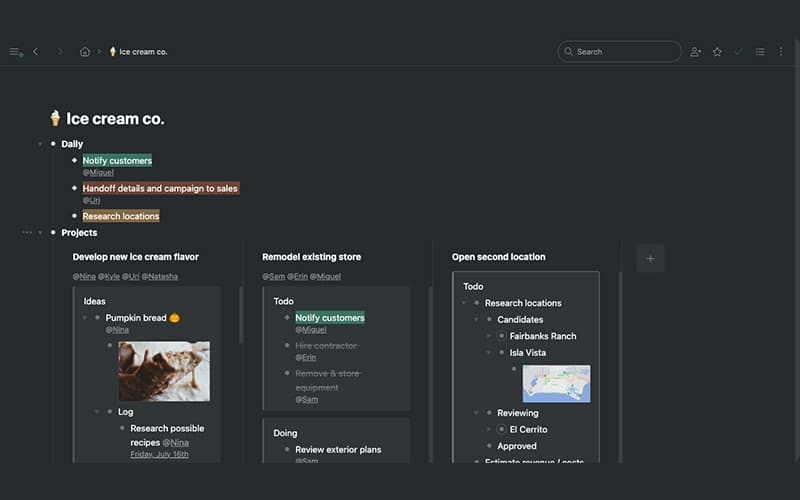
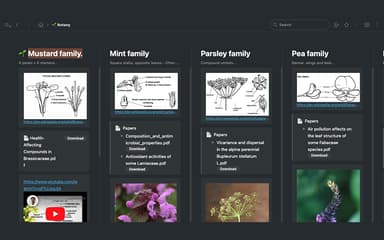
WorkFlowy turns a nested list into a Kanban-style layout, with the first level of nesting shown as columns and the items nested under each one shown as cards. Columns can be resized or moved, and cards can be dragged from one column to another as work progresses. Teams can use this layout for task stages, content calendars, or project pipelines, and the same list stays in outline form underneath the board view.
Links And Backlinks
The software connects related items within an outline or direct users to external web pages. Internal links can point to existing or newly created items. Backlinks show every location where a particular item has been referenced. It lets users follow these connections to move between related information. This makes projects, notes, and interconnected content easier to navigate.
Panes
This capability displays multiple parts of a WorkFlowy outline side by side within the same window. Each pane operates independently with its own search, navigation history, breadcrumbs, and scroll position. Users can view, edit, move, or reorganize items in one pane while keeping other sections open for reference or comparison.
Pros And Cons of WorkFlowy
Pros
Provides instant navigation with slash commands
Makes older notes easy to find
Handles complex projects efficiently
Offers strong search across growing workspaces
Maintains a useful long-term work history
Cons
Text formatting choices are somewhat limited
Large workspaces may load more slowly
Limited visual styling for differentiating content
WorkFlowy Pricing
Basic | WorkFlowy Teams | Pro |
|---|---|---|
Free Forever | $8.99 per month (billed monthly) | $6.99 per user per month (billed annually) |
|
|
|
Disclaimer: The pricing details were last updated on Sep 25, 2026 from the vendor's website. Please contact us for a tailored pricing list.
WorkFlowy Reviews

No reviews yet!
Be the first to review this product
Frequently Asked Questions
What language does WorkFlowy support?
The software is available in several languages such as English, French, Spanish, Korean, and Japanese.
What other apps does WorkFlowy integrate with?
The platform can integrate with different third-party sytems, such as Google Drive, Trello, YouTube, Google Contacts, Todoist, and Slack.
Who are the typical users of WorkFlowy?
Software is used by small businesses and professional groups such as designers, developers, freelancers, writers, researchers, and coaches.
Does WorkFlowy offer an API?
Yes. It offers an API.
What types of pricing plans does WorkFlowy offer?
WorkFlowy offers a free Basic plan, a Teams plan at $6.99/user/month (billed yearly), and a Pro plan ($8.99/month). Free Pro access is also available for verified faculty. Get a detailed WorkFlowy cost breakdown based on your specific requirements.
Does WorkFlowy have a mobile app?
Yes. WorkFlowy does have a dedicated mobile app for iOS and Android users.
What level of support does WorkFlowy offer?
WorkFlowy provides support via email, help center, guides, and knowledge base.