


Sage CRM
Last Updated
Key Takeaways
Generated from the text of customer reviews
Sage CRM is a cloud and on-premises sales CRM. Users value its ease of use and reporting tools, while some note that its visual design could be improved compared to newer alternatives. Recent updates include expanded security enhancements, application-server security controls, and platform support for Microsoft SQL Server 2025.
Our Verdict
Sage CRM is a good fit for organizations already running Sage 100, 300, 200, or X3, where the native integration can reduce the need to manually reconcile data between sales and finance. Pricing varies by region, deployment, and configuration, with current Sage pricing positioning toward small and midsized businesses. We recommend it specifically for Sage accounting customers that need a CRM connected directly to their financial data.
Sage CRM Specifications
- Contact Management
- Lead Management
- Opportunity Management
- Sales Forecasting
What Is Sage CRM?
Sage CRM is a customer relationship management platform that supports sales, marketing, and customer service activities. It can be used as an integrated CRM alongside Sage business management solutions or through individual Sales, Marketing, and Service modules, depending on regional availability. The platform manages customer information, sales opportunities, campaigns, service cases, workflows, reports, and dashboards.
What Is Sage CRM Best For?
Sage CRM stands out for its native integration with Sage 100. The integration is bidirectional: users can create quotes in Sage CRM using Sage 100 data such as pricing, item numbers, availability, and customer credit limits, while quotes and orders can be updated in Sage 100 through the integration. Sales users can also view payment history, credit status, invoices, and order status from CRM.
How Much Does Sage CRM Cost?
Sage CRM pricing starts at around €50 + VAT/month/user ($57.68 + VAT/month/user). The vendor also offers a 30-day free trial for users to test the platform before making any decisions. Actual costs, however, are customized and vary based on the region.
Beyond the subscription, estimated additional costs may include:
- Implementation - Budget $2,000–$10,000+ one-time for setup, accounting integration, data migration, customization, and user training
- Hidden Costs - Typically ranges from $0–$300+/user/year for third-party integrations, Outlook integration, and other add-ons beyond core licensing
- Other Costs - Roughly ranges from $0–$2,000+/year for ongoing administration, managed support, hosting, and configuration, depending on your setup
Users have mixed views on Sage CRM’s pricing. Some consider it reasonably priced for the functionality provided, while others find the overall cost higher than expected, particularly when factoring in support, training, implementation, and integration expenses.
Disclaimer: The pricing is subject to change.
Sage CRM Integrations
Sage CRM integrates with multiple third-party tools, including:
- Sage 100
- Sage 300 People
- Microsoft Exchange Online
- Mailchimp software
How Does Sage CRM Work?
Here is how you can access the platform and start managing customer relationships:
- Log in to Sage CRM via browser and navigate the dashboard showing pipeline status, at-risk customers, and sales forecasts
- Set up contact and company records, importing existing data via CSV or syncing from connected Sage accounting products where customer records already exist
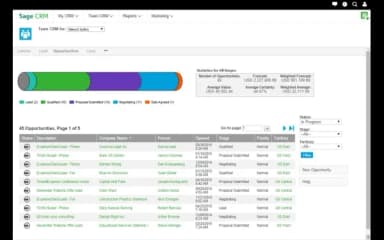
- Manage leads and opportunities through sales stages, with forecasting tools to track pipeline value
- Create quotes and orders in Sage CRM, including quotes based on existing opportunities
- Create marketing campaigns and connect Sage CRM with Mailchimp for email marketing
- Track customer service cases, SLAs, and resolutions using the service tools and knowledge base
- Create reports for sales, marketing, and service data using Sage CRM's reporting tools
- Integrate Sage CRM with Sage 100 to work with quotes, orders, payment history, invoices, and credit information
Who Is Sage CRM For?
The platform caters to the needs of several industries and sectors, including:
- Healthcare
- Manufacturing
- Financial services
- Hospitality
- Professional services
- Nonprofits
- Construction
Sage CRM Use Cases
Based on our analysis of Sage CRM's current capabilities and user feedback, here are scenarios where the platform tends to fit best:
Sage Accounting Customers That Need CRM Connected To Their Financial Data
Companies running Sage 100, 300, 200, or X3 for accounting face a recurring operational problem: sales reps work from CRM data, finance works from the accounting system, and the two need to be reconciled manually. Sage CRM's bidirectional integration reduces reconciliation as quotes pull product pricing; orders flow into accounts receivable on conversion, and reps can view payment status and order history from the CRM contact record.
SMBs Needing Both Cloud And On-Premise Deployment Options
Numerous CRM platforms in the SMB price range have moved to cloud-only delivery. Sage CRM features support for both cloud-hosted and on-premises deployment, which matters for organizations with data residency requirements, internal IT infrastructure, or regulatory constraints that make cloud hosting unsuitable. The on-premise option is available with a perpetual license model, giving organizations that prefer capital expenditure over recurring subscription fees as an alternative.
Sales And Service Teams That Need A Single Customer View Across Functions
Organizations where sales, marketing, and customer service operate with separate contact records — generating conflicting data and duplicate entries — benefit from Sage CRM's unified customer records. A service agent handling a support case can see the contact's open opportunities and orders, while simultaneously a sales rep can see whether a customer has an unresolved service case before a renewal call. This shared record access can reduce the need for inter-team queries before customer interactions.
Organizations With Non-Standard Approval Chains Or Data Capture Requirements
Some CRM platforms limit workflow configurations to no-code editors with fixed logic options. Sage CRM's workflow engine accepts SQL and JavaScript, so systems teams can build routing rules, approval chains, and data capture logic that support routing, approval, and data-capture requirements that require SQL or JavaScript configuration. Users cite this as a practical advantage for businesses whose operational processes fall outside standard CRM workflow templates.
Is Sage CRM Right For You?
If your organization runs Sage accounting and needs CRM connected to financial data without a third-party layer, Sage CRM is worth evaluating. The native bidirectional sync between CRM and Sage accounting products is the platform's clearest differentiator, and this integration makes Sage CRM relevant to businesses across industries, including ATEC Security.
Sage CRM provides guidance on GDPR considerations for organizations handling personal data and received a dedicated security and compatibility release in 2026 R1 covering infrastructure hardening and updated database platform support.
For growing organizations, Sage CRM's modular structure allows teams to add Sales, Marketing, or Service capabilities and expand to the full integrated suite without migrating to a different platform.
Still not sure about Sage CRM? Contact us at (661) 384-7070 and we can help you make an informed decision.
Sage CRM Features
Sales Force Automation
Sage CRM software's sales module covers lead and opportunity management, pipeline tracking, quote generation, and sales forecasting. Quotes created within Sage CRM pull pricing from the integrated Sage 100. In addition, configurable pipeline stages and weighted forecasting give sales managers a working view of pipeline health without manual report building.
Marketing Automation
The marketing module supports campaign creation, audience segmentation based on CRM contact data, email campaign execution through Mailchimp integration, and campaign performance tracking within the CRM. Contact lists can be built from existing customer and prospect records, with campaign activity (opens, clicks, and unsubscribes) logged against the originating contact record for follow-up by the sales team.
Customer Service Management
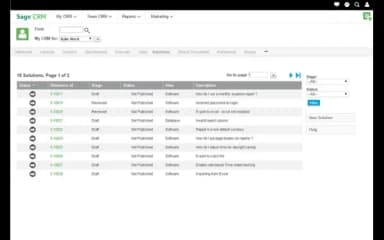
The service module tracks customer cases from opening through to resolution, with Service Level Agreement (SLA) monitoring, escalation rules, and a searchable knowledge base for recurring issue types. Service teams access the same contact record as sales, giving agents visibility into a customer's order history, open quotes, and previous interactions before handling a case.
Reporting And Dashboards
Pre-built and customizable reports cover sales pipeline performance, campaign results, service case volumes, and customer activity. Dashboard widgets display key metrics at the team and individual level, with at-risk customer views surfacing accounts that have not been contacted within a defined period. Data can be exported to Excel for analysis outside the platform.
Workflow Customization
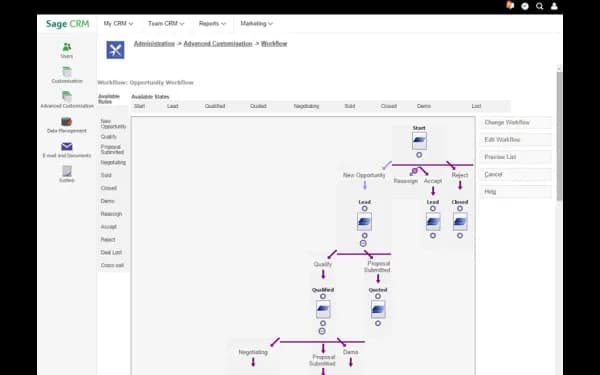
Workflow rules in Sage CRM can be configured using SQL and JavaScript. This allows systems administrators and integration teams to build routing logic, approval chains, automated notifications, and field update rules that match specific business processes.
Pros And Cons of Sage CRM
Pros
Shared document access helps keep teams aligned
Integrated accounting speeds up sales and supply operations
Market tools help target and reach customers easily
Cons
Billing features might need some improvement
Contracts module may lack subtotal displays
Sage CRM Reviews
Total 53 reviews
3.5
All reviews are from verified customers
Rating Distribution
5
Stars28%
4
Stars26%
3
Stars21%
2
Stars15%
1
Stars9%
Share your experience
Construction, 11-50 employees
Less than a year
“Excellent reporting tools!”
Pros
The reporting tools are absolutely first-rate, they've become indispensable for our team. We rely on them daily to dive deep into our key business operations, giving us the clear, detailed insights we need to make smart decisions and track our performance with precision
Cons
It feels a bit outdated to me compared to modern accounting software and training new team members on it can be challenging.
Rating Distribution
Ease of use
7
Value for money
10
Customer Support
10
Functionality
9
Marketing and Advertising, 500+ employees
More than a year
“constant performance updates”
Pros
Sage CRM platform is simple to use and constantly gets updates that improve its performance.
Cons
I feel like having the ability to sync directly with Outlook would be a really helpful feature.
Rating Distribution
Ease of use
8
Value for money
8
Customer Support
8
Functionality
7
Real Estate, 11-50 employees
More than a year
“An awkward interface that made management difficult”
Pros
Nothing much to say here as I always preferred other CRM systems over SAGE and was really eager for our company to switch to a different platform.
Cons
The interface felt awkward and managing my contact database was difficult too. Also manually sorting clients into different tiers based on their engagement level just to target active contacts became a repetitive chore.
Rating Distribution
Ease of use
2
Value for money
3
Customer Support
4
Functionality
4
Frequently Asked Questions
Does Sage CRM offer an API?
Yes, Sage CRM offers API access.
What language does Sage CRM support?
Sage CRM supports multiple languages, including English, French, German, and Spanish.
What other apps does Sage CRM integrate with?
Sage CRM integrates with Sage 100, Sage 300, Microsoft Exchange Online, and Mailchimp.
Does Sage CRM offer a mobile app?
No, Sage CRM doesn't offer a native mobile app.
How much does Sage CRM cost?
Sage CRM starts at €50 ($57.68) plus VAT/user/month. Pricing is customizable, and a 30-day free trial is available. Get in touch with us for a personalized Sage CRM cost estimate.
Who are the typical users of Sage CRM?
Sage CRM is used by professionals working across healthcare, manufacturing, financial services, hospitality, professional services, nonprofits, and construction.
What level of support does Sage CRM offer?
Sage CRM offers assisted support through live chat, along with Training, Community Hub, and Year-end Center resources. Sage also provides support via a help center and contact number.