



Last Updated
Overview
Hiver software is a Software as a Service (SaaS) application that improves collaboration within organizations through email management and multi-channel helpdesk. While it offers limited customization options for features like live chat icons, Hiver enables teams to share conversations and collaborate effectively on sales, support, hiring, project management, and operations.
Hiver Specifications
- Ticket Management
- Live Chat
- Omnichannel Support
- CRM Integration
Hiver Features
Omnichannel support
Bring every customer conversation across email, chat, Slack, voice, SMS, and social into one platform. Every interaction stays connected to the same customer record, so context carries across channels instead of starting over with every conversation.
Cross-team collaboration
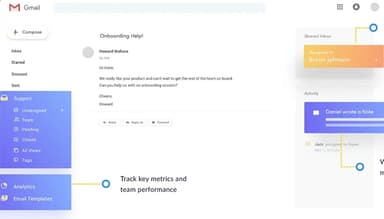
Resolve complex requests without losing context between teams. Hiver keeps conversation history, private notes, handoffs, and Slack discussions connected to the customer thread, so everyone involved works from the same picture.
Ticketing
Give every request clear ownership and structure, with status, priority, custom fields, queues, SLAs, and a complete history of every action. Teams can configure ticket fields and define SLAs in natural language, while built-in audit trails keep work accountable and reporting-ready.
AI Agents
AI Agents take customer requests from intent to resolution. They understand what the customer needs, gather relevant context, follow your team’s procedures, take actions across connected systems, and respond. They resolve requests autonomously and bring in your team when human judgment is needed.
AI Copilot
When a request needs a person, Copilot does the groundwork. It finds similar issues, gathers context, drafts replies in your team’s tone, recommends next steps, and takes directed actions, such as updating Salesforce or retrieving information from Confluence. Your team stays in control, reviewing and approving what goes out.
Self-updating help center
Turn every resolution into knowledge that compounds. Hiver AI turns resolved conversations into help center articles and flags existing content when it becomes outdated or conflicts with how your team actually resolves issues.
Integrations & Workflows
Connect the tools your team already uses and automate the work between them. Workflows route, assign, tag, triage, and escalate requests using conditions and data from your apps. Teams can build workflows, define triage rules, and trigger actions across connected systems using natural language.
Analytics
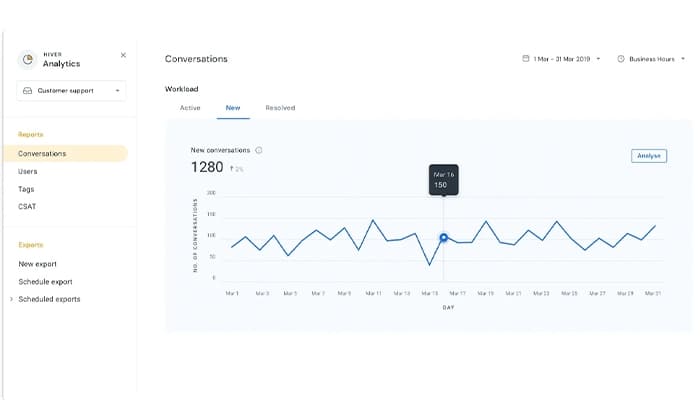
Reporting covers volume, response and resolution times, SLA attainment, and satisfaction, broken out by channel, team, and individual. It also tracks quality and customer health, and surfaces trends across conversations. Your team can query the data in natural language, inside Hiver or through MCP.
Customer Intelligence
Build a living understanding of every customer account. Hiver brings together conversations, CRM data, product usage, and calls to continuously assess health, sentiment, and churn risk. Ask AI answers deeper questions about each account, while AI Agents and your team use that intelligence to make every interaction more informed, relevant, and personal.
Pros And Cons of Hiver
Pros
Seamlessly tag emails and route them
Useful email templates and a knowledge base feature
Intuitive design that requires little training for team members
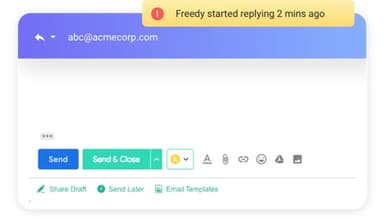
Real-time notifications prevent duplication of the same email
Cons
Lack of customization options for features like live chat icons, according to some software users
Only one person can be assigned to an email, which can be a drawback for collaborative tasks
Hiver Reviews
Total 18 reviews
4.7
All reviews are from verified customers
Rating Distribution
5
Stars72%
4
Stars28%
3
Stars0%
2
Stars0%
1
Stars0%
Share your experience
Utility, 11-50 employees
More than a year
“An old user and a happy one”
Pros
Hiver has really made a difference in how we work together. The integration with Google Workspace is seamless and the shared labels and mailboxes make it easy for our team to find emails based on our workflow setup. The analytics for shared mailboxes give us useful insights, which help us optimize our processes and improve accountability across the company. We have been using Hiver for 6 to 7 years and we're really happy with it. Whenever we have issues, their support is available timely and they never brush off our concerns. Every employee in our company uses Hiver.
Cons
Usually, it's pretty easy to find things to complain about with any app but with Hiver, I honestly can't think of anything that really bothers me with how we use it.
Rating Distribution
Ease of use
10
Value for money
10
Customer Support
10
Functionality
10
IT, 500+ employees
Less than a year
“A bit pricey, yet very effective”
Pros
I love the automation, analytics and ticket management features as they really help me keep everything running smoothly.
Cons
The auto-assignment feature could be better, and I would love to be able to download analytics reports by tag count. Also, the pricing could be a bit more reasonable.
Rating Distribution
Ease of use
10
Value for money
8
Customer Support
10
Functionality
9
IT, 101-500 employees
Less than a year
“Hiver is the best budget-friendly email tool”
Pros
The way it helps us distribute work and provides easy access to AI-based analysis for the team is great.
Cons
Automated rules are not available on the basic plan, and that causes a bit of an issue for us sometimes.
Rating Distribution
Ease of use
9
Value for money
7
Customer Support
10
Functionality
8
Frequently Asked Questions
Does Hiver software offer a mobile app?
Yes, Hiver software offers a mobile app for iOS and Android devices.
What level of support does Hiver software offer?
Hiver software provides support through phone, a 24/7 live representative, chat, email/help desk, FAQs/forums, and a knowledge base.
How is Hiver different from Zendesk or Freshdesk?
Zendesk and Freshdesk weren’t built for the AI era. Most of the AI capabilities these platforms offer work for simple support and FAQ deflection. Anything complex falls back to your team. Hiver was built with agentic AI at the center, not bolted on through acquisitions but embedded in how teams work. It resolves complex requests end to end, and hands off to a human with full context when one is needed. It assists your team, ensures quality, surfaces insights, and gets sharper over time.
What is Hiver?
Hiver is the agentic omnichannel customer service platform built for teams to manage complex support with AI Agents, cross-team collaboration, workflows, and ticketing. More than 10,000 teams, including Flexport, Gusto, Ping Identity, and Epic Games, trust Hiver to deliver support that wins customers for life.
What products does Hiver offer?
Hiver comes in two products: Hiver Omni is a dedicated omnichannel platform, and Hiver in Gmail runs inside your inbox. Hiver Omni brings every customer conversation across email, chat, Slack, voice, SMS, and social into one platform. Every interaction stays connected to the same customer record, so context carries across channels instead of starting over with every conversation.