


Tikit
Last Updated
Overview
Tikit is an ITSM platform that provides native integration with Microsoft Cloud, enabling effortless, conversational ticketing directly in Microsoft Teams. Despite some user feedback around the bot's card-based reply flow, the platform's automation capabilities and highly responsive customer support make it a compelling solution.
Overall Rating
Based on 3 users reviews
5
Rating Distribution
Positive
100%
Neutral
0%
Negative
0%
Starting Price
$26
per agent per month
Tikit Specifications
- Live Chat
- Omnichannel Support
- Analytics And Reporting
- Customer Feedback Surveys
Tikit Features
Automated Workflows
Tikit software simplifies IT operations, such as employee onboarding and offboarding, by leveraging native connections with Power Automate. It automates redundant tasks, such as user creation in Entra, saving time and mitigating human error. IT teams can also provision and manage Azure infrastructure efficiently using Logic Apps.
Convenient Ticket Creation
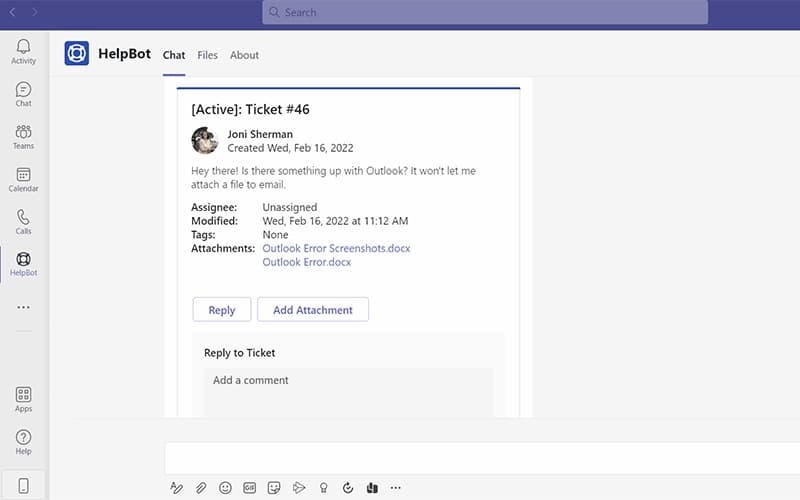
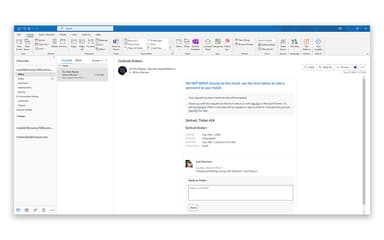
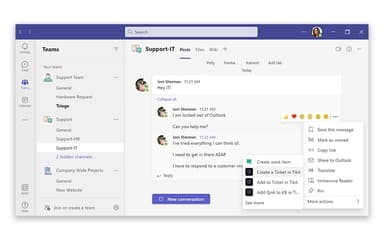
This functionality enables users and agents to create actionable, trackable tickets directly from Microsoft Teams chats with a simple right-click. It also includes seamless integration with Microsoft Outlook, enabling effortless ticket submission and updates directly through email.
Dedicated Web Portals
Tikit features distinct web portals for agents and end users, providing clear role separation and safeguarding privacy. The agent portal functions as a centralized hub for managing tickets, knowledge base content, automations, and lifecycles. Conversely, the end-user portal ensures a seamless experience for submitting new requests, tracking the status of existing issues, and engaging with support.
Create Custom Forms
The platform empowers agents to gather essential, high-quality information during the initial service request intake process. Using Tikit’s custom forms, agents can proactively ask follow-up questions to secure all necessary details.
Affected Users And Collaborators
This feature enhances transparency and collaboration by allowing multiple requestors and assignees to be included on any ticket. By involving key stakeholders and explicitly identifying affected collaborators in the support process, faster resolution times are achieved. The software ensures that everyone remains informed and engaged, allowing issues to be addressed efficiently without anyone being overlooked.
AI-Powered Virtual Agent
Tikit's Virtual Agent is a Teams bot dedicated exclusively to end users. It handles service request submissions, incident reporting, and knowledge retrieval through conversational chat without routing users to an agent first. IT teams can customize their name and appearance, and it connects directly to the AI-powered service catalog for structured request handling.
AI-Powered Ticket Deflection
Powered by Azure OpenAI, Tikit intercepts incoming requests before they reach the queue. It matches user questions against prepared Knowledge Base (KB) articles or uploaded organizational documents and delivers answers automatically. If the response resolves the issue, no ticket is created. This reduces repetitive ticket volume and frees agents to handle requests that genuinely require human attention.
Pros And Cons of Tikit
Pros
Easy tweaks speed up customization
Better tracking boosts efficiency
Supports quick learning
Cons
Limited replies reduce consistency
Escalation settings need improvement, as urgent tickets are not easy to prioritize
Tikit Pricing
Microsoft Teams Ticketing | Microsoft 365 Service Desk | Microsoft 365 ITSM |
|---|---|---|
$26/agent/month | $39/agent/month | $49/agent/month |
|
|
|
Disclaimer: The pricing details were last updated on Sep 16, 2026 from the vendor's website. Please contact us for a tailored pricing list.
Tikit Reviews
Total 3 reviews
5
All reviews are from verified customers
Rating Distribution
5
Stars100%
4
Stars0%
3
Stars0%
2
Stars0%
1
Stars0%
Share your experience
Real Estate, 51-100 employees
Less than 6 months
“smooth Teams integration”
Pros
It connects with Microsoft Teams effortlessly and the software itself is very simple to use. Setting everything up and configuring the program is also simple and hassle-free.
Cons
Even after using this program for quite a while and becoming very familiar with it, I really haven't come across any features I dislike.
Rating Distribution
Ease of use
10
Value for money
10
Customer Support
10
Functionality
8
Wholesale, 51-100 employees
Less than 6 months
“Fantastic value and fast rollout”
Pros
Getting it up and running took hardly any time at all. The live Teams support was readily available and even encouraged so we could see exactly how to use the platform and the help we received was excellent. The video tutorials are brief, clear and easy to revisit later when needed. For the price, it fit comfortably within our budget and the value was so strong that we upgraded to the top package within an hour of onboarding. The default setup was ready to use right away and making adjustments is simple when customization is needed. At this point, I honestly think of Tikit as my desktop support employee.
Cons
At times, the full comments or ticket attachments do not show up in the Teams app so I need to switch over to the web app. I already prefer using the web app so it is not a major issue for me but having that available in Teams as well would definitely be useful.
Rating Distribution
Ease of use
10
Value for money
9
Customer Support
8
Functionality
10
Small Business, 11-50 employees
“real-time outreach with Salesforce”
Pros
Being able to reach leads in real time especially with the deep Salesforce integration, has been a huge advantage.
Cons
My only wish is that they still offered their Powerdialer product because it was amazing.
Rating Distribution
Ease of use
10
Value for money
9
Customer Support
10
Functionality
10
Frequently Asked Questions
What language does Tikit support?
Tikit supports seven languages, including English, German, and Spanish.
Does Tikit offer an API?
Yes, Tikit offers an API.
Who are the typical users of Tikit?
Typical users of Tikit include professionals working in marketing, information technology, software development, human resources, and accounting industries and sectors.
What other apps does Tikit integrate with?
Tikit integrates with DocuSign, Asana, Entra, Airtable, Intune, Microsoft Teams, and Microsoft PowerBI.
What types of pricing plans does Tikit offer?
The software has three pricing plans that are billed annually: Microsoft Teams Ticketing at $26/agent/month, Microsoft 365 Service Desk at $39/agent/month, and Microsoft 365 ITSM at $49/agent/month. Get a custom Tikit cost today.
What level of support does Tikit offer?
Tikit provides online chat, a help portal, email, and phone support.
Does Tikit have a mobile app?
While Tikit does not offer a dedicated mobile app, it is compatible with both Teams on iOS and Android.