


Vanta
Last Updated
Key Takeaways
Generated from the text of customer reviews
Vanta gives security and compliance teams one place to manage their compliance tasks and prepare for audits. It can be a good fit for growing companies that want a clearer way to handle security and compliance. Users like how easy it is to use and how much time it can save, though some say getting everything set up can be difficult. Vanta now lets upload up to 30 policy, control, or custom framework files at once, while its AI agent builds the framework and automatically maps documentation.
Our Verdict
Vanta is a good choice for growing and larger companies that have to keep up with compliance and risk requirements. It makes the most sense for teams working toward certifications or dealing with several regulations at once. Since Vanta does not list fixed prices, smaller companies may find the cost harder to justify. For teams with more compliance work to manage, though, the software can be worth the expense. We recommend Vanta for companies looking for a compliance tool they can use as their needs grow.
Be the first one to leave a review!
No review found

Starting Price
Custom Pricing
Vanta Specifications
- Data Encryption
- Multi-Factor Authentication
- Security Audits and Reporting
- Vulnerability Management
What Is Vanta?
Vanta is compliance and trust management software that helps businesses meet security and privacy requirements. It addresses the growing amount of compliance work that comes with taking on more standards, going through audits, and responding to customer security requests. Vanta puts compliance tasks in one place, so teams can see what needs to be done and which evidence is required. It works with both established and custom frameworks, allowing businesses to manage their compliance program as their requirements change.
What Is Vanta Best For?
Agentic Onboarding is one of Vanta’s main features for moving an existing compliance program into the software. Teams can upload their policy and control files, and the Agent reviews them, creates the relevant policies or controls, and recommends mappings. This means compliance teams do not have to start over with their documentation and can bring their existing work into a more organized compliance program with less effort.
How Much Does Vanta Cost?
Vanta pricing is estimated to start at around $7,500–$11,500/year for smaller organizations, while larger deployments can reach $30,000–$80,000/year. Vanta currently offers four plans with custom pricing:
- Essentials
- Plus
- Professional
- Enterprise
Final costs may depend on additional costs such as:
- Compliance Audit: $7,000–$20,000+/SOC 2 audit, depending on the company’s size, scope, and type of audit
- Implementation And Consulting: $2,000–$36,000+ for setup, policy development, gap remediation, and compliance guidance
- Additional Compliance Frameworks: $5,000–$15,000+/year is a reasonable industry estimate for adding another framework, such as ISO 27001
- Third-Party Risk Management: Some vendor-management features are sold as add-ons, so that additional quote-based costs may apply
Users say Vanta can cut down the time spent on compliance work. Cost is one of the common complaints, especially among smaller companies. The price can be harder to justify when add-ons and separate audit costs are included.
Disclaimer: Pricing references are based on publicly available third-party information and industry benchmarks. Actual costs may vary.
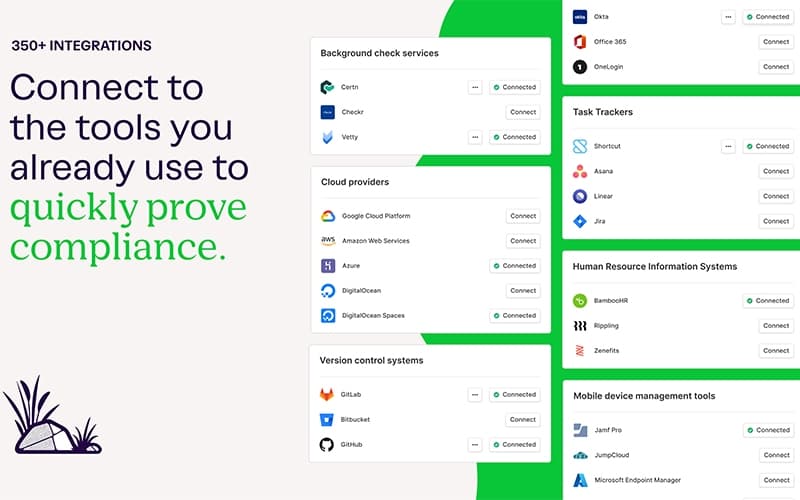
Vanta Integrations
The software supports integration with different platforms, including:
How Does Vanta Work?
Vanta starts with choosing a compliance framework and setting its scope. You then connect the systems Vanta needs to collect evidence and check controls:
- Log in to your Vanta account and open your organization’s workspace
- Choose the security or privacy framework you need to follow and set its scope
- Connect your cloud, identity, HR, development, and other systems so Vanta can collect the relevant evidence
- Add your policies and controls. You can create new ones or import existing files. Vanta’s Agent can review those files and suggest mappings
- Review your controls and tests and fix items that are missing or have failed
- Prepare for an audit by setting the scope, handling evidence requests, reviewing the evidence, and giving the auditor the required access
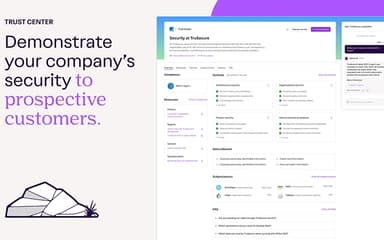
- Share relevant compliance information through the Trust Center when needed
Who Is Vanta For?
Vanta is used by companies ranging from startups to large enterprises. Its users also include businesses in regulated fields such as:
- Insurance
- Healthcare
- Marketing
- Fintech
- Healthcare
Vanta Use Cases
Based on our review of Vanta’s capabilities, these are the main situations where the tool may be a fit:
Startups Working Toward Their First SOC 2
For an early-stage company pursuing its first SOC 2, building the required compliance program can take attention away from product and growth work. Vanta provides a starting point for managing the policies, evidence, and other requirements involved in the certification process. This can be particularly useful for smaller teams that do not have a large compliance function.
Companies Facing Frequent Customer Security Reviews
Enterprise deals can slow down when prospects ask for detailed information about a company’s security practices before signing. Rather than handling every request as a separate project, teams keep their compliance information in Vanta and use it when customers ask about security. This makes it useful for B2B companies where security reviews are a regular part of the sales process.
Organizations Taking On Additional Compliance Requirements
A company may start with one compliance standard and later need to meet others as it grows, takes on new customers, or faces additional regulatory obligations. Vanta allows teams to manage requirements from different frameworks within the same compliance program. This can be useful for organizations moving beyond a single certification and dealing with several sets of requirements at once.
Security Teams Managing Recurring Audits
Regular audits can put pressure on security teams when documentation and evidence have to be collected each time an assessment begins. Vanta keeps compliance work in place between audits, giving teams a way to address outstanding requirements before the next assessment. This suits organizations that need to keep their compliance work up to date throughout the year rather than focus on it only when an audit is approaching.
B2B Companies Using Compliance To Build Customer Trust
Security documentation often becomes part of the buying process when B2B customers evaluate a vendor. Vanta lets companies make relevant compliance information available to prospects while continuing to manage the underlying program. For businesses that regularly face security reviews, this can make customer assurance part of an ongoing process rather than something handled separately for each prospect.
Is Vanta Right For You?
Vanta is suited to growing organizations where compliance and security requirements are likely to increase over time. Its customer base includes GitHub, Snowflake, Perforce, and DocGo, showing that the software is also used by larger organizations with more complex compliance programs. Vanta holds SOC 2 Type II and ISO 27001 certifications as well. For smaller businesses with one simple compliance requirement, the wider scope of the software may be more than they need.
Still doubtful if Vanta is the right fit for you? Get in touch at (661) 384-7070, and we will help you make an informed decision.
Vanta Features
Automated Compliance
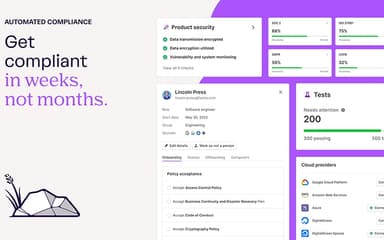
Vanta collects security evidence from connected systems and checks it against the requirements of selected frameworks. It supports more than 35 frameworks and handles parts of the work involved in maintaining compliance. Teams can also manage policies, controls, and related compliance tasks within Vanta.
Third Party Risk Management
The tool lets teams assess vendors and keep records of third-party security risks. It can review information from SOC 2 reports, DPAs, and security questionnaires as part of vendor assessments. Teams can request evidence and record decisions about vendor risk.
Questionnaire Automation
Vanta uses previous responses and uploaded documents to help answer security questionnaires. Teams can reuse information stored in its knowledge base and update answers when company details change. The tool supports questionnaires in forms and supports third-party portals.
Report Center
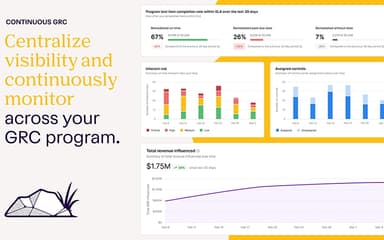
The Report Center brings compliance and risk information into one view. Users can create reports for different stakeholders and select the information they want to include. Security and compliance teams can use these reports to review program status and share updates internally.
Access Reviews
Vanta features a way to review employee access to connected systems. Teams can check account details, identify permissions that require attention, and follow up when access changes. The access view also covers service accounts, external users, and MFA status.
Pros And Cons of Vanta
Pros
Easy-to-navigate interface simplifies day-to-day compliance work
Wide integration support connects common business systems
Automated workflows reduce time spent on compliance tasks
Audit preparation requires less coordination across teams
Centralized compliance records make information easier to find
Cons
Some workflows may feel restrictive for complex requirements
Less common tools may not have a direct integration
Certain tasks may still require manual follow-up
Vanta Pricing
Essentials | Plus | Professional | Enterprise |
|---|---|---|---|
Custom Pricing | Custom Pricing | Custom Pricing | Custom Pricing |
|
|
|
|
Disclaimer: The pricing details were last updated on Sep 25, 2026 from the vendor's website. Please contact us for a tailored pricing list.
Vanta Reviews

No reviews yet!
Be the first to review this product
Frequently Asked Questions
Does Vanta offer an API?
Yes, Vanta provides an API for connecting with other systems and building custom workflows.
What level of support does Vanta offer?
Vanta provides support through its Help Center, Vanta Academy, community forum, and live chat.
Does Vanta have a mobile app?
No, Vanta does not currently offer a mobile app.
Who are the typical users of Vanta?
Vanta software is used by startups as well as established organizations with security, compliance, and GRC requirements.
What types of pricing plans does Vanta offer?
Vanta’s pricing is estimated at around $7,500–$11,500/year for smaller organizations and can reach $30,000–$80,000/year for larger deployments. Vanta currently offers four plans, with pricing based on a custom quote: Essentials, Plus, Professional, and Enterprise. You can request a Vanta cost quote for your business.
What languages does Vanta support?
Vanta supports English, Spanish, German, French, Portuguese, Japanese, and Korean.
What other apps does Vanta integrate with?
Vanta integrates with apps such as Jira, Aha! software, 360Learning, and Okta.