



Last Updated
Key Takeaways
Generated from the text of customer reviews
DentiMax is dental practice management software for clinicians, front-desk staff, and billing teams. While most users value its centralized records and day-to-day practice coverage, some frequently cite Windows-only access as a limitation. Recently, DentiMax has announced integration with three more platforms, including Mango Voice, Marea, and Gusto.
Our Verdict
DentiMax is a practical option for small and midsize dental practices coordinating ongoing patient care and insurance payments. While entry-level pricing is relatively low, migration and service charges can increase the total cost. We recommend it for practices seeking a shared system for daily operations, with deployment options based on their existing equipment and budget.
Overall Rating
Based on 81 users reviews
4.5
Rating Distribution
Positive
89%
Neutral
7%
Negative
4%
Starting Price
$169
per month
DentiMax Specifications
- Appointment Management/Scheduling
- e-Prescriptions
- Billing and Invoicing
- Claims Management
What Is DentiMax Software?
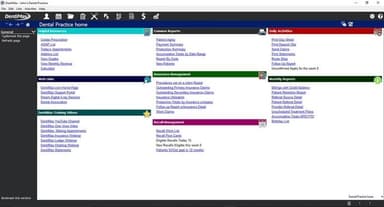
DentiMax is dental practice management software that helps manage the clinical and administrative work that goes into running an office. It includes tools for scheduling appointments, billing, charting, reporting, and messaging patients. The software also offers imaging tools to capture and view dental X-rays. Its open imaging system supports a wide range of existing hardware, including dental sensors, phosphor plate scanners, intraoral cameras, and digital panoramic and cephalometric units.
What Is DentiMax Software Best For?
The platform stands out for its ‘Dental ‘Billing’ tool that brings insurance billing and patient account management into one workflow. Using this capability, dental billing teams can create claims, check attachment requirements, and follow up on outstanding insurance balances without leaving the software. The line-item breakdown shows staff how payments and adjustments contribute to each patient’s balance. Teams can also use DentiMax to review overdue accounts, send statements with online payment options, and arrange payment plans for different treatments.
How Much Does DentiMax Software Cost?
DentiMax software price starts at $169/month for its DentiMax In-Office plan under Server-Based solutions. It includes multiple features, including a treatment planning module, DentiMax Document Center, integrated credit card processing, and unlimited support. Another plan called ‘Ultimate Bundle’ costing $358/month is also available.
The vendor also offers the following plans for ‘Flow’, its web-based software:
- Core: $499/month
- Executive: $699/month
- Unlimited: $899/month
A free trial is also available. However, additional fees may apply to Flow module plans if the number of users exceeds five. Besides the base subscription cost, it is recommended for buyers to factor in the following potential additional costs:
- Data Conversion: $1,500 (one-time) to migrate records from a previous system into Flow or the cloud plans
- Extra Users: $49/user/month beyond the 5 included users on Flow and Cloud plans
- Credit Card Processing: 2.9% of each transaction
- eRx Licenses: $35/provider/month for plans that don't include it
- eClaims And Clearinghouse: $99/month for Flow Core, In-Office, and Cloud Core, which don't include the eClaims bundle
- Backup And IT Support: $250/month
- Sensor Accessories: $199.00; Complete Bite Block Kit, $67.99-$119.99
Disclaimer: The pricing is subject to change.
DentiMax Software Integrations
DentiMax software integrates with several third-party apps, including:
- Dental R.A.T
- SolutionReach
- Intiveo
- Demand Force
- Dragon
- Incept Medical, LLC
How Does DentiMax Software Work?
Log in to the system and follow these steps to start using DentiMax:
- Create patient records using digital registration forms to collect personal information and health history
- Schedule appointments by provider, operatory, or location, and set up patient reminders
- Verify insurance eligibility before the visit and store coverage details where available
- Record clinical findings in the patient chart, add visit notes, and prepare treatment options for discussion
- Create insurance claims after treatment and check the required attachments before submission
- Review payments and adjustments, send patient statements, and arrange payment plans when needed
- Track outstanding claims and overdue balances, then review reports to monitor production and unscheduled treatment
Who Is DentiMax Software For?
The software is designed for various dental care providers and organizations, including:
- General dental practices
- Orthodontic practices
- Dental implant practices
- Multi-location dental groups
- Dental service organizations
- Dental schools
DentiMax Software Use Cases
After analyzing DentiMax software features and user feedback, we have identified the following scenarios where it is well suited to dental practice workflows:
Insurance-Heavy Practices Following Up On Unpaid Claims
When insurance payments are delayed, billing staff need to distinguish claims that are still outstanding from those that have already been resolved. DentiMax’s Insurance Aging Drill Down screen lets them check outstanding balances and claim status without leaving the software. Practices with a steady volume of insurance billing can use this view to organize follow-up and decide which claims need attention first.
Practices Managing Orthodontic And Implant Payment Plans
Treatment for braces or dental implants can stretch over several months, with patients returning for multiple visits along the way. Staff can refer to each patient’s account history in DentiMax to review past payments and outstanding balances at each appointment. This helps them continue financial discussions as treatment progresses.
Busy Dental Offices Handling Last-Minute Schedule Changes
A clinician’s unexpected absence can leave the front desk scrambling to rearrange appointments and find new time slots for affected patients. Using DentiMax’s scheduling tools, staff can adjust the day’s bookings and coordinate changes across the practice. This gives the team a practical way to reorganize the affected schedule.
General Dental Practices Discussing Treatment Alternatives
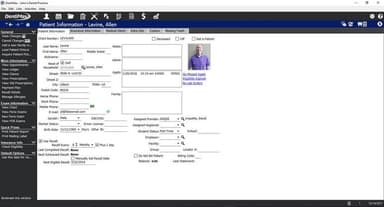
DentiMax supports consultations involving several possible treatment approaches. A dentist can prepare named treatment cases, arrange the procedures within each, and present the alternatives to the patient. When the patient returns to discuss their decision, clinical notes and tooth history provide context for continuing the conversation. Users report that DentiMax keeps records organized, accessible, and centralized.
Is DentiMax Software Right For You?
DentiMax may suit dental practices that want to manage scheduling, charting, treatment planning, billing, and patient communication in one system. Practices should compare its server-based and cloud-based Flow options based on their size, existing equipment, and need for remote access. Offices that prefer working on their own local systems may consider the server-based version, while those that need browser-based access may prefer Flow.
For practices that need control over staff access, DentiMax offers user security levels that restrict who can create, edit, or delete transactions, along with audit reports for reviewing changes. These controls support internal oversight, while its application terms include a HIPAA Business Associate Agreement addressing protected health information safeguards.
A relevant regulatory development is the July 2025 requirement for ICD-10 diagnosis codes on Medicare dental claims. DentiMax supports this workflow by adding diagnosis codes to procedures and carrying them onto claims, making it relevant to practices billing Medicare-covered dental services.
Still doubtful if DentiMax software is the right fit for you? Connect with us at (661) 384-7070 for further guidance.
DentiMax Features
Scheduling
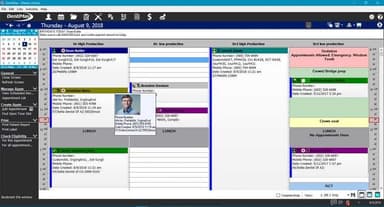
DentiMax lets staff view appointments by provider, operatory, or location. If a clinician is absent, they can copy or move an entire appointment column to rearrange bookings. Teams can also create daily schedule templates and automate setup for frequently scheduled procedures.
Automated Reminders
DentiMax sends automated appointment reminders by text, email, or voice call. Practices can use these messages to remind patients about upcoming visits without contacting each person manually. This supports routine appointment communication and may help reduce missed visits.
Realtime Insurance Verification
The platform offers real-time insurance eligibility verification with its Executive and Unlimited plans. Staff can check whether a patient's insurance plan is active before treatment begins. Where available, Dentimax software also retrieves coverage details and benefit summaries, which can be stored for future reference.
Digital Patient Registration
Patients can enter their information online through the cloud or electronically at the practice using DentiMax. These two registration options let offices collect patient details online or directly at the practice. They also reduce the need for staff to transcribe information from paper forms.
Patient Charting
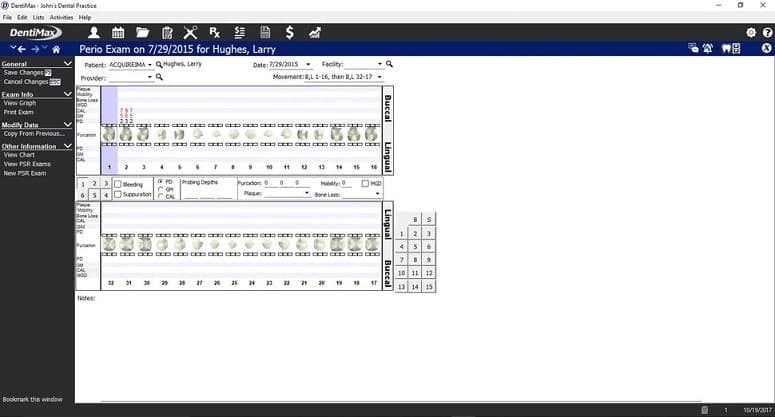
This feature provides customizable quick buttons for recording clinical findings. It lets staff adapt these shortcuts to the charting entries they use regularly. For periodontal charting, Dentimax supports foot pedal and voice-activated options that allow a team member to enter findings without assistance from another person.
Automated Clinical Notes
Clinicians can use DentiMax's note templates to avoid repeatedly typing common entries. They can filter saved notes by tooth number or user when reviewing a patient’s record. Note filtering helps staff locate relevant entries and review the treatment history of a particular tooth.
Referral Tracking
DentiMax records both incoming patient referrals and referrals sent to other providers. Staff can set a due-back date for patients expected to return after outside treatment. The due-back date helps staff identify when patients are expected to return and follow up on continuing care.
Pros And Cons of DentiMax
Pros
Keeps patient records, images, and appointments together for easier access
Helps staff manage daily tasks by bringing scheduling, charting, and reporting into one system
Lets dental teams access patient information remotely through the cloud version
Gives staff access to detailed patient profiles and clinical histories when reviewing records
Provides a straightforward workflow for daily clinic tasks
Cons
Older desktop version requires Windows, limiting Mac use
Mixed-device teams report needing to switch computers
Report generation can be slow
DentiMax Pricing
DentiMax In-OfficeServer-Based Solutions | Ultimate Bundle | CoreFlow | Executive | Unlimited |
|---|---|---|---|---|
$169 per month | $358 per month | $499 per month | $699 per month | $899 per month |
|
|
|
|
|
Disclaimer: The pricing details were last updated on Sep 30, 2026 from the vendor's website. Please contact us for a tailored pricing list.
DentiMax Reviews
Total 81 reviews
4.5
All reviews are from verified customers
Rating Distribution
5
Stars73%
4
Stars16%
3
Stars5%
2
Stars2%
1
Stars4%
Share your experience
Healthcare, 1-10 employees
Less than 6 months
“Switched from Easy Dental to Dentimax”
Pros
When I first used it, navigating Dentimax seemed pretty easy. Checking eligibility is quick, and setting up new patient appointments is a snap.
Cons
Inputting claim payments and creating secondary claims involves too much clicking around. I wish patient history could import from our old system.
Rating Distribution
Ease of use
6
Value for money
8
Customer Support
8
Functionality
8
Healthcare, 11-50 employees
More than a year
“Best PMS with Everything You Need”
Pros
I've tried out a bunch of softwares, but Dentimax has everything I need. It is easy to learn. The line item accounting keeps everything transparent, and the charting, with all notes on one screen, is super convenient. Plus, the integration with DentalXChange for claims is a game-changer, we're getting paid faster, and our claims are clean the first time!
Cons
Support from this cloud-based software is the least impressive compared to others I've used. Our conversion process was tough, follow-through was lacking and some features were not activated. While the team is great once you reach them, getting support can be impossible at times. The single support number often leads to long holds, and if you wait too long, you get disconnected.
Rating Distribution
Ease of use
10
Value for money
10
Customer Support
7
Functionality
10
Healthcare, 1-10 employees
More than a year
“Unhappy with service”
Pros
Using the system is generally easy, although we do encounter a few recurring issues.
Cons
I once waited on hold for over an hour, only to be told they could not help us.
Rating Distribution
Ease of use
5
Value for money
5
Customer Support
2
Functionality
6
Frequently Asked Questions
Can I use DentiMax sensors in other imaging programs?
Yes. DentiMax sensors work with most major third-party dental imaging programs, so practices can continue using their existing imaging software.
Do DentiMax sensors require an inline box?
No. The sensors connect directly through USB without an inline box. The direct USB connection makes it easier to move the sensors between treatment rooms.
What operating systems are supported by DentiMax software?
DentiMax’s server-based software is supported on Windows PCs and tablets. Its cloud software can be used on Mac devices and iPads. Imaging equipment has its own system requirements, so check the vendor’s technical specifications before purchasing hardware.
Can DentiMax software run on iPads or other tablets?
Yes. DentiMax Flow provides browser-based access on compatible devices, including iPads and Macs. The server-based software has separate Windows requirements, and practices should verify hardware compatibility for their imaging setup.
Can the DentiMax software handle non-US practice customizations?
Yes. DentiMax supports FDI dental charting, which allows practices outside the US to use the international tooth-numbering system.
Can users process credit card transactions directly into the ledger?
Yes. DentiMax’s Global Payments Integrated module allows users to post credit card transactions directly to the patient ledger without entering the payment twice.