


Skedda
Last Updated
Key Takeaways
Generated from the text of customer reviews
Skedda is a workplace management software that handles booking for desk, meeting room, parking bay, and shared resources. Facilities and information technology staff usually own the setup and the booking permissions. Higher education reports the strongest fit. Reviewers laud quick rollout and responsive help, while some criticism centers on reporting depth. Skedda recently released a dashboard for “Wi-Fi-based Occupancy Tracking” that helps turn data into nine different exportable reports.
Our Verdict
Skedda rewards organizations that want booking kept under firm rules rather than deep usage analysis. Mid-sized workplaces and university campuses gain most, since the plan allowances match sites of several dozen spaces. The entry price is premium but reasonable at that scale. It is recommended for teams that prioritize structure over usage analysis.
Overall Rating
Based on 21 users reviews
4.7
Rating Distribution
Positive
90%
Neutral
10%
Negative
0%
Starting Price
$99
per month
Skedda Specifications
- Space Management And Planning
- Visitor And Resource Booking
- Reporting And Analytics Dashboards
- Mobile Accessibility
What Is Skedda?
Skedda is a Workplace Management software that manages bookings for the different shared areas across a site. The software includes desk and meeting room bookings, visitor check-in, interactive floor plans, and utilization reporting for easier space management.
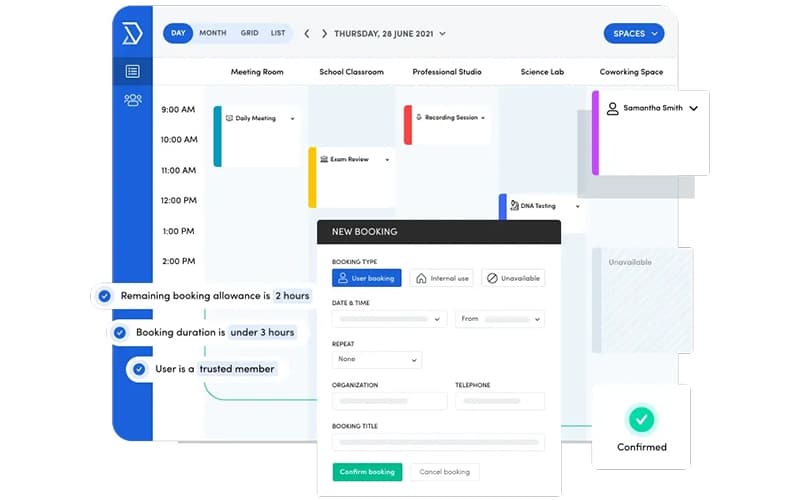
Administrators manage reservation rules, permissions, and quotas through Skedda. Those settings also cover workplace coordination, hybrid attendance planning, and space utilization reviews without the need to manually control each reservation.
What Is Skedda Best For?
Skedda is best known for its "Custom Rules and Roles Engine," which automates complex booking policies. Administrators use rules, quotas, and limits to control when and where people can book. They can shape those settings to match how a facility is actually laid out. Facilities managers therefore cover any workplace scenario without adjusting bookings by hand, whether the site is small or large.
How Much Does Skedda Cost?
The Skedda pricing starts at $99/month (billed annually) for its Starter plan. The plan includes 15 spaces, interactive floor plans, unlimited users and bookings, and a limited insights dashboard. Other plans include:
- Plus: Starts at $149/month (billed annually)
- Premier: Begins at $199/month (billed annually)
- AllBooked: Custom pricing
A 30-day free trial is also available. Organizations should also consider any additional costs beyond the base subscription. These include:
- Additional Spaces: Approximately $5–$8/space/month, depending on how many desks, rooms, and parking bays a site adds beyond its plan allowance
- Visitor Management Add-On: $99/month, covering visitor sign-in and host notification tools
- Floor Plan Setup: Typically, $300–$1,500 one-time, depending on the number of floors and how many desks and rooms need mapping
- Data Migration: About $200–$800 one-time, based on the volume of booking records and user directory data moved across
- Check-In Hardware: Roughly $200–$900/device, depending on whether teams choose lobby tablets or meeting room displays
Reviewers find the platform priced above comparable booking tools, and some buyers mention that the upper tier costs noticeably more. Smaller organizations note that advanced configuration options sit behind higher plans. Others still describe the price point as fairly reasonable.
Disclaimer: The pricing is subject to change.
Skedda Integrations
Skedda connects with workplace, identity, and productivity tools, including:
How Does Skedda Work?
Getting started with Skedda follows a short sequence:
- Log in through a browser, the mobile application, Microsoft Teams, or single sign-on credentials
- Submit an office layout file so the design team can build the interactive map
- Add desks, meeting rooms, parking bays, and assigned seats to that map
- Set booking rules, access permissions, quotas, and buffer times for each area
- Browse live availability on the floor plan and confirm a reservation
- Check in by code scan, email link, or presence detection to hold the space
- Review the Insights dashboard for utilization patterns across floors and teams
Who Is Skedda For?
Skedda serves organizations across several industries, including:
- Workplaces
- Universities
- Nonprofits
- Financial services
- Healthcare
Skedda Use Cases
Based on our analysis of user reviews and Skedda features, we have identified key scenarios where this software is a good fit:
Workplace Teams Coordinating Shared Offices And Meeting Rooms
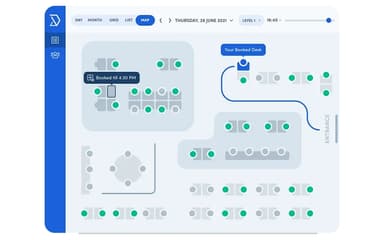
Office teams often rely on Skedda to manage desks, meeting rooms, and other shared spaces from one place. Assigned desks and available hot desks appear together on the interactive floor plan. Staff can check the map before coming into the office. Booking confirmation is available through a browser, the mobile app, or Microsoft Teams. Feedback suggests that staff can view every room at once and book the right space without help.
University Facilities Staff Scheduling Campus Rooms And Labs
Universities turn to Skedda for booking shared offices, function rooms, labs, and campus resources. Faculty and staff reserve spaces directly without routing requests through an administrator. Specific parking bays can be assigned to employees, while visitor spaces remain managed separately. They then use reporting functionality to see how campus spaces are actually used. Users often mention that faculty adopt the booking flow with little training.
Facilities Managers Handling Parking Allocation
Facilities teams manage parking spaces alongside desks and rooms with Skedda. Drivers see current parking availability on the interactive map and can book an open space there. Specific bays can be assigned to employees, with visitor parking managed separately. User reports indicate that the platform handles varied space types, from workstations to non-desk assets.
Information Technology Teams Supporting Offices In Several Locations
Information technology teams find Skedda useful when employees work across more than one office. Staff can reserve a room from the floor plan before they arrive. The existing identity system can handle account and permission updates through single sign-on and automatic user provisioning. Feedback indicates that single sign-on works well once configured and keeps offsite locations manageable.
Is Skedda Right For You?
Skedda is a practical choice for space management as it scales from a single office to several floors and locations. Administrators can add each new site to the same account rather than building a separate setup for it. That structure holds as headcount grows, since bookings stay uncapped on every plan.
SOC 2 Type 2 certification and GDPR compliance are part of Skedda's security and privacy measures. Booking data is encrypted during transit. Independent penetration tests are conducted, and the system runs automated daily backups. Organizations like Toyota Connected EU, Lufthansa, and Harvard University rely on Skedda for their workplaces.
Not sure whether Skedda software matches how your workplace runs? Reach us at (661) 384-7070, and we will help you weigh it against your options.
Skedda Features
Interactive Floor Plans
Skedda converts a submitted office layout into a live map that employees book from directly. Employees see availability for every desk and room alongside space images, descriptions, and amenity tags. Desks and rooms can be grouped into neighborhoods so teams sit together. Administrators update the map themselves when layouts change.
Meeting Room Booking
The interactive map shows available rooms, while amenity filters help employees find a suitable space. A room can then be reserved through the platform. Staff can confirm attendance through mandatory check-in using a code scan, email link, or presence detection. Rooms become available again when they remain unclaimed after the grace period.
Scheduling Automation
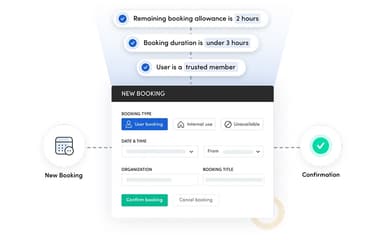
The software enables administrators set booking conditions, access rules, advance windows, buffers, and quotas across any part of the workspace. Repeat bookings cover recurring reservations, and cancellation policies govern late changes. Selected spaces can require approval before booking confirms. Custom fields capture extra details at the point of booking.
Visitor Management
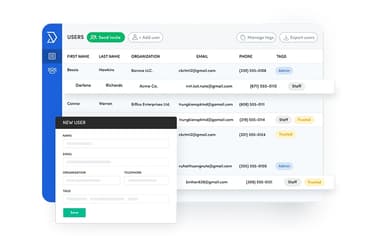
Visitor bookings tools trigger a confirmation email for both the host and the guest. Guests handle check-in and check-out themselves within the set time windows. They can use a designated tablet or their own device. Hosts receive an email alert on arrival, while administrators view and manage all visits from a dedicated settings page.
Insights Dashboard
The insights dashboard reports on space usage as it happens to remove the need for manual occupancy studies. Administrators analyze utilization by day of week, by user, and by individual space. Presence detection and check-in records confirm whether booked spaces were genuinely used. Historical patterns then support forecasts of future demand.
Pros And Cons of Skedda
Pros
Facilitates quick booking through interactive office floor plans
Helps prevent double bookings through automated booking rules
Allows advance planning through mobile and browser access
Frees unclaimed rooms automatically through check-in requirements
Reduces administrative workload through self-service reservations
Cons
Calendar view could include a jump-to-today option
Column widths in list view cannot be adjusted
Recurring bookings could be easier to edit
Skedda Pricing
Starter | Plus | Premier | AllBooked |
|---|---|---|---|
$99 per month | Starts at $149 per month | Starts at $199 per month | Custom Pricing |
|
|
|
|
Disclaimer: The pricing details were last updated on Oct 09, 2026 from the vendor's website. Please contact us for a tailored pricing list.
Skedda Reviews
Total 21 reviews
4.7
All reviews are from verified customers
Rating Distribution
5
Stars76%
4
Stars14%
3
Stars10%
2
Stars0%
1
Stars0%
Share your experience
Hospital & Health Care, 51-100 employees
Less than a year
“reliable office booking platform”
Pros
It is a user friendly platform that makes office space booking and scheduling much more organized and accessible for multiple people to use.
Cons
Honestly, I don't have anything I really dislike. I've mostly used it for scheduling and booking conference rooms and haven't explored much beyond that but for those basic tasks it has been a very dependable platform.
Rating Distribution
Ease of use
10
Value for money
10
Customer Support
10
Functionality
10
Civic & Social Organization, 500+ employees
Less than 6 months
“easy to use”
Pros
Using this app has been really easy. The floor layouts are simple but still detailed enough to show exactly where I'm booking a room or workspace which makes the whole process very clear. I also really appreciate the Google single sign on feature.
Cons
At this point, I don't really have anything to complain about since it works the way I expect it to. A few of the views can feel a bit overloaded with information but that's also balanced out by having different view options to choose from.
Rating Distribution
Ease of use
10
Value for money
10
Customer Support
10
Functionality
9
Hospital & Health Care, 500+ employees
Less than a year
“Lets me update rooms in no time”
Pros
This platform has been really simple to work with. I can update rooms in no time, rename spaces quickly and clearly label rooms, offices, workstations and even offsite locations. The Single Sign On connection and dedicated app also make everything very convenient to access and manage.
Cons
My only real issue with this is the Outlook integration. When you think you're approving a booking, it also seems to accept the calendar integration and then it blocks out the entire time in your calendar. It just feels a bit odd.
Rating Distribution
Ease of use
9
Value for money
9
Customer Support
10
Functionality
8
Frequently Asked Questions
What language does Skedda support?
The software is available in English, French, and Spanish.
What other apps does Skedda integrate with?
The platform integrates with different third-party systems such as Microsoft Teams, Slack, Zoom, Google Workspace, Zapier, and Okta.
Does Skedda have a mobile app?
Yes, it offers a mobile app for Android and iOS devices.
What types of pricing plans does Skedda offer?
The vendor offers multiple plans. These include Starter plan starting at $99/month, Plus at $149/month, Premier at $199/month, and custom-priced AllBooked, each plan with annual billing. Get in touch for a tailored Skedda cost estimate.
What level of support does Skedda offer?
Skedda offers customer support through chat, phone, email, and a help center.
Does Skedda offer an API?
Yes, Skedda offers an API, but it's still in beta mode.
Who are the typical users of Skedda?
Skedda is used by businesses across multiple sectors and industries, including healthcare, government, financial services, and higher education.