


Splan
Last Updated
Overview
Splan is a powerful visitor management system that automates check-ins and strengthens facility security. Although new administrators may face a brief learning curve, its customizable workflows streamline operations efficiently. Seamless hardware integrations further ensure a safe and professional environment for enterprises.
Splan Specifications
- Visitor And Resource Booking
- Reporting And Analytics Dashboards
- Mobile Accessibility
- Compliance And Safety Management
What Is Splan?
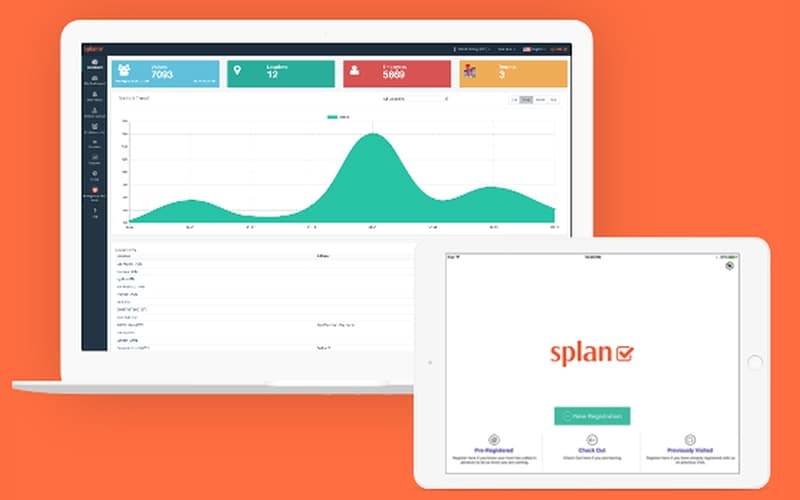
Splan provides a comprehensive, cloud-based platform for managing visitors, employees, and contractors across various facilities. By leveraging mobile credentials and automated kiosks, the software streamlines the check-in process while maintaining strict security compliance. It offers deep insights through advanced reporting and real-time dashboards, allowing security teams to track occupancy and manage watchlists effectively. Splan is built to scale, making it a reliable choice for global enterprises looking to modernize their front-desk operations.
Splan Pricing
The pricing for Splan starts at $99/month. It offers standard plans that include centralized visitor management, unlimited visitor registrations, role-based access, and Active Directory integration for streamlined authentication and secure access control.
In addition to the base subscription costs, organizations should account for the following expenses:
- Implementation: Professional configuration and onboarding can range from $500 – $20,000+ for enterprise deployments.
Disclaimer: Pricing references are based on publicly available third-party information and industry benchmarks. Actual costs may vary.
Splan Integrations
The software supports integration with multiple systems and platforms, such as:
Who Is Splan?
Splan software is ideal for a wide range of industries, including:
- Healthcare and hospitals
- Education and K-12 schools
- Corporate offices and coworking
- Manufacturing and logistics
Is Splan Right For You?
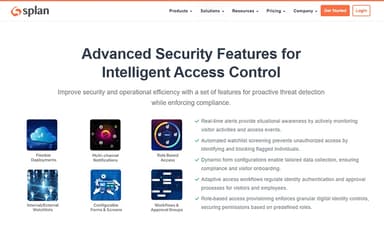
If your organization prioritizes high-level security and needs to manage a high volume of daily traffic, Splan is an excellent fit. Its standout feature is its deep integration with physical access control systems, allowing for automated badge printing and gate entry. This makes it particularly effective for regulated industries like healthcare or finance. The platform’s ability to handle complex compliance requirements ensures your facility remains secure and audit-ready at all times.
Still doubtful if Splan software is the right fit for you? Connect with our customer support staff at (661) 384-7070 for further guidance.
Splan Features
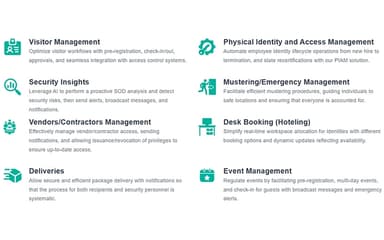
Visitor Management
Splan automates visitor check-ins, pre-registration, and verification, allowing organizations to track guests efficiently. This streamlines facility access, enhances security, and ensures compliance with organizational policies.
Mustering (Emergency Response)
The software enables real-time mustering during emergencies, tracking all occupants and visitors. This ensures accurate headcounts, quick evacuations, and supports regulatory safety requirements.
Desk Booking/Hotelling
Facilitates flexible workspace management by allowing employees to book desks or hot-desking spaces. This optimizes office space usage and simplifies scheduling for hybrid work environments.
Security Insights
Delivers actionable security insights by monitoring access patterns, flagging anomalies, and generating compliance reports. This helps administrators make informed decisions and proactively mitigate risks.
Event Management
Splan manages on-site events, including visitor registration, scheduling, and notifications. It ensures smooth operations and maintains compliance during large gatherings.
Contractor Management
Simplifies onboarding, access provisioning, and compliance tracking for contractors. This ensures that temporary staff meet security and regulatory requirements.
Pros And Cons of Splan
Pros
Simple, user-friendly interface for entering critical visitor data
Streamlined design makes the platform very easy to navigate
Basic data entry is straightforward and requires little training
Clean layout ensures a professional look for front desks
Cons
System syncing issues cause inconsistent data across different computers
Duplicate entries occur because users cannot see shared files
Software bugs may lead to the deletion of entries
Splan Reviews
Total 11 reviews
4.5
All reviews are from verified customers
Rating Distribution
5
Stars73%
4
Stars18%
3
Stars0%
2
Stars9%
1
Stars0%
Share your experience
Non-Profit Organization Management, 500+ employees
Less than a year
“powerful integrations”
Pros
Right from the start, the interface felt user friendly for everyone involved, whether that's hosts, visitors, operators or system administrators. The integrations framework is especially strong, with support for access control, third party cloud to cloud connections and custom connectors. I also appreciate how flexible the platform is when it comes to fitting those integrations into a broader security governance and risk mitigation strategy. On top of that the system architecture is innovative and makes it much easier to navigate, manage and track activity across office locations around the world.
Cons
Our setup involved a lot of complex requirements so onboarding ended up taking longer than we originally expected. Still, once everything was configured and in place, the system started running very reliably so in the end the extra time was absolutely worth it.
Rating Distribution
Ease of use
8
Value for money
10
Customer Support
9
Functionality
10
Printing, 101-500 employees
Less than a year
“great fit for secure sites”
Pros
Built with high security environments in mind, this software is very customizable for meeting contract specific security requirements and industry best practices. It also connects nicely with other applications for employee rosters, single sign on and background checks. On top of that the support team is knowledgeable and patient whenever changes are requested.
Cons
Compared with other systems, I haven't run into any major issues.
Rating Distribution
Ease of use
8
Value for money
7
Customer Support
7
Functionality
7
Education Management, 500+ employees
Less than 6 months
“fantastic support team”
Pros
The sales and support teams were incredibly helpful and worked with us to modify the software to our specific needs. During the trial, our ambassadors commented on how user friendly it was and needed very little training to get started. Whenever small issues came up, the support team responded quickly and made the necessary adjustments for us. It has been a very good fit for us at IMG Academy.
Cons
I honestly don't have any complaints to note. It delivered exactly what it promised.
Rating Distribution
Ease of use
10
Value for money
9
Customer Support
9
Functionality
9
Frequently Asked Questions
What language does Splan software support?
Splan primarily supports English.
What other apps does Splan integrate with?
Splan integrates with major platforms like Okta, Microsoft Teams, Slack, and HubSpot
Does Splan have a mobile app?
Yes, Splan offers a mobile application for both iOS and Android, allowing hosts to manage visitors and visitors to pre-register.
What level of support does Splan offer?
Splan provides comprehensive support including online documentation, email assistance, and dedicated account management for enterprise clients.
Who are the typical users of Splan?
Typical users include enterprise-level corporations, schools, and hospitals that require secure visitor tracking.
Does Splan software offer an API?
Yes, Splan provides a robust API that allows organizations to connect the visitor management system with their existing HR, IT, and security infrastructure.
What types of pricing plans does Splan offer?
Splan starts at $99/month, offering centralized visitor management, unlimited registrations, role-based access, and Active Directory integration for secure, streamlined access. Get a detailed Splan price quote.