


Azuga Fleet
Last Updated
Key Takeaways
Generated from the text of customer reviews
Our Verdict
Overall Rating
Based on 15 users reviews
3.9
Rating Distribution
Positive
73%
Neutral
7%
Negative
20%
Starting Price
$25
per vechile per month
Azuga Fleet Specifications
- GPS Tracking
- Reporting & Analytics
- Real-time Notifications
- Mobile Access
Azuga Fleet Features
GPS Tracking
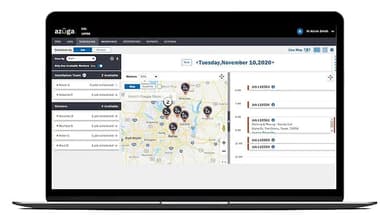
Azuga Fleet provides live vehicle location through its web dashboard and FleetMobile app. Managers can review speeding events, idling time and locations, stops near known landmarks, and mileage by state. Trip and location data can also be used to monitor vehicle activity across the fleet.
Vehicle Diagnostics And Scheduled Maintenance
The OBDII tracker captures diagnostic trouble codes and alerts for issues such as low battery, check-engine warnings, and tire pressure. ‘Scheduled Maintenance’ uses this information to help fleet managers plan service work before vehicle problems lead to downtime. Managers can also track upcoming maintenance tasks and service requirements.
Fleet AI SafetyCam
SafetyCam is a dual-facing HD dashcam that records the road ahead and activity inside the vehicle along with ‘Advanced Driver Assistance System’ (ADAS). It detects events such as lane departures, rolling stops, tailgating, and collisions. Its driver monitoring system can flag phone use, fatigue, and missing seatbelts. The system also captures event footage and impact data, including harsh braking, rapid acceleration, and high G-force events, for coaching and incident review.
Route Planning And Optimization
‘Azuga Routes’ helps dispatchers plan multiple routes around time windows, stop limits, vehicle capacity, and delivery requirements. It can optimize routes across multiple depots, reduce the number of routes needed, and provide predictive ETAs. Dispatchers can also optimize a single route with an unlimited number of stops.
Azuga Coach
'Azuga Coach' delivers driver safety training through the FleetMobile app, with short video lessons focused on common collision risks and unsafe driving behaviors. Topics include backing and parking collisions, rear-end collisions, intersection safety, aggressive driving, and impaired driving. Fleet managers can use the training to address specific driving behaviors rather than relying on general safety instruction.
Field Service Management
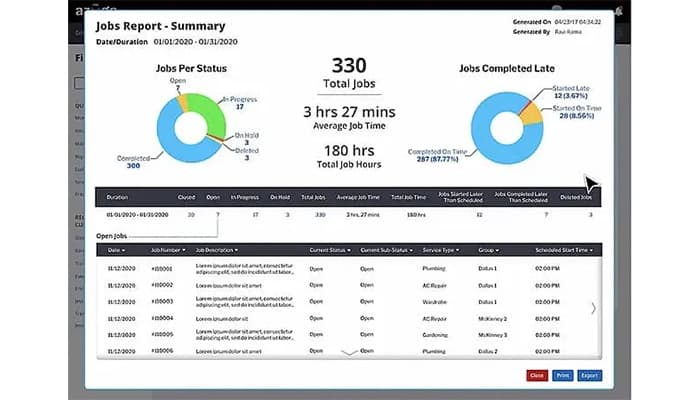
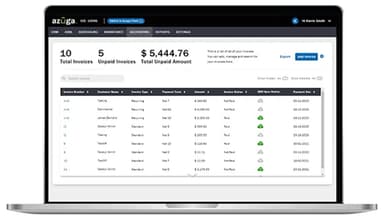
Azuga’s field service management tools cover back-office, customer, and field operations in one system. Teams can manage quotes, work orders, employee time, customer records, billing, service history, and communication. For field teams, it adds scheduling, dispatching, tracking, and routing to coordinate vehicles and technicians.
Asset And Equipment Tracking
Azuga extends tracking beyond vehicles to trailers, generators, tools, and other non-powered assets. GPS trackers and ‘Bluetooth Low Energy’ (BLE) beacons can provide location information for equipment that does not have an OBDII connection. Managers can use this data to monitor asset locations and identify equipment that has been moved or is missing.
Pros And Cons of Azuga Fleet
Pros
Helps track vehicles accurately and maintains detailed location history
Uses breadcrumb trails to verify vehicle visits and stops
Monitors driver safety and assigns scores based on driving behavior
Records video footage to review and document driving incidents
Tracks mileage and driving behavior in detail
Cons
GPS tracking can become unreliable in rural areas
Safety-camera footage cannot be accessed from mobile devices
The hardware module can be too large for some vehicle configurations
Azuga Fleet Pricing
BasicFleet | SafeFleet | CompleteFleet |
|---|---|---|
$25 per vechile per month | $30 per vechile per month | $35 per vechile per month |
|
|
|
Disclaimer: The pricing details were last updated on Sep 14, 2026 from the vendor's website. Please contact us for a tailored pricing list.
Azuga Fleet Reviews
Total 15 reviews
3.9
All reviews are from verified customers
Rating Distribution
5
Stars67%
4
Stars7%
3
Stars0%
2
Stars7%
1
Stars20%
Share your experience
Chemicals, 101-500 employees
More than a year
“Fleet monitoring made simple”
Pros
I really appreciate the tracking feature. It lets me check updated speeds, brakes and idles for all our vehicles on any date.
Cons
Sometimes it can be a little tough to find exactly what I'm looking for but honestly, it doesn't happen often. Overall, I think the program is great and does what I need it to.
Rating Distribution
Ease of use
8
Value for money
10
Customer Support
8
Functionality
10
Construction, 1-10 employees
Less than a year
“Totally disappointing”
Pros
From the very beginning, my experience with Azuga has been nothing but frustrating. It never worked the way I expected and every step of the process felt like a struggle. Ahhhhh.
Cons
The customer service has been terrible. A lot of the employees didn't know much about the devices and we kept getting the wrong units shipped to us. Then, in the last month of our sessios the units completely stopped working, which led to tens of thousands of dollars in fines from my subcontractor due to no GPS tracking. The ping rate was awful and sometimes we'd be working on-site, and it wouldn't even update. When they first sent us the units, they didn't even include the correct wiring diagram. Honestly, I would stay far away from Azuga!
Rating Distribution
Ease of use
2
Value for money
2
Customer Support
5
Functionality
5
Consumer Services, 51-100 employees
More than a year
“Love how Azuga handles tracking”
Pros
The software is flexible. Setting up new vehicles is simple and I can easily monitor vehicle usage with live views and reports.
Cons
Setting everything up took a little bit of time but once it was all rolling, things ran smoothly & I didn't have many issues after that.
Rating Distribution
Ease of use
10
Value for money
10
Customer Support
10
Functionality
10
Frequently Asked Questions
Does Azuga Fleet have a mobile app?
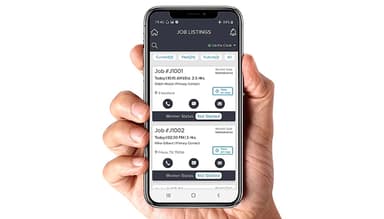
Yes. The platform offers Azuga FleetMobile, available on Android and iOS, with separate views for drivers and fleet administrators.
Does Azuga Fleet offer an API?
Yes. The platform offers an API.
What language does Azuga Fleet support?
The platform primarily supports English language.
What types of pricing plans does Azuga Fleet offer?
The software offers three per-vehicle monthly tiers, named ‘BasicFleet’ at $25, ‘SafeFleet’ at $30, and ‘CompleteFleet’ at $35. Get in touch for custom Azuga Fleet cost.
What other apps does Azuga Fleet integrate with?
Azuga's partner marketplace lists integrations with various third-party apps including Voyager, RoadFlex, ServiceTitan, FieldPulse, Aspire, BuildOps, and more.
Who are the typical users of Azuga Fleet?
The platform's typical users include fleet managers, dispatchers, operations leaders, and safety/compliance teams in construction, plumbing, pest control, landscaping, waste management, trucking, and towing.
What level of support does Azuga Fleet offer?
The platform offers phone, email, and web-based support. Its advanced pricing tier, ‘CompleteFleet’, also offers a dedicated Customer Success Manager to its clients.