Last Updated
Key Takeaways
Generated from the text of customer reviews
Our Verdict
Overall Rating
Based on 15 users reviews
4.6
Rating Distribution
Positive
100%
Neutral
0%
Negative
0%
Starting Price
$31
per month
Fergus Specifications
- Work Order Management
- Scheduling & Dispatching
- Mobile Access
- Customer Relationship Management (CRM)
What Is Fergus?
Fergus is a cloud-based job management platform for trades that lets users quote, schedule, and invoice jobs. The software helps them manage enquiries and payments. It also provides a Business Performance Dashboard for reporting and analytics. Fergus combines various functionalities ranging from tracking jobs and managing teams to issuing digital certificates, estimates, and handling fieldwork. As a result, businesses can streamline jobs from initial inquiry to payment.
What Is Fergus Best For?
Fergus stands out for its Scheduling and field team coordination functionalities for trade businesses. With its visual drag-and-drop calendar, real-time crew scheduling, staff availability overview, and conflict prevention, businesses can coordinate jobs without relying on paper-based methods. Field teams can review job details, checklists, customer information, and job locations by means of the Fergus Go mobile app. This keeps office and field teams reliant on a single source of truth.
How Much Does Fergus Cost?
Fergus pricing starts at $31/month for its Essentials plan, and $44/month for its Professional Plan. It also offers the Enterprise10+ plan at custom pricing. The vendor also offers a 14-day free trial.
Along with the base subscription cost, organizations should keep the following potential hidden costs in mind:
- Implementation And Onboarding: $500-$2500 – As a result of configuring job workflows, scheduling processes, quoting templates, and staff onboarding in the case of larger teams
- Integrations And Data Migration: $500-$3000 – Costs linked to connecting accounting, supplier, payments, and other business systems
- Advanced Reporting And Customization: $1000-$5000/year – Due to more extensive reporting, dashboards, and enterprise-specificrequirements
- Payment And Communication Usage: $15-$500+/month – Caused by key requirements like transaction-based payment processing, SMS notifications, and other usage-dependent services.
Disclaimer: The pricing is subject to change.
Fergus Integrations
Fergus software offers integrations with multiple third-party apps, such as:
- Smartly
- Xero Accounting Solution
- QuickBooks
- Mico
How Does Fergus Work?
After successful completion of the onboarding process, here’s how you can get started with Fergus:
- Access the main Fergus dashboard to review active jobs, upcoming work, team activity, and other key operations after logging in with the provided credentials
- Start by navigating through the dashboard to review your jobs, schedules, quotes, invoices, payments, and other areas from the main workspace
- Configure your company information, team members, customers, and other essential records in order to make the system reflect your day-to-day operations
- Convert approved work into jobs that can be scheduled or tracked by creating quotes and estimates for upcoming work
- Assign the scheduled jobs to the appropriate team members so that field staff can access relevant work and job details
- Monitor on-the-job activity to keep office staff informed about work status and track jobs as they progress
- Generate invoices from work that has been completed and manage your payments to keep billing activities in line with your job records
- Review reports and dashboard information to monitor business performance, job activity, team productivity, and final results
Who Is Fergus For?
The platform is mainly used by professionals in trade and field-service industries, including:
- Electricians
- Plumbers
- HVAC
- Builders
- Roofers
- Field Services
- Cleaning
Fergus Use Cases
After carefully analyzing Fergus features, capabilities, and marketing positioning, we identified its real-world use cases.
Dispatching Plumbers Between Emergency And Scheduled Jobs
Plumbing companies may have several technicians who have been assigned to scheduled jobs. This becomes an issue when an urgent call comes in that requires those professionals. To counteract this, Fergus provides the Scheduling functionality, which gives office teams a visual view of technician availability and existing bookings. As a result, the dispatcher can identify an available worker and assign them new jobs without losing track of the day’s schedule. This gives transparency to the assigned field technician and office teams.
Checking Job Profitability After Materials And Labor Are Added
When contractors are quoting a bathroom installation at a fixed price, they may see a reduction in the expected margin due to additional materials, labor, and other costs. With Fergus’ Job Costing, they can record costs against individual jobs to compare the money spent on the job with the quoted or invoiced amount. This gives companies a job-level view of cost increase instead of relying only on overall business accounts to identify an unprofitable object.
Getting Materials And Supplier Costs Into The Job Record
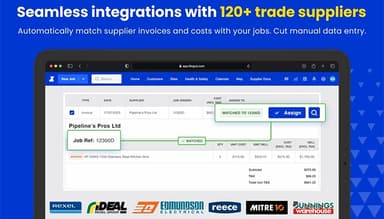
For electrical contractors that may send electricians to sites where additional cables, fittings, or materials are required, receiving a supplier invoice days later becomes a problem. Fergus tackles this with its Supplier Invoice and Cost Tracking which connects purchases with the appropriate job, allowing the contractor to account for material costs when reviewing the job’s financial position. This is typically useful when managing several jobs and matching supplier invoices to projects without having to simply rely on bank or accounting records.
Turning Technician Notes Into A Complete Customer Invoice
Finishing a service call after replacing a component or carrying out additional work separate from the job description might cause issues for technicians. Through Fergus’ on-the-job management and invoicing, job information, notes, time, materials, and other chargeable work can be combined when preparing the invoice through the completed job record. This minimizes the reliance on manual workarounds like handwritten notes, messages, or calls with the technician.
Following Up On Quotes That Have Not Yet Been Approved
Roofing and building contractors may have to send dozens of estimates each month and distinguish accepted work from quotes that are awaiting a customer’s decision. Fergus’ quoting and estimate tracking keeps quotes within the system, allowing contractors to monitor their status and move approved work to the job workflow. As a result, offices get a structured, defined process for moving a quote from an initial estimate, through to customer approval, and into scheduled work.
Is Fergus Right For You?
Trade businesses that need to manage quoting, scheduling, field work, job costs, invoices, and payments – all on one platform, might find Fergus to be particularly useful for their needs. Electricians, plumbers, HVAC contractors, builders and roofers that need to manage multiple jobs and technicians can derive strong value from the software.
For teams that are coordinating technicians across scheduled and urgent jobs, Fergus provides a visual scheduling calendar, team availability, GPS tracking, job details, and mobile access through Fergus Go. Office teams can utilize this to assign work, while syncing with field teams on their job requirements and locations.
Companies that require highly specialized industry functionality may find Fergus to be less suitable; however, its feature range makes it a valuable asset to organizations that are looking for a central platform for job management and team coordination.
Still unsure about Fergus? Connect our support team at (661) 384-7070 for further guidance!
Fergus Features
Team Management
This functionality provides a range of functions to users like GPS tracking to see where team members are located, review their GPS history, and check which jobs are scheduled for which worker. With timesheets, they can track on-site hours through mobile start/stop timers or manual entries. This clarifies job costs and billed hours for managers. They can assign work, add due dates and notes, and ensure that site tasks or equipment bookings are completed. This reduces manual follow-ups.
Reporting
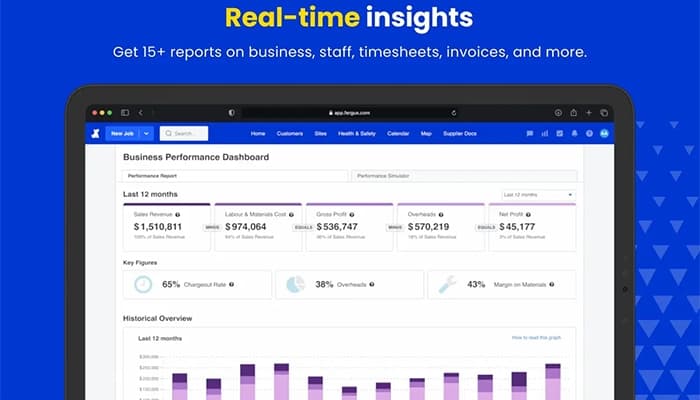
With this feature, teams get an overview of Actual Activity and Profit and Loss reports to help trades businesses monitor financial performance and plan spending. Job Reporting tracks potential profit alongside labor costs. Meanwhile, WIP reports help identify jobs that are exceeding budget before margins are affected. In addition, Employee Reporting compares staff hours with billed hours through Pay Summary and Timesheet Summary Reports. This allows managers to identify performance gaps and effectively utilize labor.
Fergus Pay
Fergus Pay allows businesses to accept debit and credit card payments on-site, through QR codes, and online when sending invoices. With Tap To Pay, field workers can take contactless card or mobile wallet payments directly through the Fergus Go app. Meanwhile, Scan To Pay allows customers to complete payments on their own devices. This helps businesses close out jobs immediately, minimizes time spent chasing unpaid invoices, and keeps cash flowing for payroll, suppliers, and other expenses.
Certificates
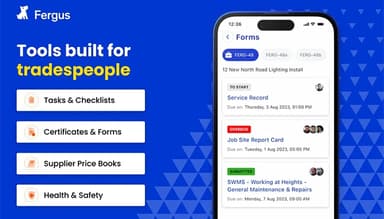
Through digital certificates, Fergus lets trade companies complete and sign plumbing, gas, and electrical certificates directly on site. Pre-filled job, customer, and licensing information reduces the time needed to complete each certification and minimizes manual data entry. Completed certificates are stored in a single repository and can be tracked through the Certification Report. This makes compliance records easier to access and manage.
Pros And Cons of Fergus
Pros
Streamlines pricing and quoting through the search function and supplier price books
Makes it easy to track job progress, reducing reliance on manual processes
Offers a simple platform that is easy to use
Cons
Mobile app may not appeal to some users
Some users report a lack of a recurring jobs function
Fergus Pricing
Essentials
$31 per month
View Price
What's Included
Quoting & Estimating
Price Books
Job Cards
Timesheets
Calendar
Materials
Supplier Integration
Recurring Jobs
Moving Items
Notes & History
Professional
$44 per month
View Price
What's Included
Everything in the Essentials plan, plus:
GPS Tracking
Checklists
Job Phases
Files & Photos
Purchase Orders
Tiered Pricing
Hazards
SWMS
Quote Report
Disclaimer: The pricing details were last updated on Aug 10, 2026 from the vendor's website. Please contact us for a tailored pricing list.
Fergus Reviews
Total 15 reviews
4.6
All reviews are from verified customers
Rating Distribution
5
Stars60%
4
Stars40%
3
Stars0%
2
Stars0%
1
Stars0%
Share your experience
Lyndsay
Construction, 1-10 employees
Less than 6 months
“Solid and reliable platform”
Pros
The chatbot works really well! It gives clear, useful information and makes things easier for me.
Cons
Fergus has a lot of great features but knowing how to use it to its full potential takes some learning. I feel like there could be a simpler version for tradespeople who are not very tech-savvy or just prefer simple software.
Rating Distribution
Ease of use
10
Value for money
10
Customer Support
10
Functionality
9
Paul
Mechanical or Industrial Engineering, N/A employees
More than a year
“Could not be happier with Fergus”
Pros
It is super simple to use and communicating with my team has never been this easy. Everything just flows smoothly.
Cons
No complaints at all.
Rating Distribution
Ease of use
8
Value for money
8
Customer Support
8
Functionality
8
Chris
Construction, 11-50 employees
Less than a year
“Fergus makes scheduling easy”
Pros
The scheduling, map features and job tracking are all amazing. It keeps my field staff and finance team organized and on track.
Cons
The reporting features, especially for quoting, feel a bit limited. I need better insights into how well my sales team is performing and it would be great if the CRM side of the software could improve to support that.
Rating Distribution
Ease of use
10
Value for money
10
Customer Support
8
Functionality
7
Frequently Asked Questions
Does Fergus offer an API?
Yes, Fergus does offer an API.
What language does Fergus support?
The platform supports the English language.
Does Fergus have a mobile app?
Fergus offers the Fergus Go mobile app for Android and iOS.
What other apps does Fergus integrate with?
Fergus software integrates multiple third-party platforms, including QuickBooks and Mico.
What types of pricing plans does Fergus offer?
Fergus price starts at $31/month for the Essentials plan and $44/month for the Professional plan. The platform also offers an Enterprise 10+ plan with custom pricing. Moreover, a 14-day free trial is also available. Request a custom Fergus pricing quote today!
Who are the typical users of Fergus?
Fergus is mainly used by trade and field-service professionals to manage jobs, quotes, invoicing, and day-to-day operations. Its users include electricians, plumbers, HVAC contractors, builders, roofers, field service teams, and cleaning businesses.
What level of support does Fergus offer?
Fergus offers support through its Help Center.