


Service Autopilot
Last Updated
Key Takeaways
Generated from the text of customer reviews
Service Autopilot is built for lawn care, landscaping, cleaning, snow removal, as well as pest control businesses. Users praise Automations along with dispatch tools for cutting daily administrative work. The recurring issues are slow support response times and invoices syncing difficulties. Recent updates include AI route optimization via NextBillion.ai.
Our Verdict
Service Autopilot works best for established operators - lawn care and cleaning, especially - once they're running multiple crews and a recurring client list large enough that manual follow-up and invoicing start slipping. That's the point where Automations pays for the Pro Plus tier. However, post-acquisition pricing makes it a tougher call for smaller or newer businesses. We recommend it to multi-crew operations that have outgrown basic scheduling.
Overall Rating
Based on 95 users reviews
3.8
Rating Distribution
Positive
66%
Neutral
23%
Negative
11%
Starting Price
$49
per month
Service Autopilot Specifications
- Work Order Management
- Scheduling & Dispatching
- Mobile Access
- Customer Management
What Is Service Autopilot?
Service Autopilot is cloud-based software for field service businesses. It is built for lawn care, landscaping, cleaning, snow removal as well as pest control companies that need to schedule, dispatch, and bill from one place. It now operates as Service Autopilot by Xplor, under Xplor Technologies. Beyond the scheduling, it also handles job costing and route optimization; the two areas where manual tracking usually breaks down first as a crew grows.
What Is Service Autopilot Best For?
The Automations feature is what sets Service Autopilot apart from a generic scheduling tool. It lets businesses build trigger-based workflows (estimate follow-ups, credit card update requests, client re-engagement emails) that run on their own once configured. In turn, office staff stop chasing these tasks manually. For a lawn care or cleaning business managing a large recurring client base, this is the reason to choose Service Autopilot.
How Much Does Service Autopilot Cost?
The pricing for Service Autopilot starts at $49/month with the Startup plan. Pricing is only available on annual subscription. Further pricing tiers include:
- Pro - $199/month
- Pro Plus - $499/month
- Elite - Custom pricing
Beyond the subscription, additional costs may include:
- Implementation And Setup – Businesses should budget $97–$247 for the one-time sign-up fee, while more involved implementations may cost around $500–$5,000 for SMBs or $5,000–$25,000 for complex deployments
- Two-Way Texting – Can roughly cost $15–$75/month for 1,500–9,000 messages, with additional messages charged at $0.01 each
- Late Payment Fees – Overdue balances incur the greater of 1.5%/month or a $35 fee
Service Autopilot receives mixed value feedback, with pricing viewed as reasonable by some users but expensive by others. SMBs appear more sensitive to the cost, while established operators are more likely to justify it based on automation and operational capabilities.
Disclaimer: The pricing is subject to change.
Service Autopilot Integrations
Service Autopilot integrates with:
- QuickBooks Online
- Gmail
- NextBillion.ai
- Outlook
- FleetSharp
How Does Service Autopilot Work?
Log in to Service Autopilot with your credentials and follow these steps:
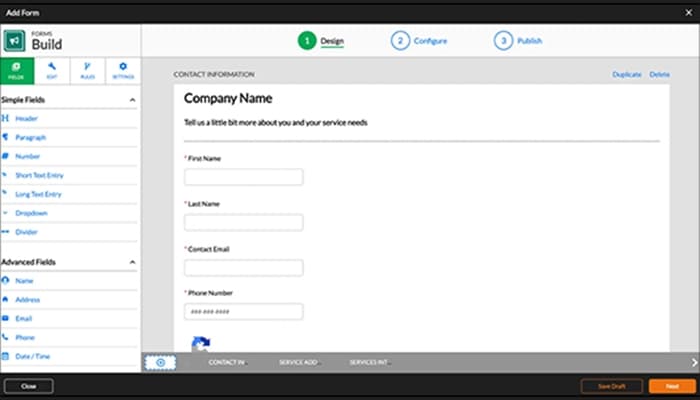
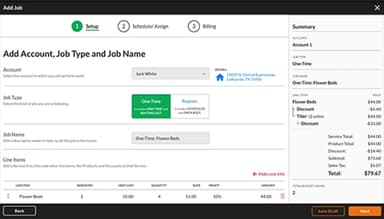
- Set up client accounts, including contact details, along with billing records, notes and photos for each job
- Build estimates in the platform, priced automatically off job parameters, and send them directly
- Schedule recurring and one-off jobs on the dispatch calendar, assigning crews by availability and location
- Run route optimization; either the built-in one-click version or the AI-driven NextBillion.ai Optimized Stops feature on the Dispatch Board
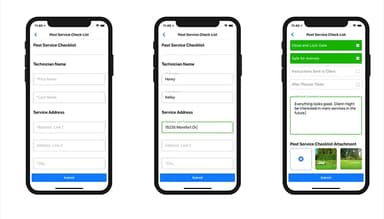
- Field crews check schedules, job details, as well as clock in/out through the mobile app
- Invoices generate automatically when a job is marked complete, and SA Payments can process same-day payment, including bulk-charging unpaid accounts by filter or tag
- The Reports Center tracks revenue, job costing, as well as employee productivity, and route efficiency after the fact
Who Is Service Autopilot For?
The platform caters to the needs of the following sectors and industries:
- Lawn care
- Landscaping
- Cleaning
- Snow removal
- Pest control
- Pool cleaning
- Field service
Service Autopilot Use Cases
Our analysis of Service Autopilot functionalities, plus the user reviews has helped us narrow down a few scenarios where it fits particularly well:
Lawn Care And Landscaping Businesses That Run Recurring Routes
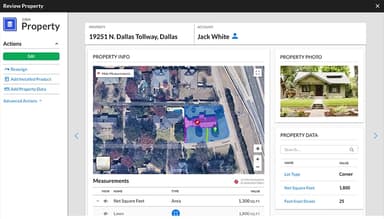
Lawn care is the industry Service Autopilot was originally built for, and it still shows. Route optimization, recurring job scheduling, chemical and asset tracking, and automated billing work together to cut the admin load on crews hitting multiple stops a day. The Deep Lawn integration layers in AI-based satellite measurement, so operators can quote a lawn without a site visit.
Multi-Crew Businesses That Need Automated Follow-Up
Growing service businesses tend to lose revenue less from work quality and more from slow follow-up. This includes estimates that nobody follows up on, invoices that sit unpaid, recurring clients who quietly stop booking. Automations, on the Pro Plus plan, is built for exactly this: estimate follow-ups, past-due nudges, seasonal re-engagement, and credit card update requests run without office staff tracking each one manually.
Snow Removal Operations With Event-Based Dispatching
Snow removal doesn't fit a standard calendar. Dispatching follows storm events, not a fixed schedule, and priority routing changes by the hour. Service Autopilot has a dedicated Snow Dispatch module for this. This event-based approach lets businesses prioritize properties as well as dispatch crews based on actual storm activity.
Cleaning Companies That Grow Past One Crew
Cleaning businesses use the recurring billing engine and routing tools to add clients without adding office staff at the same rate. Automations covers the routine client communication, and the mobile app keeps crews connected without phone calls back to the office. One thing worth knowing: the interface still carries some green-industry terminology from the platform's lawn-care origins, which can be less intuitive if you're running a cleaning company.
Is Service Autopilot Right For You?
If your organization runs lawn care, landscaping, cleaning, snow removal, pest control, or pool service work, Service Autopilot is worth a look. Its data centers are accredited to PCI DSS, ISO 27001, and ISAE 3402 Type II standards, with data encrypted during transmission and storage. The parent company, Xplor Technologies, has earned Built In's Best Places to Work list for 2025, its third-year running. Named clients include Salcido Lawn and Arboreal Lawn, and Landscapes.
Still not sure about Service Autopilot? Contact our support team at (661) 384-7070 for further guidance.
Service Autopilot Features
Flexible Scheduling
Scheduling operates on a visual dispatch calendar that handles recurring and one-off jobs. This includes weekly, biweekly, monthly, depending on the client's cadences. Multi-day job management is a Pro-tier feature and up; below that, you're working with simpler single-day scheduling. The calendar gives office staff a live view of crew assignments, job status, as well as route coverage.
Automations
Automations lets you build trigger-based workflows that run on their own once set up. This entails estimate follow-ups, overdue invoice reminders, credit card update requests, as well as re-engagement campaigns, seasonal upsell sequences. It handles the repetitive follow-up work that would otherwise land on someone's desk every day.
Instant Invoicing
Invoices generate the moment a job's marked completed. This cuts back the lag between finishing work and billing for it. SA Payments can charge accounts the same day, and it supports bulk-charging multiple unpaid accounts at once using filters and tags.
AI-Powered Route Optimization
Route optimization got an AI layer recently through the NextBillion.ai integration. It's accessible via Optimized Stops on the Dispatch Board or through Smart Maps, and it factors in live traffic data alongside machine-learning routing to plan more efficient stops for field crews. The benefit is most noticeable for businesses running several crews through a dense service area.
Reports Center
The Reports Center covers revenue, employee productivity, along with other core metrics through pre-built reports. It also has a custom report builder for anything more specific. Once configured, it can track job costing, crew performance, as well as profitability.
Client Account History
Every client interaction, service request, along with payment gets logged, so each client's full history is stored within the system. In addition, the Client Portal lets clients check their own account, schedule, and invoice history.
Pros And Cons of Service Autopilot
Pros
Automates client arrival preferences and related workflows
Supports texting clients directly from the software
Lets managers assign and track employee to-dos
Cons
Rapid feature expansion can contribute to unresolved issues
Calendar does not directly open client accounts
Service Autopilot Pricing
Startup | Pro | Pro Plus | Elite |
|---|---|---|---|
$49 per month | $199 per month | $499 per month | Custom pricing |
|
|
|
|
Disclaimer: The pricing details were last updated on Sep 25, 2026 from the vendor's website. Please contact us for a tailored pricing list.
Service Autopilot Reviews
Total 95 reviews
3.8
All reviews are from verified customers
Rating Distribution
5
Stars45%
4
Stars21%
3
Stars12%
2
Stars12%
1
Stars11%
Share your experience
Hospital & Health Care, 11-50 employees
“Poor customer service”
Pros
I really appreciate the Dispatch board and the scheduling tools. They make it easy for me to keep my clients informed with current, accurate information.
Cons
I find Service Autopilot's customer support disappointing. It seems under-resourced and I often struggle to reach an agent. Phone lines take a long time and on several occasions I had to wait for a callback.
Rating Distribution
Ease of use
8
Value for money
10
Customer Support
6
Functionality
9
Medical Practice, 11-50 employees
“Service has gone downhill”
Pros
I like that it provides automations and all the essential features I count on.
Cons
Around two years ago the company got sold to a credit card firm and I've been uneasy about what that means. The service has really gone downhill. It takes forever to get any issue fixed. They only want to respond via email and the replies are always incomplete. A report we�ve been using for years stopped working six months ago and they still haven�t done anything about it.
Rating Distribution
Ease of use
7
Value for money
6
Customer Support
2
Functionality
6
Retail, 51-100 employees
“Keeps getting pricier”
Pros
For my everyday work, I rely on it to handle production management and sales tasks.
Cons
I've noticed the prices keep rising while I don't see any improvement in the service quality. It is not scalable as well.
Rating Distribution
Ease of use
9
Value for money
8
Customer Support
10
Functionality
8
Frequently Asked Questions
Does Service Autopilot offer an API?
Yes, Service Autopilot offers an API.
What language does Service Autopilot support?
The software is primarily offered in English.
What other apps does Service Autopilot integrate with?
Service Autopilot integrates with QuickBooks Online, Gmail, NextBillion.ai, Outlook, and FleetSharp.
Does Service Autopilot have a mobile app?
Yes. Service Autopilot provides mobile applications for both iOS and Android users.
How much does Service Autopilot cost?
Service Autopilot offers Startup at $49/month, Pro at $199/month, Pro Plus at $499/month, and Elite with custom pricing. Get in touch with us for a personalized Service Autopilot cost estimate.
Who are the typical users of Service Autopilot?
The platform caters to lawn care, landscaping, cleaning, snow removal, pest control, pool cleaning, and general field service industries.
What level of support does Service Autopilot offer?
Support is offered via phone and online form.