

Last Updated

Overview
Sona replaces spreadsheets and disconnected systems with a single, modern platform for frontline workforce management. From scheduling and payroll to engagement and compliance, it simplifies operations. Though not designed for very small teams, it’s a strong choice for growing organizations focused on efficiency and staff retention.
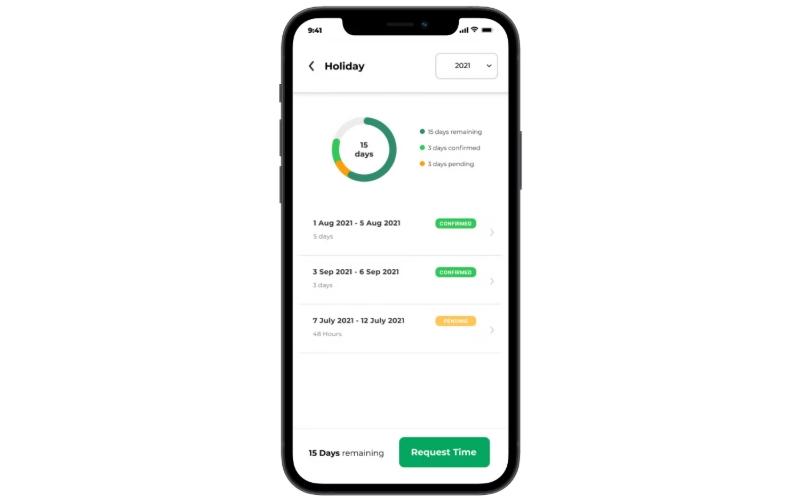
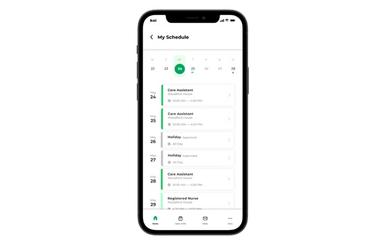
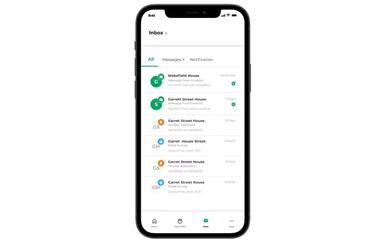
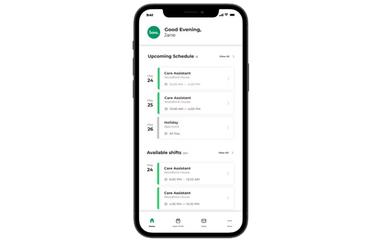
Sona Specifications
- Employee Information Management
- Attendance and Time Tracking
- Employee Onboarding
- Training and Development
What Is Sona?
Sona is a next-generation, all-in-one workforce management platform designed specifically for businesses with large frontline teams. It replaces fragmented legacy systems with a unified, AI-powered solution for managing smart scheduling, time and attendance, human resources (HR) administration, payroll, and employee engagement. By centralizing these critical functions, Sona aims to dramatically improve operational efficiency, enhance the employee experience, and boost staff retention across diverse industries.
Sona Pricing
Sona Integrations
Who Is Sona For?
Sona is ideal for a wide range of industries and sectors, including:
- Hospitality
- Social care
- Retail
- Casual dining
Is Sona Right For You?
Sona is the right choice for organizations that are looking to move away from inefficient spreadsheets and disconnected legacy systems toward a single, modern platform. It is particularly well-suited for leaders in hospitality, retail, and social care who prioritize improving staff retention and operational efficiency as key business objectives.
Still doubtful if Sona is the right fit for you? Connect with our customer support staff at (661) 384-7070 for further guidance.
Sona Features
Scheduling
Sona’s ‘Scheduling Cloud’ automates the creation of complex, multi-site schedules using dynamic templates and bulk assignments. Its integrated time and attendance tools use geo-fencing to ensure accurate clock-ins, reducing payroll errors and saving managers' significant administrative time.
Centralized HR Cloud
This module acts as a single source of truth for all employee data. It provides a secure employee directory and digital storage for essential documents like visas and professional certifications, with automated alerts for expiry dates to ensure compliance.
Employee Engagement
Designed to improve retention, the ‘Engagement Cloud’ includes tools for monitoring team morale through wellbeing check-ins, sharing company news, and facilitating peer-to-peer recognition. This helps organizations proactively address churn and build a positive workplace culture.
Payroll
This feature streamlines the entire pay process by automatically generating accurate hours reports based on verified time and attendance data. It allows managers to swiftly approve or amend hours, ensuring staff are paid correctly and on time while reducing costly mistakes.
Pros And Cons of Sona
Pros
Improves management oversight and reporting
Makes it easier for staff to view schedules and pick up available hours
Centralizes and standardizes operations across the organization
Cons
Required substantial adjustments along the way
New feature releases not always communicated clearly
Sona Reviews
Total 9 reviews
4.8
All reviews are from verified customers
Rating Distribution
5
Stars78%
4
Stars22%
3
Stars0%
2
Stars0%
1
Stars0%
Share your experience
Lou L.
Not Specified, N/A employees
“Flexible rota import and integration”
Pros
I love that it can take our different rota formats and pull them right into the system. They keep working as usual, but are now much easier for the management team to access. It works consistently for the whole organization, even with different teams doing things their own way. I also like that we can easily ask for screens to show more or less detail. Best of all, the support team is always quick to help and never makes you feel like you're asking a silly question.
Cons
Initially pulling together our data was challenging, because you are starting from a blank slate. I would like to see a user management module added soon since, like any organisation, it would make everyday team administration much simpler and reduce the time spent on routine roster tasks across departments.
Rating Distribution
Ease of use
8
Value for money
10
Customer Support
10
Functionality
9
Stephen W.
Not Specified, N/A employees
“Centralised, efficient roster management”
Pros
Within our organisation, this solution has given us significantly better control and oversight of our rosters, removing the reliance on messy paper schedules covered in handwritten swap notes that used to dominate the noticeboards and cause confusion, now everything is centralised and much cleaner. Monthly rotas are generated from templates in just a few minutes which genuinely reduces administrative burden and frees up time for other priorities. Managers can publish available shifts via the platform so that staff receive immediate notifications on the app, eliminating the need for numerous phone calls to find cover and saving an enormous amount of manager time. Colleagues can check their shifts from anywhere at any time and because they are increasingly opting into advertised availabilities themselves we have already cut down on using costly agency workers and the elevated fees that come with them. I also value the 'Wellbeing' feature, where team members check in to tell us how they are feeling, because ensuring our people are happy in their roles is a priority for us, this functionality helps us monitor morale and we are hopeful it will lead to improved retention.
Cons
We currently don't have the ability to directly access or manage our staff details ourselves, as this tool handles staff management on our behalf, although they tend to process requests quickly, surrendering that direct control is not ideal. I am, however, aware that a 'Users Management' feature is expected to be released soon and I anticipate that once it is available it should largely resolve this limitation.
Rating Distribution
Ease of use
10
Value for money
10
Customer Support
10
Functionality
10
Caren B.
Not Specified, N/A employees
“Easy to navigate, minimal complexity”
Pros
From our perspective, the software feels easy to navigate and avoids unnecessary complexity. We are able to manage and report on the items we require without the system becoming overwhelming for team members who use it daily. I appreciate that teams can provide feedback about how their shifts went and their wellbeing at work which prompts useful responses.
Cons
No issues! We are presently in the implementation phase. Thus far, I am impressed with this product.
Rating Distribution
Ease of use
8
Value for money
10
Customer Support
10
Functionality
9
Frequently Asked Questions
What level of support does Sona offer?
The vendor provides support through a help desk.
Does Sona offer an API?
Yes, it offers an API.
What languages does Sona support?
Sona software is primarily available in English.
Who are the typical users of Sona?
Typical users who benefit from Sona features include businesses across various industries and sectors, such as social care, casual dining, retail, and hospitality.
Does Sona offer a mobile app?
Yes, it offers a mobile app.
What types of pricing plans does Sona offer?
The vendor offers customized pricing plans, depending on organizations' unique requirements. Get in touch for a tailored HR Directory cost estimate.
What other apps does Sona integrate with?
The vendor has not listed any available third-party integrations for this software.