


Litify
Last Updated
Key Takeaways
Generated from the text of customer reviews
Our Verdict
Litify Specifications
- Case Management
- Document management
- Client management (CRM)
- Billing & Invoicing
Litify Features
Total Policy Agent
The agent reviews uploaded insurance policies against matter records to identify available coverage, uncover potentially unused benefits, and verify applicable policy limits. It can help legal teams identify relevant coverage without manually comparing policy documents with matter information.
Intake Management
Litify uses dynamic questionnaires that adjust the next question based on previous responses. It enables legal service requests to be tracked in real time and automatically routed to the appropriate specialist. The Intake Qualifier Agent can also screen prospective matters against predefined criteria to identify potentially viable claims and filter out cases that do not meet those criteria. The feature can help legal teams collect relevant information, route requests, and assess potential matters with relatively less manual screening.
Matter Management
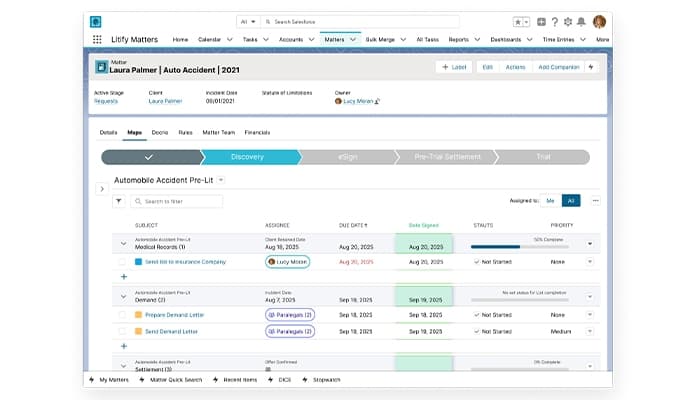
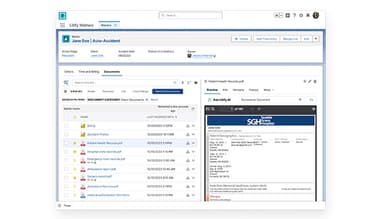
It lets teams create configurable matter plans with task lists based on the practice area, case type, and their processes. A case activity timeline brings files, emails, calendar events, and other matter activity into one chronological view. The Matter Summary Agent uses information from the matter history to provide updates on case status, recent activity, and strategic notes. The functionality can assist legal teams in keeping track of case progress and finding important matter information while reducing the need to review the entire case history manually.
Time And Billing
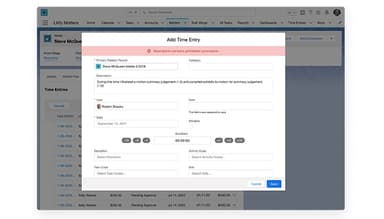
The Time and Billing module provides a calendar view of time entries to help identify missing billable time and billing rule violations. LitifyAI Time Capture can track daily activities and suggest time entries, including time spent on emails and internal coordination. Teams can also generate multiple bills at once or schedule billing jobs for later. It could help legal teams capture more billable activity and reduce the need to check billing entries manually.
Legal Spend Management
The software reviews invoices at the line-item level against preset billing rules and budgets, flagging inconsistencies for review. Its AI can also recommend outside counsel based on previous invoice reviews, eBilling data, jurisdiction, legal specialty, and other factors. It allows teams to apply discounts automatically to late invoices while keeping them within set rules. With Legal Spend Management, legal teams can identify billing issues, evaluate outside counsel options, and manage invoice costs.
Reporting And Analytics
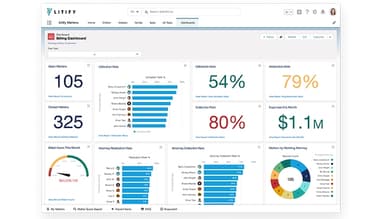
Litify provides real-time dashboards and configurable reports for tracking case performance, team productivity, and revenue. Executives, attorneys, and staff can view the metrics relevant to their roles and adjust dashboards and reports to reflect their reporting needs. The platform also allows teams to compare case types and team performance using current data, helping them identify areas that may need attention. This feature can help legal teams monitor key performance measures and make decisions using current case and business data.
Pros And Cons of Litify
Pros
Users appreciate the ability to organize cases and client information in one place
Reviewers value reporting for tracking team effort, productivity, and case progress
Supports collaboration by making case information and work more visible across teams
Gives firms the flexibility to tailor the system to their specific needs
Users find the platform relatively easy to use for day-to-day case management
Cons
The system’s performance may slow down when handling large volumes of files or data
Some users report occasional issues with document synchronization or integrations
Data migration may require additional effort, particularly when moving from another system
Litify Reviews
Total 103 reviews
4.2
All reviews are from verified customers
Rating Distribution
5
Stars50%
4
Stars31%
3
Stars12%
2
Stars7%
1
Stars1%
Share your experience
Law Practice, 51-100 employees
Less than a year
“flexible and user-friendly platform”
Pros
Using Litify has been a very user friendly experience and the customization options make it easy to tailor to different needs. They also keep releasing new features on a regular basis and many of those updates have been genuinely helpful.
Cons
The only frustrating part is that new features often come with random error messages. On top of that every time something new is added, there seem to be tons of permission sets that also need to be configured.
Rating Distribution
Ease of use
10
Value for money
10
Customer Support
10
Functionality
10
Legal Services, 11-50 employees
More than a year
“costly rollout and weak reporting”
Pros
Having everything housed in one database is definitely a plus. It's convenient being able to work from a single screen instead of constantly jumping through multiple tabs.
Cons
Reporting is the biggest downside since it isn't accurate. Moving over to this tool was extremely expensive and the transition wasn't handled properly which created a lot of problems for the firm. There also isn't a simple way to correct those issues, only another costly fix. On top of that the support hasn't been genuinely helpful and mostly points you toward yet another paid service to train staff.
Rating Distribution
Ease of use
6
Value for money
5
Customer Support
5
Functionality
6
Legal Services, 11-50 employees
Less than 6 months
“Pretty easy to setup”
Pros
It is quite easy to use so it didn't take long to learn how to use it. The way everything is organized also works well so it's fairly simple to navigate and understand.
Cons
One thing I don't care for is how exact the spelling has to be when searching for someone. It would be much better if the search allowed a little more flexibility with misspellings.
Rating Distribution
Ease of use
9
Value for money
8
Customer Support
8
Functionality
8
Frequently Asked Questions
Does Litify offer an API?
Yes, the software provides APIs and connectors for integrating with other legal and business applications.
What language does Litify support?
Litify supports the English languages.
What other apps does Litify integrate with?
The platform integrates with several third-party applications including 8am MyCase, Docusign, Microsoft Outlook, and more.
Does Litify have a mobile app?
No, it does not offer a mobile app.
What type of pricing plans does Litify offer?
Litify’s pricing starts at approximately $150/user/month. Request a custom Litify price quotation.
Who are the typical users of Litify?
It is designed for law firms and corporate legal departments, including teams in areas such as personal injury, insurance defense, and immigration.
What level of support does Litify offer?
Litify provides customer success support, a support ticket system, product documentation, troubleshooting resources, and a user community.