


Last Updated
Overview
Soluno elevates law firm management with powerful tools like intuitive billing, trust accounting, and case management features. Although navigation can be difficult occasionally, its cloud-based accessibility allows you to manage your practice from anywhere. Experience a smoother, more efficient workflow that keeps your firm thriving with Soluno.

Soluno Specifications
- Case Management
- Document Management
- Client Management (CRM)
- Billing & Invoicing
Soluno Features
Accounting
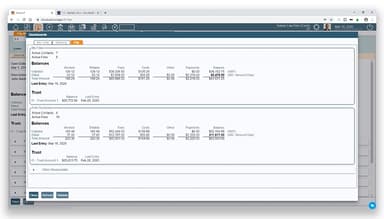
This feature allows users to administer their finances flexibly and supports different accounting methods like accrual and cash. It assists in tracking costs separately and generates powerful financial statements with ease. It also allows users to keep past reports for quick access, saving them time and effort.
Billing
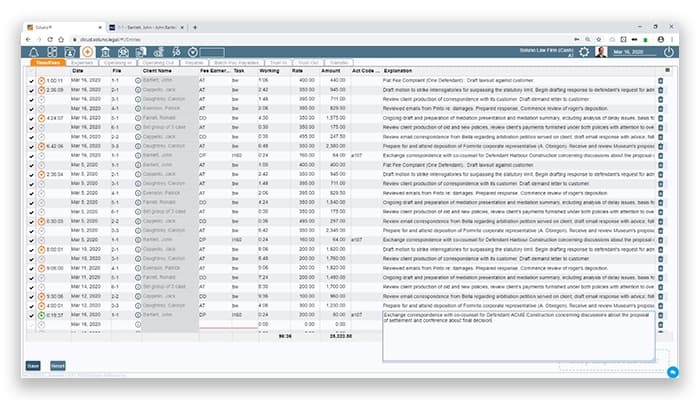
It facilitates seamless billing by allowing users to enter various billing types using an easy timesheet, like flat fees or hourly rates. Furthermore, users can use simple drag-and-drop options for external entries and create custom billing arrangements. Soluno streamlines invoicing with clarity and accuracy for all involved.
Integrations
The software connects your firm with over 18 platforms, creating a seamless experience. This tool manages everything, from practice management to document handling, by integrating with relevant apps. It simplifies workflows and ensures that you have all the necessary tools at your disposal.
Innovation
Soluno offers updated, secure data and workflow solutions tailored to the particulars of legal professionals. It supports protected data handling, simplifies cash flows, and enhances workflows. It also allows users to switch between tasks effortlessly, keeping the user’s work organized and efficient.
Taxes (CAD)
The solution simplifies tax compliance by tracking the user's requirements for Canadian tax regulations. It further helps monitor payments and refunds while ensuring accurate reporting for HST/GST. Soluno provides clear insights into tax statuses, allowing users to claim all the credits they deserve.
Pros And Cons of Soluno
Pros
Cloud-based accessibility
Intuitive layout for accounting
Organized platform for billing
Fast online support
Time-saving invoice management
Cons
As some users suggest, difficult navigation at times
Limited financial reporting options
Occasional login delays, according to some software users
Soluno Reviews
Total 28 reviews
4.4
All reviews are from verified customers
Rating Distribution
5
Stars54%
4
Stars36%
3
Stars7%
2
Stars0%
1
Stars4%
Share your experience
Holly
Accounting, 1-10 employees
More than a year
“The top legal accounting program”
Pros
In my view, this is the top legal accounting program available! The platform is user friendly, simple to use and highly adaptable. My favorite part is how effortlessly you can correct or reverse an entry which is a massive help for bookkeeping and saves so much time.
Cons
Personally I don't have any complaints but I think my clients would prefer more customer relationship management features. The good news is that their new partnership with Actionstep should be adding that functionality soon.
Rating Distribution
Ease of use
10
Value for money
10
Customer Support
9
Functionality
9
Ben
Law Practice, 51-100 employees
More than a year
“powerfully simple for a clear financial overview”
Pros
What makes this platform truly stand out is its powerful simplicity. As an administrator, I get an immediate, crystal-clear snapshot of our entire financial health at a glance, no digging through reports or waiting for data to load.
Cons
At times the server goes down unexpectedly. Another occasional problem is the tricky process for changing what different users are allowed to access.
Rating Distribution
Ease of use
9
Value for money
8
Customer Support
8
Functionality
8
Leslee
Accounting, 1-10 employees
More than a year
“The most outstanding legal software”
Pros
I must say it is the most outstanding legal accounting and practice management software you can find right now.
Cons
One thing I noticed is that there is not a dedicated mobile app for Soluno yet. But you can still get to it through a web browser on your phone anytime you have an internet connection, though.
Rating Distribution
Ease of use
9
Value for money
9
Customer Support
9
Functionality
8
Frequently Asked Questions
Does Soluno offer an API?
Yes, Soluno does offer an API.
Who are the typical users of Soluno?
Typical users of Soluno are legal professionals, sole law practitioners, and small to medium-sized law firms.
What other apps does Soluno integrate with?
Soluno integrates with Microsoft Office 365, Copitrak, Confido Legal, LawGro, LawPay, iManage, and CASEpeer.
What language does Soluno support?
Soluno supports the English language only.
What types of pricing plans does Soluno offer?
The Soluno cost starts at $71/license/month if paid annually or $79/license/month if paid on monthly billing. And adding more licenses reduces the prices. Get a tailored Soluno pricing estimate for your firm.
What level of support does Soluno offer?
Soluno provides support through phone, live chat, email, and FAQs/forums.