


Wolters Kluwer ELM Solutions
Last Updated
Overview
Wolters Kluwer ELM Solutions empowers legal teams with seamless matter management and billing tools. While data migration takes time, it offers flexible deployment options like cloud and on-premise. Structured for law firms and corporate legal departments, it enhances efficiency, improves compliance, and provides valuable insights into smarter legal decision-making.
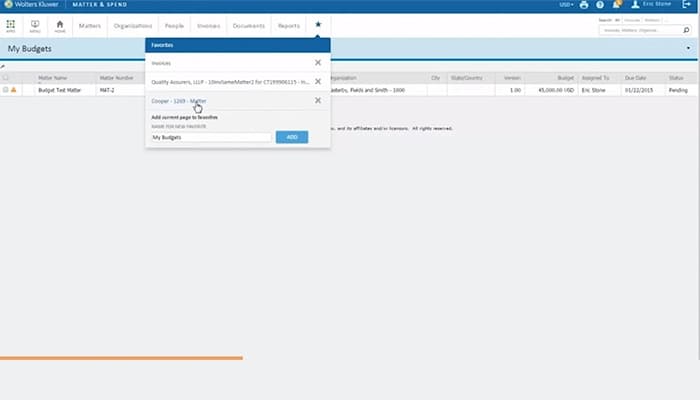
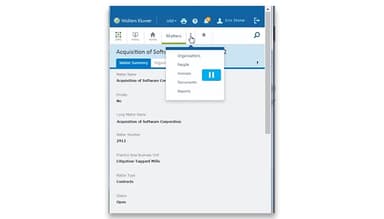
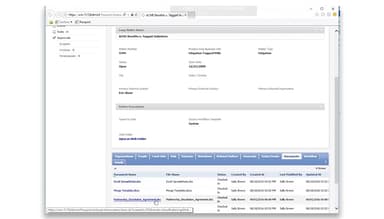
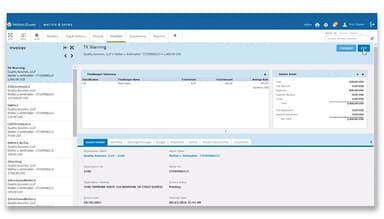
Wolters Kluwer ELM Solutions Specifications
- Document Management
- Billing & Invoicing
- Time Tracking
- Workflow Automation
Wolters Kluwer ELM Solutions Features
Kluwer Arbitration
This feature streamlines the entire international arbitration process, providing a comprehensive database of cases, expert insights, and practical tools. It empowers legal professionals with reliable data, a vast network of arbitrator profiles, and leading publications, ensuring informed decision-making and efficient case management.
Enterprise Legal Management
The software helps corporate legal and claims teams manage legal matters, spending, and billing with AI-powered insights. It improves efficiency, reduces costs, and provides industry-leading tools for e-billing, analytics, and legal operations. Eventually, teams optimize performance and drive better business outcomes.
Legisway
It assists legal teams in managing contracts, compliance, litigation, and intellectual property from a single platform. The software also enhances collaboration, reduces risks, and boosts overall efficiency. In this regard, its AI-powered automation, centralized data storage, and streamlined workflows enable businesses to primarily focus on their growth.
VitalLaw AI
Wolters Kluwer ELM Solutions transforms legal research with AI-driven search, summarization, and analysis. It smoothly integrates expert insights with advanced technology, reducing time spent on manual research while providing accurate information. In addition to that, it assists legal professionals in making faster and well-informed decisions with efficiency.
Pros And Cons of Wolters Kluwer ELM Solutions
Pros
AI-powered billing analysis enhances efficiency in bill reviews
Microsoft Office integration for managing matters and invoices easily
Recognized for innovation and excellence in legal operations tech
Flexible deployment options, including cloud, on-premise, and web
Cons
Customization limitations are not aligned with unique workflows, according to some software users
Time-consuming data migration from previous systems
Regular training is required due to continuous updates and new features
Wolters Kluwer ELM Solutions Reviews
Total 2 reviews
3.5
All reviews are from verified customers
Rating Distribution
5
Stars50%
4
Stars0%
3
Stars0%
2
Stars50%
1
Stars0%
Share your experience
Legal Services, 1-10 employees
Less than 6 months
“Fast access to information whenever required”
Pros
This software is invaluable for staying updated on trends in other areas of law. I don't always have time to read daily or weekly reports but when I have a few free moments over the weekend, it's nice to catch up on a quick summary of various opinions and legal trends in other fields.
Cons
Its subscription is pretty pricey, so you really have to know exactly what you want to read and make the most of it. If I had more time to read through more cases and store them for future reference, that would be ideal.
Rating Distribution
Ease of use
8
Value for money
7
Customer Support
8
Functionality
10
Financial Services, 500+ employees
More than a year
“Helps me review legal invoices efficiently”
Pros
It is a reliable way to track spending and link bills to specific areas and allocations. The invoice summary features are great, they break down the invoice to show what was spent on fees versus taxes and I also love being able to reject individual line items when needed.
Cons
The interface feels slow, clunky and bulky�.it just doesn't have a smooth or appealing look to it. Technically, it doesn't integrate well with Workday and customer service isn't very helpful either.
Rating Distribution
Ease of use
6
Value for money
2
Customer Support
2
Functionality
5
Frequently Asked Questions
What level of support does Wolters Kluwer ELM Solutions offer?
Wolters Kluwer ELM Solutions offers support through email, FAQs, how-to guides, video tutorials, and a knowledge base.
Does Wolters Kluwer ELM Solutions have a mobile app?
Yes, Wolters Kluwer ELM Solutions has a mobile app for Android and iOS users.
What types of pricing plans does Wolters Kluwer ELM Solutions offer?
The Wolters Kluwer ELM Solutions cost is structured according to each business’s specific requirements.
Does Wolters Kluwer ELM Solutions offer an API?
Yes, Wolters Kluwer ELM Solutions offers an API.
What language does Wolters Kluwer ELM Solutions support?
Wolters Kluwer ELM Solutions supports English, French, Spanish, and Portuguese languages.
What other apps does Wolters Kluwer ELM Solutions integrate with?
Wolters Kluwer ELM Solutions offers smooth integration with
Who are the typical users of Wolters Kluwer ELM Solutions?
Wolters Kluwer ELM Solutions offers smooth integration with Microsoft Outlook, Microsoft Excel, Microsoft Word, Microsoft PowerPoint, Microsoft Windows File System, and IBM Notes.