

DataCamp
Last Updated
Overview
DataCamp equips learners with in-demand data science, Artificial Intelligence (AI) and machine learning skills through interactive online courses. Its extensive library of self-paced lessons builds proficiency in technologies. While the learning curve varies by course complexity, DataCamp's learn-by-doing approach and immediate feedback reinforce concepts effectively for most users.
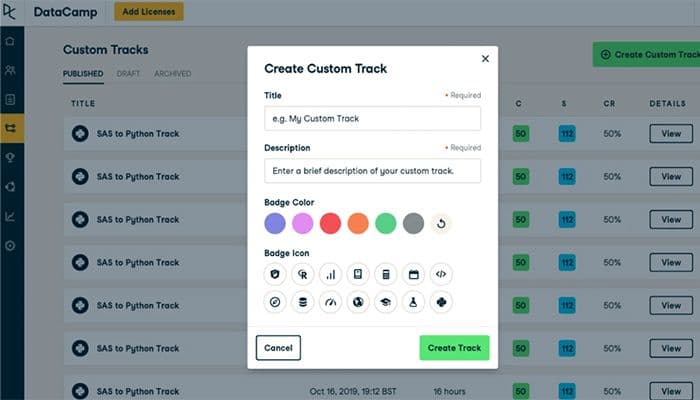
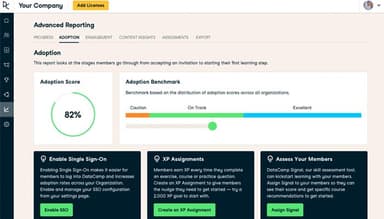
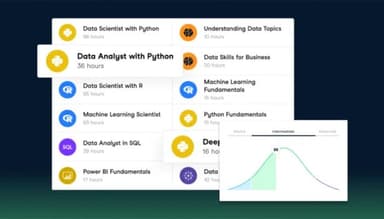
DataCamp Specifications
- Activity Dashboard
- Asynchronous Learning
- Activity Tracking
- Access Controls/Permissions
What Is DataCamp?
DataCamp is an online learning platform focused on data-related skills, including Python, SQL, statistics, machine learning, data visualization, and tools like Power BI, Tableau, and Spark. It enables aspiring data analysts and engineers to learn about the field of data analytics in a way that’s sustainable, interactive, and fun. It works well for professionals and students who want to build job-ready data skills quickly without getting bogged down in technical setups. It offers workspaces for practice, projects to build a portfolio, competitions to challenge your skills, courses to learn, and certifications recognized by Forbes.
What Is DataCamp Best For?
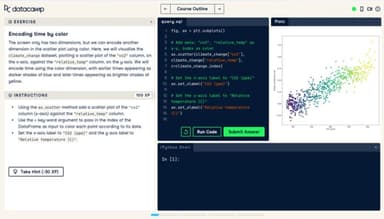
In-browser coding lab is the most stand out feature of DataCamp as it offers a split-screen webpage that replaces video-watching with mandatory, live typing tasks. Specifically built for Excel users, marketers, and analysts, this feature eliminates the need for download approvals from the IT department, bypasses confusing installation errors, and helps build muscle memory by writing real code.
How Much Does DataCamp Cost?
DataCamp pricing starts at $8/user/month for the Teams plan under DataLab module. The vendor also offers free Starter and Basic plans for DataLab and Learn modules, respectively. It scales its pricing across multiple individual and business-tier plans:
For Individuals And Students:
- DataLab Premium: $14/user/month
- Learn Premium: $19/month
- Learn Teams: $28/user/month (For Teams of 2 and Up)
For businesses, the software offers custom-priced Small Business and Enterprise plans.
Beyond the monthly or annual license, organizations should also budget for setup and rollout costs:
- Setup And Onboarding: $0–$3,000 for a small team, $3,000–$15,000 for enterprise team
- LMS/LXP Integration: $2,500–$10,000 for a standard connector and SSO setup
- Multi-Team Or Department Rollout: Starting at $5,000 for 2-5 departments and $20,000 for a broad enterprise program
- Staff And Admin Training: $1,000–$5,000 for a small admin group, $5,000–$20,000 for enterprise-wide enablement
- Ongoing Management: $3,000–$15,000/year for a small program, $20,000–$100,000+/year at enterprise scale
- Optional Custom Content Or Live Training: $5,000–$25,000+/engagement
Users generally view DataCamp's pricing as reasonable and affordable, especially compared to college courses. Some reviewers note it costs more than similar programs but justify this with added course depth and better format, while a few users flag concerns over auto-renewal billing practices.
Disclaimer: The pricing is subject to change.
DataCamp Integrations
DataCamp offers integration with multiple third-party LXP and LMS platforms, including:
- Cornerstone
- Workday
- Degreed LMS
- Microsoft Viva Learning
- Docebo LMS
- 360Learning
- SABA
How Does DataCamp Work?
Once your DataCamp account is set up, you can start learning by following these steps:
- Log in with your credentials and select an individual or business plan based on your requirements
- Head on to browse the available courses. skill tracks, and career tracks and choose one that matches your learning goals
- DataCamp combines short video lessons with interactive coding exercises. You can write and run code in your browser without installing a local development environment
- Complete projects and assessments to test your understanding and apply the concepts covered in the lessons
- Track completed courses and other learning milestones from your account
- For business plan, administrators can assign learning paths, monitor employee progress, and access reports from the admin dashboard
Who Is DataCamp For?
It serves complete beginners, career switchers, and working professionals and organizations across a range of roles and sectors, including:
- L&D teams
- Business professionals
- Data analysts and scientists
- Students
- Early-career learners
DataCamp Use Cases
After analyzing DataCamp based on its features and course offerings, we identified key scenarios where the platform is a practical fit for individuals and organizations building data skills:
Corporate 'Non-Technical' Workforce Data Upskilling
Workers lacking technical skills are often reliant on the engineering department to produce even simple reports, which cause significant operational overhead. This can be both time-consuming and frustrating for the engineering team, particularly if they need to build python environments or explain basic software engineering concepts to marketers. DataCamp offers virtual, isolated, and browser-based environments where non-technical workers can execute simple database queries, connect to cloud environments, and experiment with new software stacks without requiring IT installations or risking real corporate data.
Standardized Technical Onboarding For New Hires
When organizations bring in a group of junior developers, data analysts, or engineers, the recruits often have extremely varied levels of technical proficiency. More senior engineers then have to spend time helping juniors understand the fundamentals before they can start contributing. Engineering managers use DataCamp to standardize the onboarding process by requiring new joins to demonstrate their proficiency. Before allowing new engineers to explore production systems, managers can ask them to complete a set of skill assessments and subsequently recommend micro-course refreshers based on the identified weaknesses.
Career Pivot And Portfolio Building For Self-Directed Job Seekers
When a self-taught worker from a different domain identifies an interest in data science, they often do not have a background required to apply for entry-level analyst roles. Most recruiters also do not consider candidates without a formal degree in computer science, statistics, or related fields. The worker needs access to a comprehensive career path that helps them understand how to begin their transition into the new field while also building a portfolio as per recruiters’ expectations. DataCamp offers structured career tracks that provide learners with the exact curriculum needed to make the transition. The software also includes a gamified element that keeps users engaged, reminding them to practice coding and report their progress. It also features timed production-grade practical assessments to review learner progress and ensure they are ready to meet the expectations of recruiters.
Interactive Homework Engine For Universities And Bootcamps
The university professor or bootcamp instructor teaches students theoretical statistics and machine learning concepts during class. Outside of the lecture hall, the students need to complete coding exercises to develop proficiency. The professor may not have the time or resources to review coding exercises completed by hundreds of students, particularly when working with limited institutional support. The software’s AI Tutor reviews and evaluates student submissions instantly, recognizing common errors and providing learners with advice and guidance, thus eliminating the need to contact the instructor for each mistake.
Is DataCamp Right For You?
DataCamp software is right for you if you learn best by doing, want to build data skills quickly without installing complex software, and prefer highly structured learning paths. It provides completion certificates, but they are commercial credentials. If your goal is a formal master's degree in data science to back up academic applications, then relying on this software only is not enough.
It is officially ISO/IEC 27001 certified. This certification covers its information security management system (ISMS), verifying that the company follows global best practices for safeguarding data across its learning platform and environment.
Still not sure if DataCamp is the right choice for you? Contact us at (661) 384-7070, and our team will help you decide based on your requirements.
DataCamp Features
Hands-On Learning
This is DataCamp's signature cloud-based, interactive training ecosystem. It features over 790+ bite-sized courses covering programming languages (Python, R, SQL) and business intelligence tools (Power BI, Excel, Tableau). It utilizes an in-browser coding terminal, removing the need to download heavy datasets, configure IDEs, or manage installations locally. It also includes guided and unguided real-world projects to let users apply code to actual datasets.
DataCamp AI Tutor
It offers an AI-native assistant integrated directly inside the coding environment. When a student gets stuck on a coding challenge or submits incorrect syntax, the AI Tutor reviews the code, delivers personalized, real-time feedback, corrects syntax errors, and explains complex mathematical or programmatic concepts without giving away the direct answer.
Skill Assessments
The software offers free, adaptive technical tests (such as DataCamp Signal) designed to benchmark a user's proficiency in specific tools like Python, SQL, R, or data literacy in as little as 10 minutes. Upon completion, it flags exact skill deficiencies and maps a personalized, automated course recommendation list to fill those gaps.
Certification
DataCamp has official, industry-recognized career certifications for targeted professional roles, such as Data Analyst, Data Scientist, and Data Engineer. These certifications are secure, timed examinations coupled with practical case studies to simulate a real industry workload.
Pros And Cons of DataCamp
Pros
Offers helpful AI tutor for personalized guidance
Wide course catalog assists users with varying skill levels
Interactive quizzes and sandbox environment make learning engaging
Cons
Slow response from customer support team can sometimes be frustrating
Some users report difficulty canceling processes
DataCamp Pricing
Basic | Starter | Learn Premium | Learn Teams | DataLab Premium | DataLab Teams | Learn Small Business | Learn Enterprise | DataLab Enterprise |
|---|---|---|---|---|---|---|---|---|
Free | Free | $19/month | $28/user/month | $214/user/month | $8/user/month | Custom Pricing | Custom Pricing | Custom Pricing |
|
|
|
|
|
|
|
|
|
Disclaimer: The pricing details were last updated on Oct 02, 2026 from the vendor's website. Please contact us for a tailored pricing list.
DataCamp Reviews
Total 2 reviews
5
All reviews are from verified customers
Rating Distribution
5
Stars100%
4
Stars0%
3
Stars0%
2
Stars0%
1
Stars0%
Share your experience
IT, 51-100 employees
Less than a year
“DataCamp review from a Data Analyst POV.”
Pros
The only downside is that it is a paid software.
Cons
Coming from a third world country, the price of this product is a bit over the top, which is a drawback.
Rating Distribution
Ease of use
10
Value for money
10
Customer Support
10
Functionality
10
IT, 101-500 employees
Less than a year
“Great Quality content for all the Data folks”
Pros
I have gained extensive knowledge in various topics such as Cloud concepts, Data analytics, Python, R programming, and Big Data concepts. The learning experience includes bite-sized theory videos where industry instructors explain with examples. Each video is followed by hands-on sessions in a user-friendly interface. The software provides a workspace area for practice, skill showcasing, and sharing as part of our portfolio. The assessments provided offer insights into our learning progress and areas of strength. Additionally, the support is excellent, offering hints and assistance when encountering programming tasks or MCQs. The Slack community is also a valuable resource with active users and instructors resolving doubts quickly and efficiently.
Cons
The VM crashes when learning Tableau and Power BI, and it takes a long time to load initially. I also encountered an issue with the course progress. I had completed three modules/chapters out of four, but when I tried to proceed to the fourth chapter, it reset the progress of the third chapter and showed it as incomplete. I provided feedback with screenshots in the feedback section for each module.
Rating Distribution
Ease of use
10
Value for money
10
Customer Support
10
Functionality
9
Frequently Asked Questions
Does DataCamp offer an API?
Yes, the software provides a read-only API.
What languages does DataCamp support?
DataCamp is primarily offered in the English language.
What other apps does DataCamp integrate with?
The vendor integrates with several LMS and LXP platforms, including Cornerstone, Workday, Microsoft Viva Learning, Degreed LMS, Docebo LMS, 360Learning, and SABA.
Does DataCamp have a mobile app?
Yes, DataCamp has a mobile app.
What types of pricing plans does DataCamp offer?
DataCamp price starts at $8/user/month for the DataLab Teams plan. It also offers free Starter and Basic plans for DataLab and Learn. Paid options include DataLab Premium at $14/user/month, Learn Premium at $19/month, and Learn Teams at $28/user/month. Small Business and Enterprise plans are also available at custom pricing. Request a tailored DataCamp pricing estimate.
Who are the typical users of DataCamp?
Data analysts, data scientists, business professionals upskilling in data literacy, students, and enterprise learning and development teams are typical users of DataCamp.
What level of support does DataCamp offer?
It provides customer support through its live chat, help center, and ticketing system.
Does DataCamp have alternatives?
Yes, DataCamp alternatives are Canvas, Schoology, and Moodle.