

Digital Samba
Last Updated
Overview
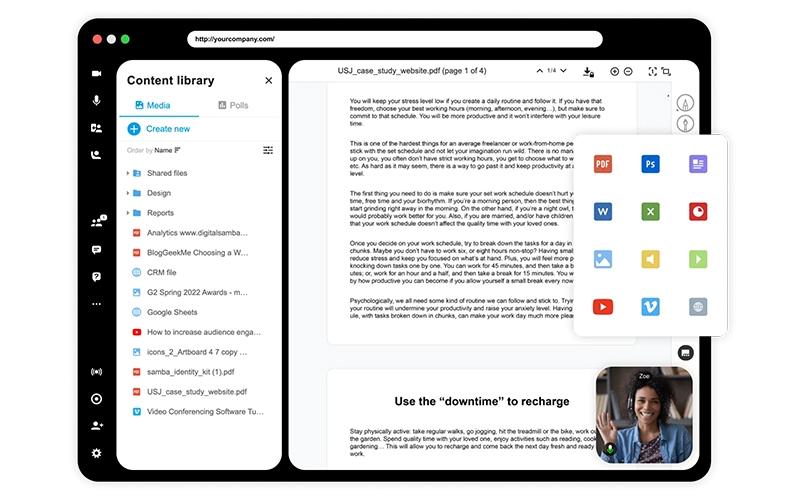
Digital Samba provides a secure video communication platform, enabling businesses to embed fully branded virtual classrooms and meetings into their own software. While some users report that its image quality degrades on upload, the software’s high-quality performance and extensive features make it a compelling choice for privacy-conscious organizations.
Digital Samba Specifications
- Activity Dashboard
- Asynchronous Learning
- Access Controls/Permissions
- Collaboration Tools
Digital Samba Features
Breakout Rooms
To boost interactivity during large sessions, Digital Samba allows hosts to split the main audience into smaller sub-groups. This feature is designed to facilitate more focused discussions and collaborative work, making it ideal for virtual workshops and training settings.
AI-Powered Captions
The platform utilizes artificial intelligence (AI) to generate real-time transcriptions of spoken words, turning them into accessible captioned text. This enhances inclusivity for participants with hearing impairments and improves comprehension for all attendees, especially in multilingual or noisy environments.
Cloud Recordings
Meetings or webinars can be recorded and stored directly on secure servers. These recordings are easily accessible through the platform's API, allowing for simple retrieval, management, and sharing of session content after the event has concluded.
Custom Roles And Permissions
Digital Samba offers a flexible system for managing participants. Hosts can create and assign tailored roles with specific permissions, suiting diverse use cases like corporate meetings (moderator/participant) to maintain control over the session.
Pros And Cons of Digital Samba
Pros
Extensive white-labeling and branding
Browser-based with no downloads
Reliable performance and stability
Cons
Image quality degrades on upload
Some modules are not intuitive
Digital Samba Reviews
Total 6 reviews
4.8
All reviews are from verified customers
Rating Distribution
5
Stars83%
4
Stars17%
3
Stars0%
2
Stars0%
1
Stars0%
Share your experience
Mid-Market, 51-100 employees
“natural UX design with outstanding video quality”
Pros
The UX design feels really natural and easy to use. I run an agency and do a lot of consulting work, so I'm on video calls all the time and the video quality here is honestly outstanding. It beats everything else I've tried so far.
Cons
I haven't run into any problems yet, so there's nothing negative I can really point out.
Rating Distribution
Ease of use
10
Value for money
10
Customer Support
10
Functionality
10
Mid-Market, 51-100 employees
“Amazing customer support”
Pros
We actually did a lot of research before picking this platform and I'm glad we took the time. The European hosting and full GDPR compliance were big reasons we chose it. After using it for months now, the performance has been consistently solid. The interface is easy to use and has all the tools we need for effective online meetings. Their support team also responds quickly and actually fixes issues which isn't always the case with other tools. If you need a secure, reliable video conferencing option to embed into your software, I'd say this is definitely worth it.
Cons
I'm honestly excited for when they roll out collaboration features. I'm hoping the wait is worth it because it sounds like it could be great once it's live.
Rating Distribution
Ease of use
10
Value for money
10
Customer Support
10
Functionality
10
Small-Business, 11-50 employees
“easy-to-use meeting tools with secure data transmission”
Pros
The screen sharing, whiteboard, document sharing and video conferencing tools are all great. I love how everything works easily across all my devices and makes setting up or hosting meetings stress-free. What I really like most is the secure data transmission and it gives me peace of mind knowing everything is safe.
Cons
The cost for video conferencing rooms feels high compared to other platforms but I'll admit the video quality is definitely solid.
Rating Distribution
Ease of use
8
Value for money
9
Customer Support
9
Functionality
9
Frequently Asked Questions
What other apps does Digital Samba integrate with?
The software seamlessly integrates with several platforms, such as Google Calendar Plugin.
Does Digital Samba have a mobile application?
No, Digital Samba has a mobile app.
What level of support does Digital Samba offer?
The software offers how-to guides, phone, and email support.
What types of pricing plans does Digital Samba offer?
The platform’s pricing follows a subscription-based model. It offers a free plan called Digital Samba, while the Digital Samba Embedded plan starts at €0.0026/minute. You can also request a personalized Digital Samba price quote now.
Does Digital Samba offer an API?
Yes, Digital Samba software provides an API.
Who are the typical users of Digital Samba?
Businesses across various industries, including education, healthcare, legal services, SaaS providers, and event management, benefit from Digital Samba features.
What language does Digital Samba support?
The platform is available in English, German, and Spanish languages.