

Last Updated
Overview
MLS supports vocational training with mobile task creation, progress reporting, and seamless content integration. While offline access is limited, its GDPR-compliant, installation-free platform ensures secure and intuitive learning. Overall, it streamlines workplace training for apprenticeships and schools preparing learners for Industry 4.0 environments.


MLS Specifications
- Activity Dashboard
- Asynchronous Learning
- Activity Tracking
- Training Management
MLS Features
Task Creator
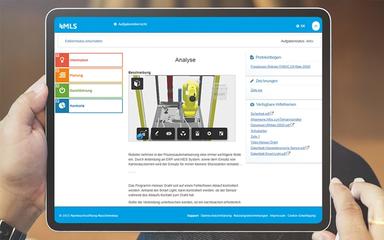
This feature enables trainers to build company-specific learning tasks using 3D configurations, videos, classic quizzes, and more—all in a simple digital interface. It supports practical, personalized content creation without installation, making the instructional design process intuitive and adaptable to real workplace scenarios.
Didactic Principle Of Integral Action
The software uses the “complete action” didactic principle, guiding learners through integrated theoretical and practical tasks. Learners develop problem-solving skills by tackling tasks that reflect real vocational challenges, promoting deeper understanding and hands-on competence from the start.
Reporting Tool
The platform offers a reporting tool that tracks learning progress from day one to completion. It enables trainers to identify each learner’s strengths and potentials, guiding targeted support and development of skilled professionals.
External Content Integration
MLS allows importing your own learning modules and accessing content from external providers via Single Sign-On. This feature extends resource flexibility and enables trainers to enrich learning with reputable third-party materials.
Intuitive, Installation-Free Use
Users can access MLS instantly via internet connection on smartphones, notebooks, or tablets without installation. The GDPR-compliant platform provides fast, user-friendly experiences across devices, reducing administrative burden and increasing accessibility.
Pros And Cons of MLS
Pros
Personalized task creation using diverse media
Integrates theory and practical skills seamlessly
Helps identify trainee strengths and potentials
Cons
Upload limit per file may restrict large media
Platform updates may alter user interface
MLS Reviews
Total 1 reviews
5
All reviews are from verified customers
Rating Distribution
5
Stars100%
4
Stars0%
3
Stars0%
2
Stars0%
1
Stars0%
Share your experience
Luis A.
Real Estate, N/A employees
More than a year
“Easy to set up and share”
Pros
I find setting up portals, sharing links, and connecting to the app to be incredibly easy. The process is straightforward, with clear instructions at every step, making it quick to get everything up and running without any hassle. Also it is user-friendly and I can manage everything without needing technical expertise.
Cons
The mobile app still has some glitches that bother me. When I select a listing, the app sometimes allows background items to be selected too. I believe the background map should be disabled to ensure only listings can be properly selected.
Rating Distribution
Ease of use
9
Value for money
10
Customer Support
10
Functionality
9
Frequently Asked Questions
Who are the typical users of MLS?
MLS is used by businesses across various industries and sectors, such as manufacturing, vocation training, and mechanical engineering.
Does MLS have a mobile app?
No, MLS does not have a mobile app.
What language does MLS support?
MLS supports the English language.
What types of pricing plans does MLS offer?
MLS price starts at €2.00/month. Users can also get a custom MLS cost quote for their organizations.
What other apps does MLS integrate with?
The vendor has not provided information about specific integrations.
What level of support does MLS offer?
MLS offers support through phone and email.
Does MLS offer an API?
The vendor does not indicate whether it offers an API.